I’m learning python requests and BeautifulSoup. For an exercise, I’ve chosen to write a quick NYC parking ticket parser. I am able to get an html response which is quite ugly. I need to grab the lineItemsTable and parse all the tickets.
You can reproduce the page by going here: https://paydirect.link2gov.com/NYCParking-Plate/ItemSearch and entering a NY plate T630134C
soup = BeautifulSoup(plateRequest.text)
#print(soup.prettify())
#print soup.find_all('tr')

table = soup.find("table", { "class" : "lineItemsTable" })
for row in table.findAll("tr"):
    cells = row.findAll("td")
    print cells
Can someone please help me out? Simple looking for all tr does not get me anywhere.
Answers:
Thank you for visiting the Q&A section on Magenaut. Please note that all the answers may not help you solve the issue immediately. So please treat them as advisements. If you found the post helpful (or not), leave a comment & I’ll get back to you as soon as possible.
Method 1
Here you go:
data = []
table = soup.find('table', attrs={'class':'lineItemsTable'})
table_body = table.find('tbody')

rows = table_body.find_all('tr')
for row in rows:
    cols = row.find_all('td')
    cols = [ele.text.strip() for ele in cols]
    data.append([ele for ele in cols if ele]) # Get rid of empty values
This gives you:
[ [u'1359711259', u'SRF', u'08/05/2013', u'5310 4 AVE', u'K', u'19', u'125.00', u'$'],
  [u'7086775850', u'PAS', u'12/14/2013', u'3908 6th Ave', u'K', u'40', u'125.00', u'$'],
  [u'7355010165', u'OMT', u'12/14/2013', u'3908 6th Ave', u'K', u'40', u'145.00', u'$'],
  [u'4002488755', u'OMT', u'02/12/2014', u'NB 1ST AVE @ E 23RD ST', u'5', u'115.00', u'$'],
  [u'7913806837', u'OMT', u'03/03/2014', u'5015 4th Ave', u'K', u'46', u'115.00', u'$'],
  [u'5080015366', u'OMT', u'03/10/2014', u'EB 65TH ST @ 16TH AV E', u'7', u'50.00', u'$'],
  [u'7208770670', u'OMT', u'04/08/2014', u'333 15th St', u'K', u'70', u'65.00', u'$'],
  [u'$0.00nnnPayment Amount:']
]
Couple of things to note:
- The last row in the output above, the Payment Amount is not a part
of the table but that is how the table is laid out. You can filter it
out by checking if the length of the list is less than 7. - The last column of every row will have to be handled separately since it is an input text box.
Method 2
Updated Answer
If a programmer is interested in only parsing a table from a webpage, they can utilize the pandas method pandas.read_html.
Let’s say we want to extract the GDP data table from the website: https://worldpopulationreview.com/countries/countries-by-gdp/#worldCountries
Then following codes does the job perfectly (No need of beautifulsoup and fancy html):
Using pandas only
# sometimes we can directly read from the website
url = "https://en.wikipedia.org/wiki/AFI%27s_100_Years...100_Movies#:~:text=%20%20%20%20Film%20%20%20,%20%204%20%2025%20more%20rows%20"
df = pd.read_html(url)
df.head()
Using pandas and requests (More General Case)
# if pd.read_html does not work, we can use pd.read_html using requests.
import pandas as pd
import requests

url = "https://worldpopulationreview.com/countries/countries-by-gdp/#worldCountries"

r = requests.get(url)
df_list = pd.read_html(r.text) # this parses all the tables in webpages to a list
df = df_list[0]
df.head()
Required modules
pip install lxml
pip install requests
pip install pandas
Output
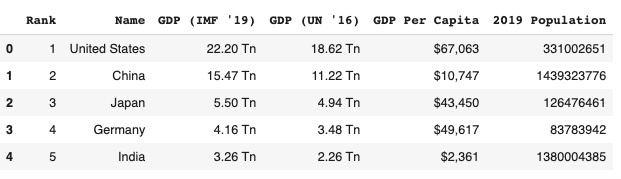
Method 3
Solved, this is how your parse their html results:
table = soup.find("table", { "class" : "lineItemsTable" })
for row in table.findAll("tr"):
    cells = row.findAll("td")
    if len(cells) == 9:
        summons = cells[1].find(text=True)
        plateType = cells[2].find(text=True)
        vDate = cells[3].find(text=True)
        location = cells[4].find(text=True)
        borough = cells[5].find(text=True)
        vCode = cells[6].find(text=True)
        amount = cells[7].find(text=True)
        print amount
Method 4
Here is working example for a generic <table>. (question links-broken)
Extracting the table from here countries by GDP (Gross Domestic Product).
htmltable = soup.find('table', { 'class' : 'table table-striped' })
# where the dictionary specify unique attributes for the 'table' tag
The tableDataText function parses a html segment started with tag <table> followed by multiple <tr> (table rows) and inner <td> (table data) tags. It returns a list of rows with inner columns. Accepts only one <th> (table header/data) in the first row.
def tableDataText(table):
    rows = []
    trs = table.find_all('tr')
    headerow = [td.get_text(strip=True) for td in trs[0].find_all('th')] # header row
    if headerow: # if there is a header row include first
        rows.append(headerow)
        trs = trs[1:]
    for tr in trs: # for every table row
        rows.append([td.get_text(strip=True) for td in tr.find_all('td')]) # data row
    return rows
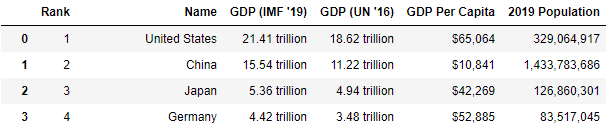
Using it we get (first two rows).
list_table = tableDataText(htmltable)
list_table[:2]

[['Rank',
  'Name',
  "GDP (IMF '19)",
  "GDP (UN '16)",
  'GDP Per Capita',
  '2019 Population'],
 ['1',
  'United States',
  '21.41 trillion',
  '18.62 trillion',
  '$65,064',
  '329,064,917']]
That can be easily transformed in a pandas.DataFrame for more advanced tools.
import pandas as pd
dftable = pd.DataFrame(list_table[1:], columns=list_table[0])
dftable.head(4)
Method 5
from behave import *
from selenium import webdriver
from selenium.webdriver.common.by import By
from selenium.webdriver.support.wait import WebDriverWait
from selenium.webdriver.support import expected_conditions as ec
import pandas as pd
import requests
from bs4 import BeautifulSoup
from tabulate import tabulate

class readTableDataFromDB:
    def LookupValueFromColumnSingleKey(context, tablexpath, rowName, columnName):
        print("element present readData From Table")
        element = context.driver.find_elements_by_xpath(tablexpath+"/descendant::th")
        indexrow = 1
        indexcolumn = 1
        for values in element:
            valuepresent = values.text
            print("text present here::"+valuepresent+"rowName::"+rowName)
            if valuepresent.find(columnName) != -1:
                 print("current row"+str(indexrow) +"value"+valuepresent)
                 break
            else:
                 indexrow = indexrow+1

        indexvalue = context.driver.find_elements_by_xpath(
            tablexpath+"/descendant::tr/td[1]")
        for valuescolumn in indexvalue:
            valuepresentcolumn = valuescolumn.text
            print("Team text present here::" +
                  valuepresentcolumn+"columnName::"+rowName)
            print(indexcolumn)
            if valuepresentcolumn.find(rowName) != -1:
                print("current column"+str(indexcolumn) +
                      "value"+valuepresentcolumn)
                break
            else:
                indexcolumn = indexcolumn+1

        print("index column"+str(indexcolumn))
        print(tablexpath +"//descendant::tr["+str(indexcolumn)+"]/td["+str(indexrow)+"]")
        #lookupelement = context.driver.find_element_by_xpath(tablexpath +"//descendant::tr["+str(indexcolumn)+"]/td["+str(indexrow)+"]")
        #print(lookupelement.text)
        return context.driver.find_elements_by_xpath(tablexpath+"//descendant::tr["+str(indexcolumn)+"]/td["+str(indexrow)+"]")

    def LookupValueFromColumnTwoKeyssss(context, tablexpath, rowName, columnName, columnName1):
        print("element present readData From Table")
        element = context.driver.find_elements_by_xpath(
            tablexpath+"/descendant::th")
        indexrow = 1
        indexcolumn = 1
        indexcolumn1 = 1
        for values in element:
            valuepresent = values.text
            print("text present here::"+valuepresent)
            indexrow = indexrow+1
            if valuepresent == columnName:
                print("current row value"+str(indexrow)+"value"+valuepresent)
                break

        for values in element:
            valuepresent = values.text
            print("text present here::"+valuepresent)
            indexrow = indexrow+1
            if valuepresent.find(columnName1) != -1:
                print("current row value"+str(indexrow)+"value"+valuepresent)
                break

        indexvalue = context.driver.find_elements_by_xpath(
            tablexpath+"/descendant::tr/td[1]")
        for valuescolumn in indexvalue:
            valuepresentcolumn = valuescolumn.text
            print("Team text present here::"+valuepresentcolumn)
            print(indexcolumn)
            indexcolumn = indexcolumn+1
            if valuepresent.find(rowName) != -1:
                print("current column"+str(indexcolumn) +
                      "value"+valuepresentcolumn)
                break
        print("indexrow"+str(indexrow))
        print("index column"+str(indexcolumn))
        lookupelement = context.driver.find_element_by_xpath(
            tablexpath+"//descendant::tr["+str(indexcolumn)+"]/td["+str(indexrow)+"]")
        print(tablexpath +
              "//descendant::tr["+str(indexcolumn)+"]/td["+str(indexrow)+"]")
        print(lookupelement.text)
        return context.driver.find_element_by_xpath(tablexpath+"//descendant::tr["+str(indexrow)+"]/td["+str(indexcolumn)+"]")
All methods was sourced from stackoverflow.com or stackexchange.com, is licensed under cc by-sa 2.5, cc by-sa 3.0 and cc by-sa 4.0