Can you tell me when to use these vectorization methods with basic examples?
I see that map is a Series method whereas the rest are DataFrame methods. I got confused about apply and applymap methods though. Why do we have two methods for applying a function to a DataFrame? Again, simple examples which illustrate the usage would be great!
Answers:
Thank you for visiting the Q&A section on Magenaut. Please note that all the answers may not help you solve the issue immediately. So please treat them as advisements. If you found the post helpful (or not), leave a comment & I’ll get back to you as soon as possible.
Method 1
Straight from Wes McKinney’s Python for Data Analysis book, pg. 132 (I highly recommended this book):
Another frequent operation is applying a function on 1D arrays to each column or row. DataFrame’s apply method does exactly this:
In [116]: frame = DataFrame(np.random.randn(4, 3), columns=list('bde'), index=['Utah', 'Ohio', 'Texas', 'Oregon'])

In [117]: frame
Out[117]:
               b         d         e
Utah   -0.029638  1.081563  1.280300
Ohio    0.647747  0.831136 -1.549481
Texas   0.513416 -0.884417  0.195343
Oregon -0.485454 -0.477388 -0.309548

In [118]: f = lambda x: x.max() - x.min()

In [119]: frame.apply(f)
Out[119]:
b    1.133201
d    1.965980
e    2.829781
dtype: float64
Many of the most common array statistics (like sum and mean) are DataFrame methods,
so using apply is not necessary.Element-wise Python functions can be used, too. Suppose you wanted to compute a formatted string from each floating point value in frame. You can do this with applymap:
In [120]: format = lambda x: '%.2f' % x

In [121]: frame.applymap(format)
Out[121]:
            b      d      e
Utah    -0.03   1.08   1.28
Ohio     0.65   0.83  -1.55
Texas    0.51  -0.88   0.20
Oregon  -0.49  -0.48  -0.31
The reason for the name applymap is that Series has a map method for applying an element-wise function:
In [122]: frame['e'].map(format)
Out[122]:
Utah       1.28
Ohio      -1.55
Texas      0.20
Oregon    -0.31
Name: e, dtype: object
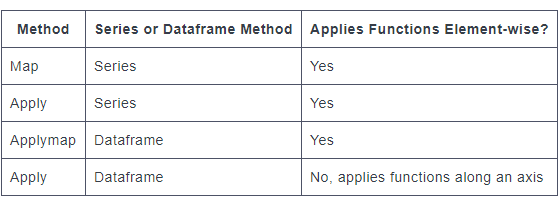
Summing up, apply works on a row / column basis of a DataFrame, applymap works element-wise on a DataFrame, and map works element-wise on a Series.
Method 2
Comparing map, applymap and apply: Context Matters
First major difference: DEFINITION
mapis defined on Series ONLYapplymapis defined on DataFrames ONLYapplyis defined on BOTH
Second major difference: INPUT ARGUMENT
mapacceptsdicts,Series, or callableapplymapandapplyaccept callables only
Third major difference: BEHAVIOR
mapis elementwise for Seriesapplymapis elementwise for DataFramesapplyalso works elementwise but is suited to more complex operations and aggregation. The behaviour and return value depends on the function.
Fourth major difference (the most important one): USE CASE
mapis meant for mapping values from one domain to another, so is optimised for performance (e.g.,df['A'].map({1:'a', 2:'b', 3:'c'}))applymapis good for elementwise transformations across multiple rows/columns (e.g.,df[['A', 'B', 'C']].applymap(str.strip))applyis for applying any function that cannot be vectorised (e.g.,df['sentences'].apply(nltk.sent_tokenize)).
Also see When should I (not) want to use pandas apply() in my code? for a writeup I made a while back on the most appropriate scenarios for using apply (note that there aren’t many, but there are a few— apply is generally slow).
Summarising

Footnotes
mapwhen passed a dictionary/Series will map elements based on the keys in that dictionary/Series. Missing values will be recorded as
NaN in the output.applymapin more recent versions has been optimised for some operations. You will findapplymapslightly faster thanapplyin
some cases. My suggestion is to test them both and use whatever works
better.mapis optimised for elementwise mappings and transformation. Operations that involve dictionaries or Series will enable pandas to
use faster code paths for better performance.Series.applyreturns a scalar for aggregating operations, Series otherwise. Similarly forDataFrame.apply. Note thatapplyalso has
fastpaths when called with certain NumPy functions such asmean,
sum, etc.
Method 3
Quick Summary
-
DataFrame.applyoperates on entire rows or columns at a time. -
DataFrame.applymap,Series.apply, andSeries.mapoperate on one
element at time.
Series.apply and Series.map are similar and often interchangeable. Some of their slight differences are discussed in osa’s answer below.
Method 4
Adding to the other answers, in a Series there are also map and apply.
Apply can make a DataFrame out of a series; however, map will just put a series in every cell of another series, which is probably not what you want.
In [40]: p=pd.Series([1,2,3])
In [41]: p
Out[31]:
0    1
1    2
2    3
dtype: int64

In [42]: p.apply(lambda x: pd.Series([x, x]))
Out[42]:
   0  1
0  1  1
1  2  2
2  3  3

In [43]: p.map(lambda x: pd.Series([x, x]))
Out[43]:
0    0    1
1    1
dtype: int64
1    0    2
1    2
dtype: int64
2    0    3
1    3
dtype: int64
dtype: object
Also if I had a function with side effects, such as “connect to a web server”, I’d probably use apply just for the sake of clarity.
series.apply(download_file_for_every_element)
Map can use not only a function, but also a dictionary or another series. Let’s say you want to manipulate permutations.
Take
1 2 3 4 5
2 1 4 5 3
The square of this permutation is
1 2 3 4 5
1 2 5 3 4
You can compute it using map. Not sure if self-application is documented, but it works in 0.15.1.
In [39]: p=pd.Series([1,0,3,4,2])

In [40]: p.map(p)
Out[40]:
0    0
1    1
2    4
3    2
4    3
dtype: int64
Method 5
@jeremiahbuddha mentioned that apply works on row/columns, while applymap works element-wise. But it seems you can still use apply for element-wise computation….
frame.apply(np.sqrt)
Out[102]:
               b         d         e
Utah         NaN  1.435159       NaN
Ohio    1.098164  0.510594  0.729748
Texas        NaN  0.456436  0.697337
Oregon  0.359079       NaN       NaN

frame.applymap(np.sqrt)
Out[103]:
               b         d         e
Utah         NaN  1.435159       NaN
Ohio    1.098164  0.510594  0.729748
Texas        NaN  0.456436  0.697337
Oregon  0.359079       NaN       NaN
Method 6
Probably simplest explanation the difference between apply and applymap:
apply takes the whole column as a parameter and then assign the result to this column
applymap takes the separate cell value as a parameter and assign the result back to this cell.
NB If apply returns the single value you will have this value instead of the column after assigning and eventually will have just a row instead of matrix.
Method 7
Just wanted to point out, as I struggled with this for a bit
def f(x):
    if x < 0:
        x = 0
    elif x > 100000:
        x = 100000
    return x

df.applymap(f)
df.describe()
this does not modify the dataframe itself, has to be reassigned:
df = df.applymap(f)
df.describe()
Method 8
Based on the answer of cs95
mapis defined on Series ONLYapplymapis defined on DataFrames ONLYapplyis defined on BOTH
give some examples
In [3]: frame = pd.DataFrame(np.random.randn(4, 3), columns=list('bde'), index=['Utah', 'Ohio', 'Texas', 'Oregon'])

In [4]: frame
Out[4]:
            b         d         e
Utah    0.129885 -0.475957 -0.207679
Ohio   -2.978331 -1.015918  0.784675
Texas  -0.256689 -0.226366  2.262588
Oregon  2.605526  1.139105 -0.927518

In [5]: myformat=lambda x: f'{x:.2f}'

In [6]: frame.d.map(myformat)
Out[6]:
Utah      -0.48
Ohio      -1.02
Texas     -0.23
Oregon     1.14
Name: d, dtype: object

In [7]: frame.d.apply(myformat)
Out[7]:
Utah      -0.48
Ohio      -1.02
Texas     -0.23
Oregon     1.14
Name: d, dtype: object

In [8]: frame.applymap(myformat)
Out[8]:
            b      d      e
Utah     0.13  -0.48  -0.21
Ohio    -2.98  -1.02   0.78
Texas   -0.26  -0.23   2.26
Oregon   2.61   1.14  -0.93

In [9]: frame.apply(lambda x: x.apply(myformat))
Out[9]:
            b      d      e
Utah     0.13  -0.48  -0.21
Ohio    -2.98  -1.02   0.78
Texas   -0.26  -0.23   2.26
Oregon   2.61   1.14  -0.93


In [10]: myfunc=lambda x: x**2

In [11]: frame.applymap(myfunc)
Out[11]:
            b         d         e
Utah    0.016870  0.226535  0.043131
Ohio    8.870453  1.032089  0.615714
Texas   0.065889  0.051242  5.119305
Oregon  6.788766  1.297560  0.860289

In [12]: frame.apply(myfunc)
Out[12]:
            b         d         e
Utah    0.016870  0.226535  0.043131
Ohio    8.870453  1.032089  0.615714
Texas   0.065889  0.051242  5.119305
Oregon  6.788766  1.297560  0.860289
Method 9
Just for additional context and intuition, here’s an explicit and concrete example of the differences.
Assume you have the following function seen below. (
This label function, will arbitrarily split the values into ‘High’ and ‘Low’, based upon the threshold you provide as the parameter (x). )
def label(element, x):
    if element > x:
        return 'High'
    else:
        return 'Low'
In this example, lets assume our dataframe has one column with random numbers.
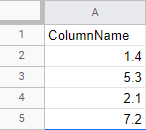
If you tried mapping the label function with map:
df['ColumnName'].map(label, x = 0.8)
You will result with the following error:
TypeError: map() got an unexpected keyword argument 'x'
Now take the same function and use apply, and you’ll see that it works:
df['ColumnName'].apply(label, x=0.8)
Series.apply() can take additional arguments element-wise, while the Series.map() method will return an error.
Now, if you’re trying to apply the same function to several columns in your dataframe simultaneously, DataFrame.applymap() is used.
df[['ColumnName','ColumnName2','ColumnName3','ColumnName4']].applymap(label)
Lastly, you can also use the apply() method on a dataframe, but the DataFrame.apply() method has different capabilities. Instead of applying functions element-wise, the df.apply() method applies functions along an axis, either column-wise or row-wise. When we create a function to use with df.apply(), we set it up to accept a series, most commonly a column.
Here is an example:
df.apply(pd.value_counts)
When we applied the pd.value_counts function to the dataframe, it calculated the value counts for all the columns.
Notice, and this is very important, when we used the df.apply() method to transform multiple columns. This is only possible because the pd.value_counts function operates on a series. If we tried to use the df.apply() method to apply a function that works element-wise to multiple columns, we’d get an error:
For example:
def label(element):
    if element > 1:
        return 'High'
    else:
        return 'Low'

df[['ColumnName','ColumnName2','ColumnName3','ColumnName4']].apply(label)
This will result with the following error:
ValueError: ('The truth value of a Series is ambiguous. Use a.empty, a.bool(), a.item(), a.any() or a.all().', u'occurred at index Economy')
In general, we should only use the apply() method when a vectorized function does not exist. Recall that pandas uses vectorization, the process of applying operations to whole series at once, to optimize performance. When we use the apply() method, we’re actually looping through rows, so a vectorized method can perform an equivalent task faster than the apply() method.
Here are some examples of vectorized functions that already exist that you do NOT want to recreate using any type of apply/map methods:
- Series.str.split() Splits each element in the Series
- Series.str.strip() Strips whitespace from each string in the Series.
- Series.str.lower() Converts strings in the Series to lowercase.
- Series.str.upper() Converts strings in the Series to uppercase.
- Series.str.get() Retrieves the ith element of each element in the Series.
- Series.str.replace() Replaces a regex or string in the Series with another string
- Series.str.cat() Concatenates strings in a Series.
- Series.str.extract() Extracts substrings from the Series matching a regex pattern.
Method 10
My understanding:
From the function point of view:
If the function has variables that need to compare within a column/ row, use
apply.
e.g.: lambda x: x.max()-x.mean().
If the function is to be applied to each element:
1> If a column/row is located, use apply
2> If apply to entire dataframe, use applymap
majority = lambda x : x > 17
df2['legal_drinker'] = df2['age'].apply(majority)

def times10(x):
  if type(x) is int:
    x *= 10
  return x
df2.applymap(times10)
Method 11
FOMO:
The following example shows apply and applymap applied to a DataFrame.
map function is something you do apply on Series only. You cannot apply map on DataFrame.
The thing to remember is that apply can do anything applymap can, but apply has eXtra options.
The X factor options are: axis and result_type where result_type only works when axis=1 (for columns).
df = DataFrame(1, columns=list('abc'),
                  index=list('1234'))
print(df)

f = lambda x: np.log(x)
print(df.applymap(f)) # apply to the whole dataframe
print(np.log(df)) # applied to the whole dataframe
print(df.applymap(np.sum)) # reducing can be applied for rows only

# apply can take different options (vs. applymap cannot)
print(df.apply(f)) # same as applymap
print(df.apply(sum, axis=1))  # reducing example
print(df.apply(np.log, axis=1)) # cannot reduce
print(df.apply(lambda x: [1, 2, 3], axis=1, result_type='expand')) # expand result
As a sidenote, Series map function, should not be confused with the Python map function.
The first one is applied on Series, to map the values, and the second one to every item of an iterable.
Lastly don’t confuse the dataframe apply method with groupby apply method.
All methods was sourced from stackoverflow.com or stackexchange.com, is licensed under cc by-sa 2.5, cc by-sa 3.0 and cc by-sa 4.0