How can I check if any of the strings in an array exists in another string?
Like:
a = ['a', 'b', 'c']
str = "a123"
if a in str:
  print "some of the strings found in str"
else:
  print "no strings found in str"
That code doesn’t work, it’s just to show what I want to achieve.
Answers:
Thank you for visiting the Q&A section on Magenaut. Please note that all the answers may not help you solve the issue immediately. So please treat them as advisements. If you found the post helpful (or not), leave a comment & I’ll get back to you as soon as possible.
Method 1
You can use any:
a_string = "A string is more than its parts!"
matches = ["more", "wholesome", "milk"]

if any(x in a_string for x in matches):
Similarly to check if all the strings from the list are found, use all instead of any.
Method 2
any() is by far the best approach if all you want is True or False, but if you want to know specifically which string/strings match, you can use a couple things.
If you want the first match (with False as a default):
match = next((x for x in a if x in str), False)
If you want to get all matches (including duplicates):
matches = [x for x in a if x in str]
If you want to get all non-duplicate matches (disregarding order):
matches = {x for x in a if x in str}
If you want to get all non-duplicate matches in the right order:
matches = []
for x in a:
    if x in str and x not in matches:
        matches.append(x)
Method 3
You should be careful if the strings in a or str gets longer. The straightforward solutions take O(S*(A^2)), where S is the length of str and A is the sum of the lenghts of all strings in a. For a faster solution, look at Aho-Corasick algorithm for string matching, which runs in linear time O(S+A).
Method 4
Just to add some diversity with regex:
import re

if any(re.findall(r'a|b|c', str, re.IGNORECASE)):
    print 'possible matches thanks to regex'
else:
    print 'no matches'
or if your list is too long – any(re.findall(r'|'.join(a), str, re.IGNORECASE))
Method 5
A surprisingly fast approach is to use set:
a = ['a', 'b', 'c']
str = "a123"
if set(a) & set(str):
    print("some of the strings found in str")
else:
    print("no strings found in str")
This works if a does not contain any multiple-character values (in which case use any as listed above). If so, it’s simpler to specify a as a string: a = 'abc'.
Method 6
You need to iterate on the elements of a.
a = ['a', 'b', 'c']
str = "a123"
found_a_string = False
for item in a:
    if item in str:
        found_a_string = True

if found_a_string:
    print "found a match"
else:
    print "no match found"
Method 7
jbernadas already mentioned the Aho-Corasick-Algorithm in order to reduce complexity.
Here is one way to use it in Python:
- Download aho_corasick.py from here
-
Put it in the same directory as your main Python file and name it
aho_corasick.py -
Try the alrorithm with the following code:
from aho_corasick import aho_corasick #(string, keywords)

print(aho_corasick(string, ["keyword1", "keyword2"]))
Note that the search is case-sensitive
Method 8
A compact way to find multiple strings in another list of strings is to use set.intersection. This executes much faster than list comprehension in large sets or lists.
>>> astring = ['abc','def','ghi','jkl','mno']
>>> bstring = ['def', 'jkl']
>>> a_set = set(astring)  # convert list to set
>>> b_set = set(bstring)
>>> matches = a_set.intersection(b_set)
>>> matches
{'def', 'jkl'}
>>> list(matches) # if you want a list instead of a set
['def', 'jkl']
>>>
Method 9
a = ['a', 'b', 'c']
str =  "a123"

a_match = [True for match in a if match in str]

if True in a_match:
  print "some of the strings found in str"
else:
  print "no strings found in str"
Method 10
Just some more info on how to get all list elements availlable in String
a = ['a', 'b', 'c']
str = "a123"
list(filter(lambda x:  x in str, a))
Method 11
Yet another solution with set. using set.intersection. For a one-liner.
subset = {"some" ,"words"}
text = "some words to be searched here"
if len(subset & set(text.split())) == len(subset):
   print("All values present in text")

if subset & set(text.split()):
   print("Atleast one values present in text")
Method 12
The regex module recommended in python docs, supports this
words = {'he', 'or', 'low'}
p = regex.compile(r"L<name>", name=words)
m = p.findall('helloworld')
print(m)
output:
['he', 'low', 'or']
Some details on implementation: link
Method 13
It depends on the context
suppose if you want to check single literal like(any single word a,e,w,..etc) in is enough
original_word ="hackerearcth"
for 'h' in original_word:
      print("YES")
if you want to check any of the character among the original_word:
make use of
if any(your_required in yourinput for your_required in original_word ):
if you want all the input you want in that original_word,make use of all
simple
original_word = ['h', 'a', 'c', 'k', 'e', 'r', 'e', 'a', 'r', 't', 'h']
yourinput = str(input()).lower()
if all(requested_word in yourinput for requested_word in original_word):
    print("yes")
Method 14
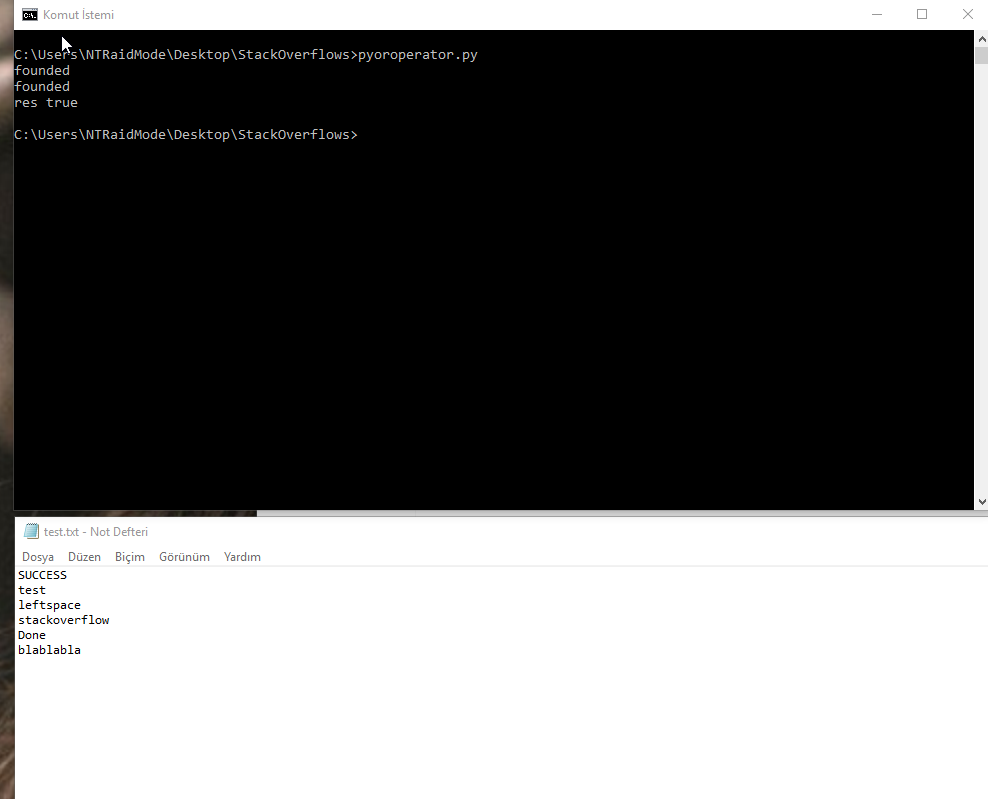
flog = open('test.txt', 'r')
flogLines = flog.readlines()
strlist = ['SUCCESS', 'Done','SUCCESSFUL']
res = False
for line in flogLines:
     for fstr in strlist:
         if line.find(fstr) != -1:
            print('found')
            res = True


if res:
    print('res true')
else:
    print('res false')
Method 15
I would use this kind of function for speed:
def check_string(string, substring_list):
    for substring in substring_list:
        if substring in string:
            return True
    return False
Method 16
data = "firstName and favoriteFood"
mandatory_fields = ['firstName', 'lastName', 'age']


# for each
for field in mandatory_fields:
    if field not in data:
        print("Error, missing req field {0}".format(field));

# still fine, multiple if statements
if ('firstName' not in data or
    'lastName' not in data or
    'age' not in data):
    print("Error, missing a req field");

# not very readable, list comprehension
missing_fields = [x for x in mandatory_fields if x not in data]
if (len(missing_fields)>0):
    print("Error, missing fields {0}".format(", ".join(missing_fields)));
Method 17
If you want exact matches of words then consider word tokenizing the target string. I use the recommended word_tokenize from nltk:
from nltk.tokenize import word_tokenize
Here is the tokenized string from the accepted answer:
a_string = "A string is more than its parts!"
tokens = word_tokenize(a_string)
tokens
Out[46]: ['A', 'string', 'is', 'more', 'than', 'its', 'parts', '!']
The accepted answer gets modified as follows:
matches_1 = ["more", "wholesome", "milk"]
[x in tokens for x in matches_1]
Out[42]: [True, False, False]
As in the accepted answer, the word “more” is still matched. If “mo” becomes a match string, however, the accepted answer still finds a match. That is a behavior I did not want.
matches_2 = ["mo", "wholesome", "milk"]
[x in a_string for x in matches_1]
Out[43]: [True, False, False]
Using word tokenization, “mo” is no longer matched:
[x in tokens for x in matches_2]
Out[44]: [False, False, False]
That is the additional behavior that I wanted. This answer also responds to the duplicate question here.
All methods was sourced from stackoverflow.com or stackexchange.com, is licensed under cc by-sa 2.5, cc by-sa 3.0 and cc by-sa 4.0