I have a GridView which uses BoundField for columns. I am trying to set a maxwidth for my UserInfo column.
I have tried many many ways but non of them work. Below is the code for my GridView :
<asp:GridView ID="GridView1" AutoGenerateEditButton="True"
ondatabound="gv_DataBound" runat="server" DataSourceID="SqlDataSource1"
AutoGenerateColumns="False">

<Columns>
                <asp:BoundField HeaderText="UserId"
                DataField="UserId"
                SortExpression="UserId"></asp:BoundField>

                <asp:BoundField HeaderText="Username"
                DataField="Username"
                SortExpression="Username"></asp:BoundField>

                <asp:BoundField HeaderText="UserInfo"
                DataField="UserInfo"
                SortExpression="UserInfo"></asp:BoundField>

                </Columns>
</asp:GridView>
Looking for suggestions on how I can set the width of a specific column, which is my UserInfo column.
Answers:
Thank you for visiting the Q&A section on Magenaut. Please note that all the answers may not help you solve the issue immediately. So please treat them as advisements. If you found the post helpful (or not), leave a comment & I’ll get back to you as soon as possible.
Method 1
I did a small demo for you. Demonstrating how to display long text.
In this example there is a column Name which may contain very long text. The boundField will display all content in a table cell and therefore the cell will expand as needed (because of the content)
The TemplateField will also be rendered as a cell BUT it contains a div which limits the width of any contet to eg 40px. So this column will have some kind of max-width!
    <asp:GridView ID="gvPersons" runat="server" AutoGenerateColumns="False" Width="100px">
        <Columns>
            <asp:BoundField HeaderText="ID" DataField="ID" />
            <asp:BoundField HeaderText="Name (long)" DataField="Name">
                <ItemStyle Width="40px"></ItemStyle>
            </asp:BoundField>
            <asp:TemplateField HeaderText="Name (short)">
                <ItemTemplate>
                    <div style="width: 40px; overflow: hidden; white-space: nowrap; text-overflow: ellipsis">
                        <%# Eval("Name") %>
                    </div>
                </ItemTemplate>
            </asp:TemplateField>
        </Columns>
    </asp:GridView>
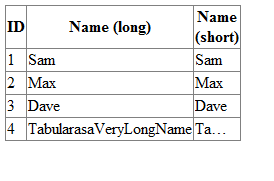
Here is my demo codeBehind
 public partial class gridViewLongText : System.Web.UI.Page
 {
     protected void Page_Load(object sender, EventArgs e)
     {
         #region init and bind data
         List<Person> list = new List<Person>();
         list.Add(new Person(1, "Sam"));
         list.Add(new Person(2, "Max"));
         list.Add(new Person(3, "Dave"));
         list.Add(new Person(4, "TabularasaVeryLongName"));
         gvPersons.DataSource = list;
         gvPersons.DataBind();
         #endregion
     }
 }

 public class Person
 {
     public int ID { get; set; }
     public string Name { get; set; }

     public Person(int _ID, string _Name)
     {
         ID = _ID;
         Name = _Name;
     }
 }
Method 2
add HeaderStyle in your bound field:
    <asp:BoundField HeaderText="UserId"
                DataField="UserId"
                SortExpression="UserId">

                <HeaderStyle Width="200px" />

</asp:BoundField>
Method 3
Width can be set to specific column as below:
By percentages:
<asp:BoundField HeaderText="UserInfo"  DataField="UserInfo"
SortExpression="UserInfo" ItemStyle-Width="100%"></asp:BoundField>
OR
By pixel:
<asp:BoundField HeaderText="UserInfo"  DataField="UserInfo"
SortExpression="UserInfo" ItemStyle-Width="500px"></asp:BoundField>
Method 4
This is going to work for all situations while working with width.
`<asp:TemplateField HeaderText="DATE">
   <ItemTemplate>
   <asp:Label ID="Label1" runat="server" Text='<%# Bind("date") %>' Width="100px"></asp:Label>
   </ItemTemplate>
  </asp:TemplateField>`
Method 5
<asp:GridView ID="GridView1" AutoGenerateEditButton="True"
ondatabound="gv_DataBound" runat="server" DataSourceID="SqlDataSource1"
AutoGenerateColumns="False" width="600px">

<Columns>
                <asp:BoundField HeaderText="UserId"
                DataField="UserId"
                SortExpression="UserId" ItemStyle-Width="400px"></asp:BoundField>
   </Columns>
</asp:GridView>
Method 6
hey recently i figured it out how to set width if your gridview databound with sql dataset.first set these control RowStyle-Wrap="false" HeaderStyle-Wrap="false" and then you can set the column width as much as you like. ex : ItemStyle-Width="150px" HeaderStyle-Width="150px"
All methods was sourced from stackoverflow.com or stackexchange.com, is licensed under cc by-sa 2.5, cc by-sa 3.0 and cc by-sa 4.0