Ok, I have scoured online resources and applied all the suggested solutions.
I am setting up a simple website on Windows Server 2008 R2 under IIS 7.5 using the “ASP.NET v4.0” pool. I am setting this up as an application under Default Web Site with a different root. I keep getting the 403 Forbidden error.
I have:
- Installed asp.net using aspnet_regiis.exe -i (many times)
- Made sure my root directory (physical path) has permissions for
“IIS_IUSR” and “IUSR” users. - Made sure “Anonymous Authentication” is enabled and set to “Application Pool Identity”
- I have restarted IIS numerous times
- I have checked and double-checked every other configuration.
What’s strange is that I have another application under Default Web Site and it works just fine.
Any suggestions will help. This shouldn’t be so hard unless I am missing something obvious.
Answers:
Thank you for visiting the Q&A section on Magenaut. Please note that all the answers may not help you solve the issue immediately. So please treat them as advisements. If you found the post helpful (or not), leave a comment & I’ll get back to you as soon as possible.
Method 1
Ok, I am quite embarrassed but the over sight was that “Require SSL” was checked by default and that is the place I did not check. I guess it is because an SSL is bound to the Default Web Site. Removing that check made it work.
Hopefully this will help someone else.
Method 2
Haha you think that is embarrasing! This is probably the 1000th webserver I’ve installed… 30mins of 403s!! I can’t figure it out. There is a stub default.asp in there.. permissions all correct… everything!
I turned on “directory” browsing in desparation of flicking around.
default.asp.txt is sitting there….. DOH.
Need to turn OFF “known file types”… why is that setting like that anyway?
Method 3
Another possible issue which leads to a 403 error:
The Global.asax file is missing.
Method 4
For me the answer was in handler mappings section of IIS 7.5
Adding the following to web.config enabled all the aspx pages to work correctly
<configuration>
...
  <system.webServer>
    <modules runAllManagedModulesForAllRequests="true" />
    <handlers accessPolicy="Read, Script" />
    ...
  </system.webServer>
</configuration>
Method 5
Grant permission to the Network Service user in the NTFS folder
Also check the .Net authorization rules:

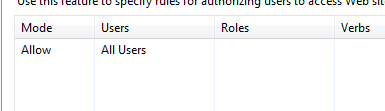
Method 6
Check that IP address restrictions are not blocking the request. Can check this in the logs.
(This was my embarrassing reason!)
Method 7
Mine was even more embarrassing.
Right Click on folder,Remove READ only attribute.
Method 8
For me, there was a vestigial Web.config in C:inetpubwwwroot with rewrite rules. Deleting it solved the problem.
Method 9
I was facing issue on windows 7 and surprisingly it was fixed after installing service pack 1
Method 10
You might also get this if setting up FTP for a website and you try and change the default directory for FTP on the website.
From what I can tell:
Manage FTP Site -> Advanced Settings -> Physical Path
is the same
Manage Website -> Advanced Settings -> Physical Path
Changing one will change the other and possibly cause a 403 on a working site.
All methods was sourced from stackoverflow.com or stackexchange.com, is licensed under cc by-sa 2.5, cc by-sa 3.0 and cc by-sa 4.0