I’m using IIS7 Application Request Routing in front of Tomcat as a replacement for ISAPI redirection. The basic reverse proxy function is working well, but I don’t have enough information in the final request headers. My application exists on several subdomains: customerone.ourservice.com, customertwo.ourservice.com, etc. Each subdomain runs the same application, but with different branding graphics.
The application currently looks at the Host header to tell which branding to display. When I use the IIS7 reverse proxy, that information is lost. My headers are now:
accept = text/html,application/xhtml+xml,application/xml;q=0.9,*/*;q=0.8
accept-charset = ISO-8859-1,utf-8;q=0.7,*;q=0.7
accept-encoding = gzip,deflate
accept-language = en-gb,en;q=0.7,en-us;q=0.3
cookie = JSESSIONID=......
host = 127.0.0.1:8080
max-forwards = 10
user-agent = Mozilla/5.0 (X11; U; Linux x86_64; en-GB; rv:1.9.0.15) Gecko/2009102815 Ubuntu/9.04 (jaunty) Firefox/3.0.15
x-original-url = /
x-forwarded-for = [iis7ip]:47567
x-arr-log-id = affbf81c-a5cf-4212-a43b-901cd9adcee6
connection = Keep-Alive
Is there any way I can insert the original Host header into the request headers passed on by the reverse proxy?
Answers:
Thank you for visiting the Q&A section on Magenaut. Please note that all the answers may not help you solve the issue immediately. So please treat them as advisements. If you found the post helpful (or not), leave a comment & I’ll get back to you as soon as possible.
Method 1
Application Request Routing has an option to preserve the original host header: preserveHostHeader. This option is by default false. You can enable it with:
"C:WindowsSystem32inetsrvappcmd.exe" set config -section:system.webServer/proxy /preserveHostHeader:"True" /commit:apphost
Method 2
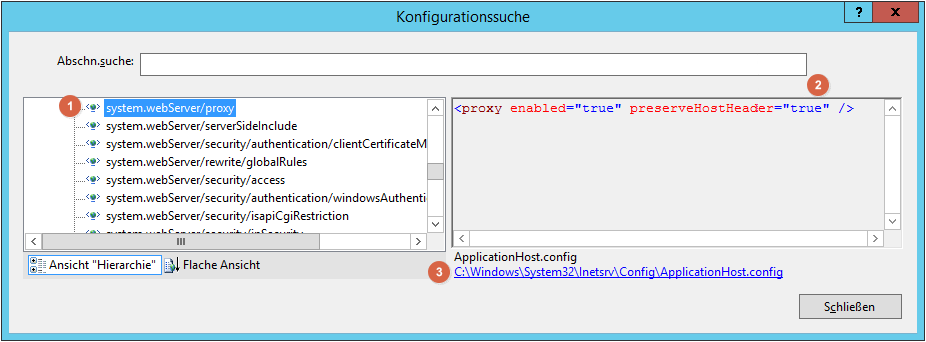
You could set the preserveHostHeader flag by hand.
    <proxy enabled="true" preserveHostHeader="true" />

</system.webServer>
In the iis configuration gui you can find this value under system.webServer/proxy.
All methods was sourced from stackoverflow.com or stackexchange.com, is licensed under cc by-sa 2.5, cc by-sa 3.0 and cc by-sa 4.0