Let’s say I have the following input model:
public class InputModel
{
    [Required]
    public string? Name { get; set; }

    [Required]
    public DateTime? Birthday { get; set; }
}
When the birthday field is not provided then I get the following appropriate response:
{
    "type": "https://tools.ietf.org/html/rfc7231#section-6.5.1",
    "title": "One or more validation errors occurred.",
    "status": 400,
    "traceId": "00-818caf3d757ae345a735fd0f4a523ecb-e9f90641c111814c-00",
    "errors": {
        "Birthday": [
            "The Birthday field is required."
        ]
    }
}
But if I provide an invalid date string, then the following is returned:
{
    "type": "https://tools.ietf.org/html/rfc7231#section-6.5.1",
    "title": "One or more validation errors occurred.",
    "status": 400,
    "traceId": "00-715471c843155940a6f0cae580cd1b69-247e6dbfe3442446-00",
    "errors": {
        "model": [
            "The model field is required."
        ],
        "$.birthday": [
            "The JSON value could not be converted to System.Nullable`1[System.DateTime]. Path: $.birthday | LineNumber: 13 | BytePositionInLine: 37."
        ]
    }
}
These two response models are not consistent which makes it difficult for the client to reason about the validation errors.
How can I validate the DateTime string before it gets handled by the converter so that I can return a response model similar to the first? Something like this:
{
    "type": "https://tools.ietf.org/html/rfc7231#section-6.5.1",
    "title": "One or more validation errors occurred.",
    "status": 400,
    "traceId": "00-818caf3d757ae345a735fd0f4a523ecb-e9f90641c111814c-00",
    "errors": {
        "Birthday": [
            "The Birthday field is badly formed."
        ]
    }
}
Answers:
Thank you for visiting the Q&A section on Magenaut. Please note that all the answers may not help you solve the issue immediately. So please treat them as advisements. If you found the post helpful (or not), leave a comment & I’ll get back to you as soon as possible.
Method 1
How can I validate the DateTime string before it gets handled by the
converter so that I can return a response model similar to the first?
You can create a custom BadRequest method that inherits ValidationProblemDetails to return the error message you want.
First, add the following code in your startup.cs ConfigureServices method:
 services.AddMvc()
               .ConfigureApiBehaviorOptions(options =>
               {
                   options.InvalidModelStateResponseFactory = context =>
                   {
                       var problems = new CustomBadRequest(context);
                       return new BadRequestObjectResult(problems);
                   };
               });
Here is the custom Bad Request method:
public class CustomBadRequest : ValidationProblemDetails
    {
        public CustomBadRequest(ActionContext context)
        {
            Title = "Invalid arguments to the API";
            Detail = "The inputs supplied to the API are invalid";
            Status = 400;
            ConstructErrorMessages(context);
            Type = context.HttpContext.TraceIdentifier;
        }
        private void ConstructErrorMessages(ActionContext context)
        {
            foreach (var keyModelStatePair in context.ModelState)
            {
                var key = keyModelStatePair.Key.Replace("$.", "");
                var errors = keyModelStatePair.Value.Errors;
                if (errors != null && errors.Count > 0)
                {
                    if (errors.Count == 1)
                    {
                        var errorMessage = GetErrorMessage(key, errors[0]);
                        Errors.Add(key, new[] { errorMessage });
                    }
                    else
                    {
                        var errorMessages = new string[errors.Count];
                        for (var i = 0; i < errors.Count; i++)
                        {
                            errorMessages[i] = GetErrorMessage(key,errors[i]);
                        }
                        Errors.Add(key, errorMessages);
                    }
                }
            }
        }
        string GetErrorMessage(string key, ModelError error)
        {
            if (error.ErrorMessage != $"The {key} field is required.")
            {
                return $"The {key} field is badly formed.";
            }
            return error.ErrorMessage;

        }
    }
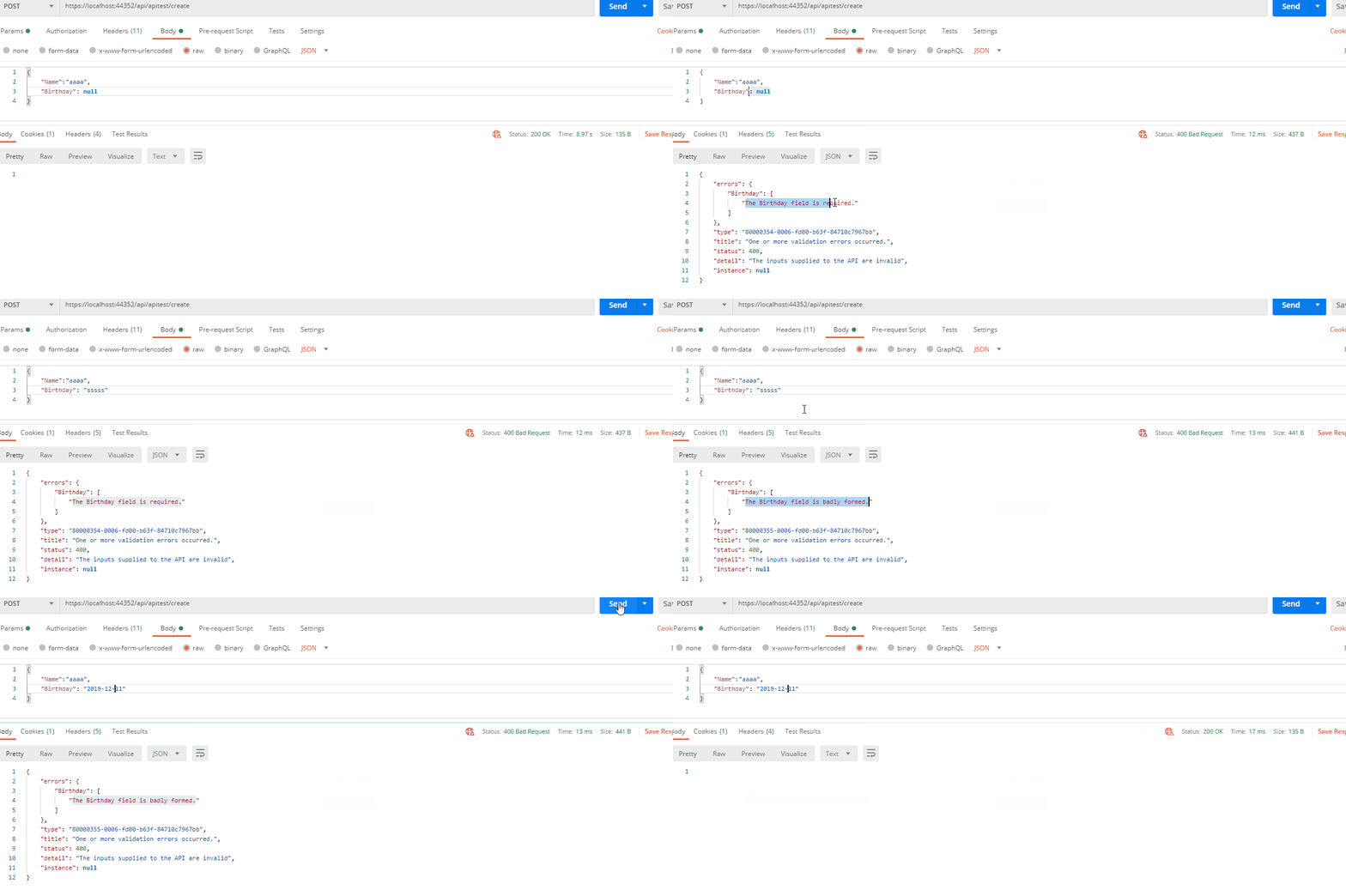
After the above settings, when your InputModel is illegal, it will automatically enter the CustomBadRequest method and return the corresponding error message through judgment.
Here is the test result through postman:
Method 2
Try defining the datatype of the datetime field like as follows:
[Required]
[DataType(DataType.DateTime)]
public DateTime? Birthday { get; set; }
All methods was sourced from stackoverflow.com or stackexchange.com, is licensed under cc by-sa 2.5, cc by-sa 3.0 and cc by-sa 4.0