I have a project that is coming up with 5 BC30002 errors, type ‘typename’ is not defined. However, when I double-click the error to open the offending line of code, intellisence does not show the line as an error, and in fact, when I clear out the name and re-type, intellisence finds the type for me.
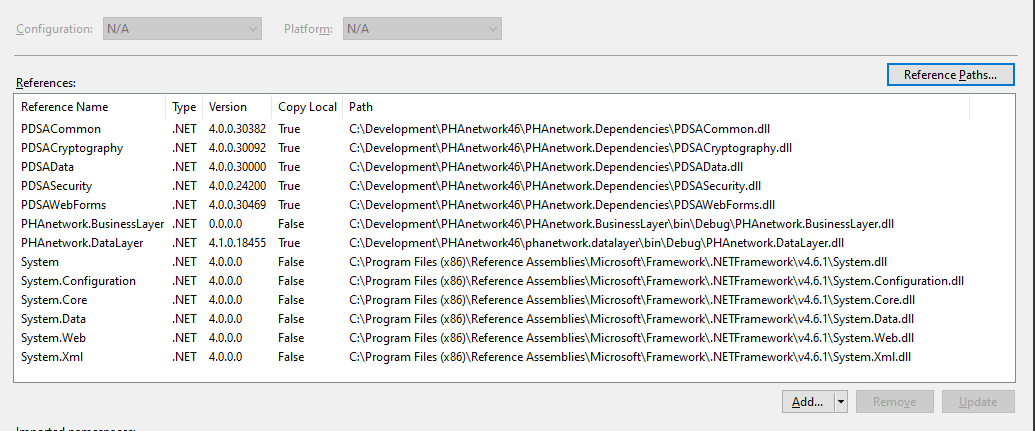
One thing I have noticed is that the referenced library in question appears correctly if I remove it and add it back in. It shows the version number of the DLL and “Copy Local” is showing as “True”. After I build the project, I then see the version number as 0.0.0.0 and local path is set to “False” (see below). I think this is the root of the problem as it seems that during the build process, it loses track of this DLL.
Any ideas on what might be causing this?
Answers:
Thank you for visiting the Q&A section on Magenaut. Please note that all the answers may not help you solve the issue immediately. So please treat them as advisements. If you found the post helpful (or not), leave a comment & I’ll get back to you as soon as possible.
Method 1
Have you tried deleting your VS folder?
All methods was sourced from stackoverflow.com or stackexchange.com, is licensed under cc by-sa 2.5, cc by-sa 3.0 and cc by-sa 4.0