Entity Framework is duplicating database name on tables ex: DatabaseName.DatabaseName.TableName. My connection string config and web.config do not have duplication in them. Has anyone seen this before?
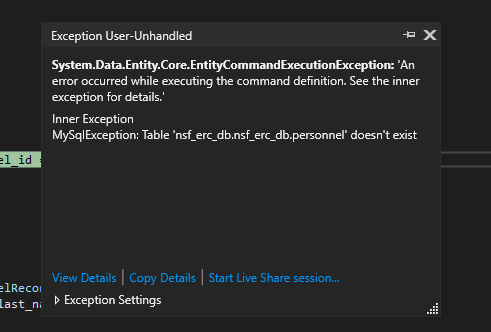
As you see from the error the table is:
MySqlException: Table ‘nsf_erc_db.nsf_erc_db.personnel’ doesn’t exist
When it should be table nsf_erc_db.personnel
Answers:
Thank you for visiting the Q&A section on Magenaut. Please note that all the answers may not help you solve the issue immediately. So please treat them as advisements. If you found the post helpful (or not), leave a comment & I’ll get back to you as soon as possible.
Method 1
Whenever I’ve had issues with Entity Framework, I’ll sometimes delete and re-add everything to the model. Goes without saying, but just to be safe, make sure you got a version of your project you can role back to.
To do this, select all of your tables in your model -> right click any of the tables -> select Delete from model.
Once everything is gone, right click in the empty model space and select Update model from database... and then re-add all your tables from the Add tab.
If doing that still doesn’t work, you might have to manually go into the .edmx file and do some changes yourself. Messing around in the Model Browser could work too.
All methods was sourced from stackoverflow.com or stackexchange.com, is licensed under cc by-sa 2.5, cc by-sa 3.0 and cc by-sa 4.0