I am trying to learn programming in ASP.NET Core by making simple programs, but I got stuck with translating some parts of texts by using a localization feature.
For example, I created Resources and folders with all needed resource files with translated words and phrases. For _Layout.cshtml i created Resources -> Views -> Shared -> _Layout.en.resx and _Layout.fr.resx
I tried to use this type of code but it doesn’t work, the page is loading but when I change the culture from en to fr the words in _Layout don’t change, only what I get is the words write in @localizer quotes in both languages.
The code in _Layout is the same as yours.
The differences in Startup.cs:
In ConfigureServices:
services.AddLocalization(opt => { opt.ResourcesPath = “Resources”; });
services.AddMvc().AddViewLocalization(LanguageViewLocationExpanderFormat.Suffix).AddDataAnnotationsLocalization();
        services.Configure<RequestLocalizationOptions>(
            opt =>
            {
                var supportCulteres = new List<CultureInfo>
                {
                    new CultureInfo("en"),
                    new CultureInfo("fr")
                };
                opt.DefaultRequestCulture = new RequestCulture("en");
                opt.SupportedCultures = supportCulteres;
                opt.SupportedUICultures = supportCulteres;
            });
In Configure i add only that code:
app.UseRequestLocalization(app.ApplicationServices.GetRequiredService<IOptions>().Value);
I made this to work this file _Culture.cshtml (problem with adding code)
https://i.stack.imgur.com/WV9pn.jpg
And I got side like this:
https://i.stack.imgur.com/1vRWE.jpg
And after changing the language (in this example i have polish language but normally it is french)
https://i.stack.imgur.com/Fbn8j.jpg
Answers:
Thank you for visiting the Q&A section on Magenaut. Please note that all the answers may not help you solve the issue immediately. So please treat them as advisements. If you found the post helpful (or not), leave a comment & I’ll get back to you as soon as possible.
Method 1
Here is a whole working demo:
1.Add resource file in Resources/Views/Shared folder in root project:
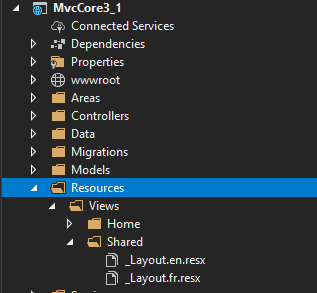
2.Edit your resource file(_Layout.fr.resx) like below:
Note:Be sure you have added the correct value for key(Home,Privacy,Book List.Book List contains space).

3.Create _Culture.cshtml:
@using Microsoft.AspNetCore.Builder
@using Microsoft.AspNetCore.Localization
@using Microsoft.AspNetCore.Mvc.Localization
@using Microsoft.Extensions.Options

@inject IViewLocalizer Localizer
@inject IOptions<RequestLocalizationOptions> LocOptions

@{
    var culture = Context.Features.Get<IRequestCultureFeature>();
    var cultureList = LocOptions.Value.SupportedUICultures
        .Select(c => new SelectListItem { Value = c.Name, Text = c.DisplayName })
        .ToList();
    var returnUrl = string.IsNullOrEmpty(Context.Request.Path) ? "~/" : $"~{Context.Request.Path.Value}";
}

<div>
    <form asp-controller="Home" asp-action="CultureManagement"
          asp-route-returnUrl="@returnUrl" method="post">
        <select name="culture" asp-for="@culture.RequestCulture.UICulture.Name" asp-items="cultureList"
                onchange="this.form.submit();" >
        </select>
    </form>
</div>
4.Change your _Layout.cshtml like below:
@inject Microsoft.AspNetCore.Mvc.Localization.IViewLocalizer localizer
<!DOCTYPE html>
<html lang="en">
<head>
//...
</head>
<body>
<header>
<nav class="navbar navbar-expand-sm navbar-toggleable-sm navbar-light bg-white border-bottom box-shadow mb-3">
<div class="container">
<a class="navbar-brand" asp-area="" asp-controller="Home" asp-action="Index">MvcCore3_1</a>
<button class="navbar-toggler" type="button" data-toggle="collapse" data-target=".navbar-collapse" aria-controls="navbarSupportedContent"
aria-expanded="false" aria-label="Toggle navigation">
<span class="navbar-toggler-icon"></span>
</button>
<div class="navbar-collapse collapse d-sm-inline-flex flex-sm-row-reverse">
<ul class="navbar-nav flex-grow-1">
<li class="nav-item">
<a class="nav-link text-dark" asp-area="" asp-controller="Home" asp-action="Index">@localizer["Home"]</a>
</li>
<li class="nav-item">
<a class="nav-link text-dark" asp-area="" asp-controller="Home" asp-action="Privacy">@localizer["Privacy"]</a>
</li>
</ul>
//add the partial here
@await Html.PartialAsync("_Culture")
</div>
</div>
</nav>
</header>
<div class="container">
<main role="main" class="pb-3">
@RenderBody()
</main>
</div>
<footer class="border-top footer text-muted">
<div class="container">
© 2020 - MvcCore3_1 - <a asp-area="" asp-controller="Home" asp-action="Privacy">Privacy</a>
</div>
</footer>
<script src="~/lib/jquery/dist/jquery.min.js"></script>
<script src="~/lib/bootstrap/dist/js/bootstrap.bundle.min.js"></script>
<script src="~/js/site.js" asp-append-version="true"></script>
@RenderSection("Scripts", required: false)
</body>
</html>
5.Be sure add AddViewLocalization in your Startup.cs like below:
Note: It should be:app.ApplicationServices.GetRequiredService<IOptions<RequestLocalizationOptions>>() not app.ApplicationServices.GetRequiredService<IOptions>().
    public void ConfigureServices(IServiceCollection services)
    {

        services.AddLocalization(options => options.ResourcesPath = "Resources");

        services.AddControllersWithViews()
            .AddViewLocalization(LanguageViewLocationExpanderFormat.Suffix);

        services.Configure<RequestLocalizationOptions>(
         opt =>
         {
             var supportCulteres = new List<CultureInfo>
             {
                new CultureInfo("en"),
                new CultureInfo("fr")
             };
             opt.DefaultRequestCulture = new RequestCulture("en");
             opt.SupportedCultures = supportCulteres;
             opt.SupportedUICultures = supportCulteres;
         });

    }

    public void Configure(IApplicationBuilder app, IWebHostEnvironment env)
    {

        var options = app.ApplicationServices.GetRequiredService<IOptions<RequestLocalizationOptions>>();
        app.UseRequestLocalization(options.Value);

        app.UseHttpsRedirection();
        app.UseStaticFiles();
        app.UseAuthentication();

        app.UseRouting();

        app.UseAuthorization();

        app.UseEndpoints(endpoints =>
        {
            endpoints.MapControllerRoute(
                name: "default",
                pattern: "{controller=Home}/{action=Index}/{id?}");
        });

    }
6.Controller:
[HttpPost]
public IActionResult CultureManagement(string culture, string returnUrl)
{
    Response.Cookies.Append(
        CookieRequestCultureProvider.DefaultCookieName,
        CookieRequestCultureProvider.MakeCookieValue(new RequestCulture(culture)),
        new CookieOptions { Expires = DateTimeOffset.UtcNow.AddYears(1) }
    );

    return LocalRedirect(returnUrl);
}
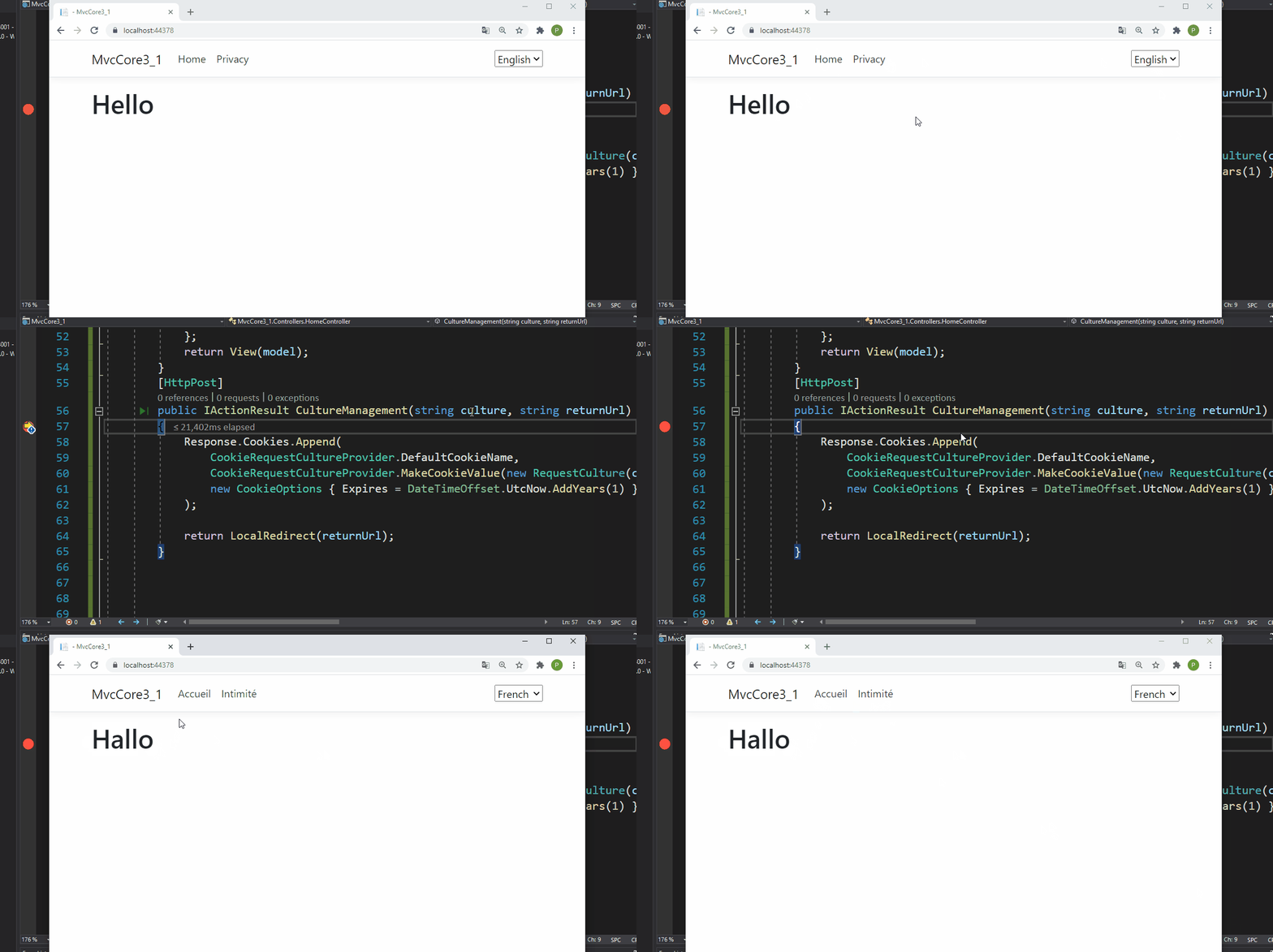
Result:
All methods was sourced from stackoverflow.com or stackexchange.com, is licensed under cc by-sa 2.5, cc by-sa 3.0 and cc by-sa 4.0