Im trying to make an admin page where if i click on the button ‘send’, the message will be sent and there will popup a bootstrap alert on the employee page.
I have already the bootstrap alert setup, the message for the first time is shown. After I close and i send a message again i dont see any alert. I think it needs to be triggered when i click on the send button but im struggling about how to do that. Hope anyone can show me a simple way.
Here is the code for the admin page to send:
<form action="" method="post">
    <fieldset>
        <tr>
            <div class="form-group">
                <td>Send message</td>
                <input type="text" id="msg" name="Bericht"/>
            </div>

            <div class="form group">
                <button type="submit" id="sendButton"  asp-page-handler="Submit" >Send</button>
            </div>

        </tr>
    </fieldset>

</form>
And here is the code for the employeepage where there should be a popup bootstrap alert from the admin page
<script src="~/lib/signalr.js"></script>

<script type="text/javascript">
// Start the connection.
var connection = new signalR.HubConnectionBuilder()
    .withUrl('/speedalarmhub')
    .build();


    connection.on('ReceiveMessage', function (message) {

                var encodedMsg = message;

                // Add the message to the page.

                document.getElementById("output").innerHTML = encodedMsg;


    });
    // Transport fallback functionality is now built into start.
    connection.start()
        .then(function () {

            console.log('connection started');
            connection.invoke('SendMessage');
        })
        .catch(error => {
            console.error(error.message);
        });
</script>

<div class=container>
    <div class="alert alert-warning">
        <a href="#" class="close" data-dismiss="alert" aria-label="close">×</a>
        <p id="output"></p>
    </div>
</div>
And here is the code for the Submit handler
public void  OnPostSubmit(NotificationModel notif)
        {
            DateTime datenow = DateTime.Now;
            CreateNotification(datenow, notif.Bericht);

        }


        public void CreateNotification(DateTime convdayid, string Bericht)
        {


            var cs = Database.Database.Connector();

            using var con = new NpgsqlConnection(cs);
            con.Open();

            var sql = "INSERT INTO notification(bericht, datumnu) VALUES(@Msg, @Date)";
            using var cmd = new NpgsqlCommand(sql, con);
            cmd.Parameters.AddWithValue("Msg", Bericht);
            cmd.Parameters.AddWithValue("Date", convdayid);


            cmd.Prepare();

            cmd.ExecuteNonQuery();
            con.Close();
        }
Answers:
Thank you for visiting the Q&A section on Magenaut. Please note that all the answers may not help you solve the issue immediately. So please treat them as advisements. If you found the post helpful (or not), leave a comment & I’ll get back to you as soon as possible.
Method 1
Im trying to make an admin page where if i click on the button ‘send’, the message will be sent and there will popup a bootstrap alert on the employee page.
To achieve your requirement of pushing notification to all connected users (employees) and then update client UI with received data, you can refer to the following code snippet to modify your project.
inject an instance of IHubContext into admin page model class by adding it to your constructor
private readonly IHubContext<ChatHub> _hubContext;

public AdminPanelModel(IHubContext<ChatHub> hubContext)
{
    _hubContext = hubContext;
}
update CreateNotification method to push notification to connected clients
public async Task CreateNotification(DateTime convdayid, string Bericht)
{
    //...
    //your code logic here
    //...

    await _hubContext.Clients.All.SendAsync("ReceiveMessage", $"{Bericht}");
Test Result
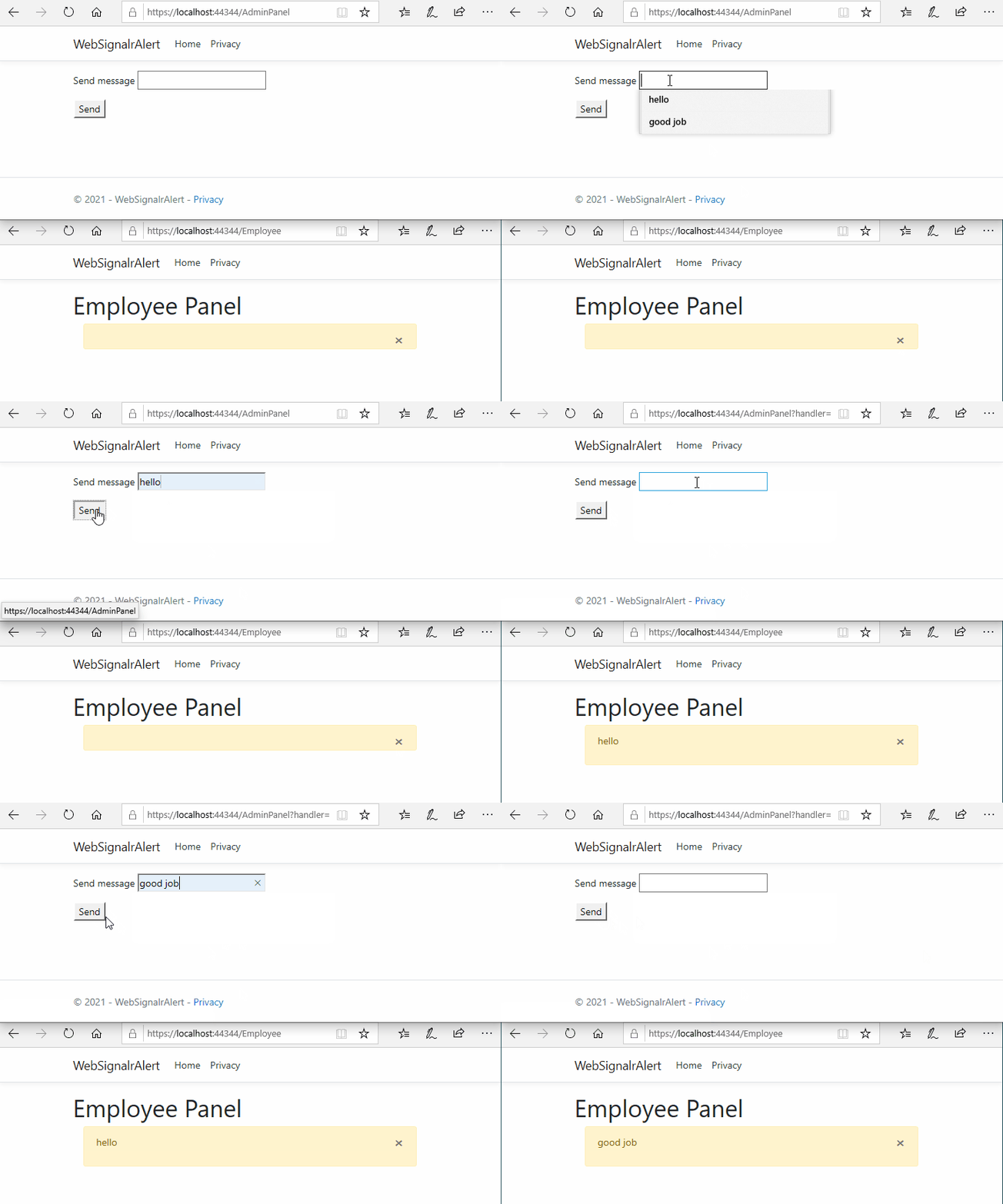
Note: for more information about “Send messages from outside a hub”, please check this doc: https://docs.microsoft.com/en-us/aspnet/core/signalr/hubcontext?view=aspnetcore-5.0
All methods was sourced from stackoverflow.com or stackexchange.com, is licensed under cc by-sa 2.5, cc by-sa 3.0 and cc by-sa 4.0