I am developing a Razor application and I need the Admin to assign or update roles of the Users. I am using a checkbox to carry out this action. So far, I have been able to populate the view to show the users and their respective roles ticked in the checkbox, but I haven’t been able to update their roles, as anytime a checkbox is ticked to add a role, it doesn’t add the role to the user. I think this line is the culprit: var selectedRoles = model.Where(x => x.Selected).Select(y => y.RoleName);.
This is the Model:
public class ManageUserRolesViewModel
{
    public string RoleId { get; set; }
    public string RoleName { get; set; }
    public bool Selected { get; set; }
}
This is the Page:
<form method="post">
    <div class="card">
        <div class="card-header">
            <h2>Manage User Roles</h2>
            Add / Remove Roles for @Model.UserID

        </div>
        <div class="card-body">
            @foreach (var x in Model.UserRoles)
             {
                <div class="form-check m-1">
                    <input type="hidden" asp-for="@x.RoleId" />
                    <input type="hidden" asp-for="@x.RoleName" />
                    <input asp-for="@x.Selected" class="form-check-input" />
                    <label class="form-check-label" asp-for="@x.Selected">
                        @x.RoleName
                    </label>
                </div>
             }
            <div asp-validation-summary="All" class="text-danger"></div>
        </div>
        <div class="card-footer">
            <input type="submit" value="Update" class="btn btn-primary" style="width:auto" />
            <a asp-page="/Account/UserManagement/UserList" class="btn btn-primary" style="width:auto">Cancel</a>
        </div>
    </div>
</form>
This is the Page Model:
public class ManageModel : PageModel
    {
        private readonly RoleManager<IdentityRole> _roleManager;
        private readonly BankAssesmentApplicationIdentityDbContext _db;
        private readonly UserManager<IdentityUser> _userManager;

        public ManageModel(
         RoleManager<IdentityRole> roleManager,
         UserManager<IdentityUser> userManager,
         BankAssesmentApplicationIdentityDbContext db)
        {
            _db = db;
            _userManager = userManager;
            _roleManager = roleManager;
        }

        public IList<ManageUserRolesViewModel> UserRoles = new List<ManageUserRolesViewModel>();
        public string UserID { get; set; }

        public async Task<IActionResult> OnPostAsync(List<ManageUserRolesViewModel> model, string userId)
        {
            UserID = userId;

            if (ModelState.IsValid)
            {
                IdentityUser user = await _userManager.FindByNameAsync(userId);
                if (user == null)
                {
                    return Page();
                }

                var roles = await _userManager.GetRolesAsync(user);
                var result = await _userManager.RemoveFromRolesAsync(user, roles);

                if (!result.Succeeded)
                {
                    ModelState.AddModelError("", "Cannot remove user existing roles");
                    return Page();
                }

                var selectedRoles = model.Where(x => x.Selected).Select(y => y.RoleName);

                await _userManager.AddToRolesAsync(user, selectedRoles);

                if (!result.Succeeded)
                {
                    ModelState.AddModelError("", "Cannot add selected roles to user");
                    return Page();
                }

                return RedirectToPage("/Account/UserManagement/UserList");
            }

            return Page();
        }

        public async Task<IActionResult> OnGetAsync(string userId)
        {
            UserID = userId;

            var user = await _userManager.FindByEmailAsync(userId);
            if (user == null)
            {
                return Page();
            }

            var model = new List<ManageUserRolesViewModel>();
            foreach (var role in _roleManager.Roles.ToList())
            {
                ManageUserRolesViewModel roles = new ManageUserRolesViewModel
                {
                    RoleId = role.Id,
                    RoleName = role.Name,
                };
                UserRoles.Add(roles);

                if (await _userManager.IsInRoleAsync(user, role.Name))
                {
                    roles.Selected = true;
                }
                else
                {
                    roles.Selected = false;
                }
                model.Add(roles);
            }
            return Page();
        }
    }
Answers:
Thank you for visiting the Q&A section on Magenaut. Please note that all the answers may not help you solve the issue immediately. So please treat them as advisements. If you found the post helpful (or not), leave a comment & I’ll get back to you as soon as possible.
Method 1
Firsly,you need know that for each property of the complex type, model binding looks through the sources for the name pattern prefix.property_name. If nothing is found, it looks for just property_name without the prefix.Your backend wants to receive a list model,so what you pass should be [index].PropertyName.But what you did will result in serveral inputs with the same name,the model binding system could not match the value for the list.
Then you need know that asp-for="@x.Selected" will generate the value for checkbox,but it will not change the value when you change the checkbox state,you need create a click event to change the value:
<input asp-for="@x.Selected" onclick="$(this).val(this.checked ? true : false)"/>
What you need change like below:
<form method="post">
    <div class="card">
        <div class="card-header">
            <h2>Manage User Roles</h2>
            Add / Remove Roles for @Model.UserID

        </div>
        <div class="card-body">
        @*Begin change*@
            @{ int i = 0;}
            @foreach (var x in Model.UserRoles)
            {
                <div class="form-check m-1">
                    <input type="hidden" asp-for="@x.RoleId" name="[@i].RoleId"/>
                    <input type="hidden" asp-for="@x.RoleName" name="[@i].RoleName"/>
                    <input asp-for="@x.Selected" name="[@i].Selected" class="form-check-input" onclick="$(this).val(this.checked ? true : false)"/>
                    <label class="form-check-label" asp-for="@x.Selected">
                        @x.RoleName
                    </label>
                </div>
                i++;
            }
         @*End change*@
            <div asp-validation-summary="All" class="text-danger"></div>
        </div>
        <div class="card-footer">
            <input type="submit" value="Update" class="btn btn-primary" style="width:auto" />
            <a asp-page="/Account/UserManagement/UserList" class="btn btn-primary" style="width:auto">Cancel</a>
        </div>
    </div>
</form>
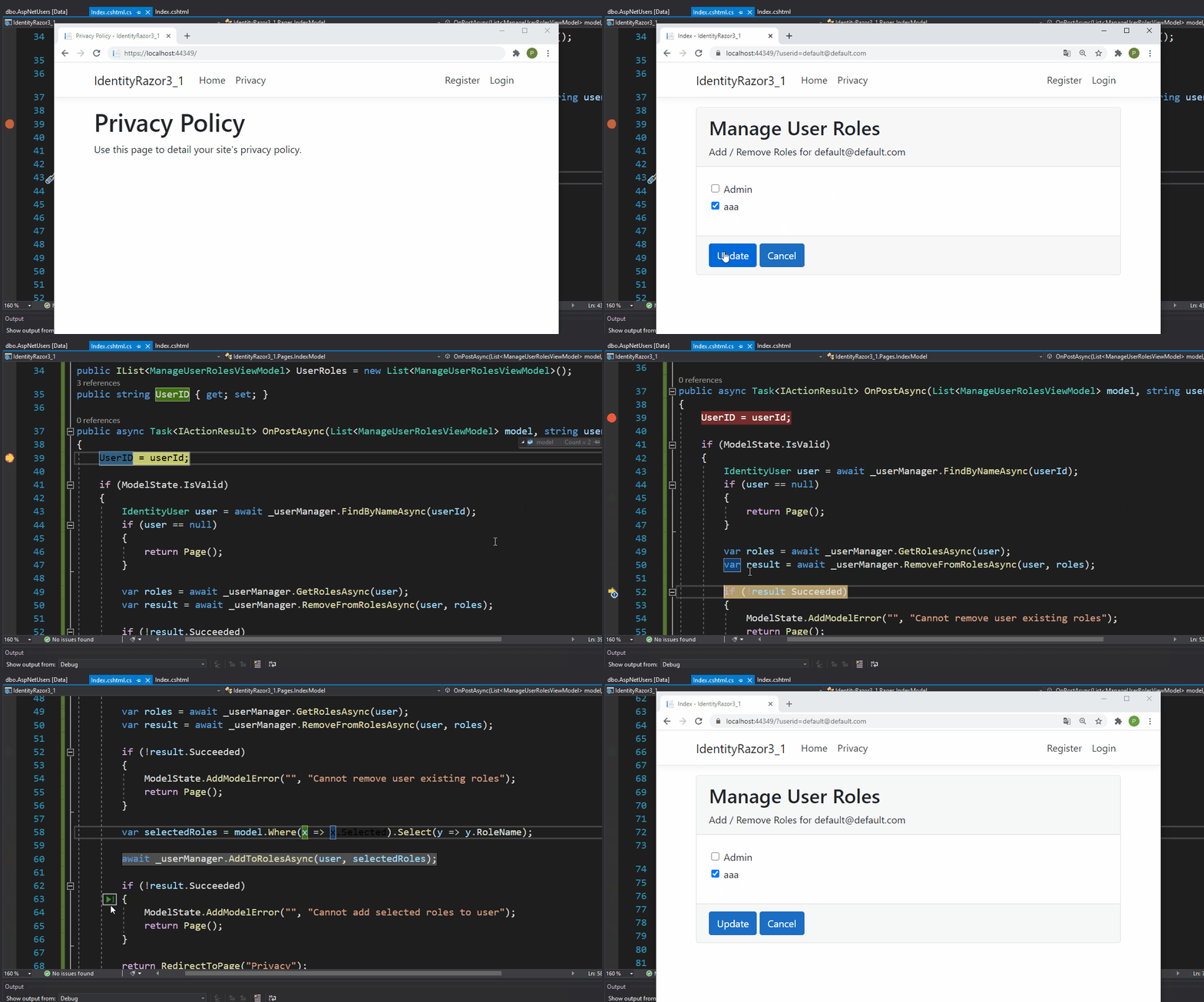
Result:
Method 2
@user:3843256 have a look at this sample it works ok, the only difference is you are using for each, that means bind does not take place, change to counter based index binding
All methods was sourced from stackoverflow.com or stackexchange.com, is licensed under cc by-sa 2.5, cc by-sa 3.0 and cc by-sa 4.0