Assume that I have a partial layout called “_Layout.cshtml” and I have a sidebar call “Sidebar.cshtml” both of them are located in “/Views/Shared”.
I have few pages such as Login, Index,Account Maintenance, Manage Course and etc.
I would like to make that “Sidebar.cshtml” appear in “Account Maintenance.cshtml” and “Manage Course.cshtml” but the “Index.cshtml” and “Login.cshtml” should not appear the “Sidebar.cshtml”.
I have tested implemented the @RenderSection in the “_Layout.cshtml” but it does not render and I know the “_Layout.cshtml” is a partial view. In this case, how can I achieve the assumption that I attempt to achieve.
Image illustration: “Left Bar” identifies as “Sidebar”
P/S: New to .NET Core
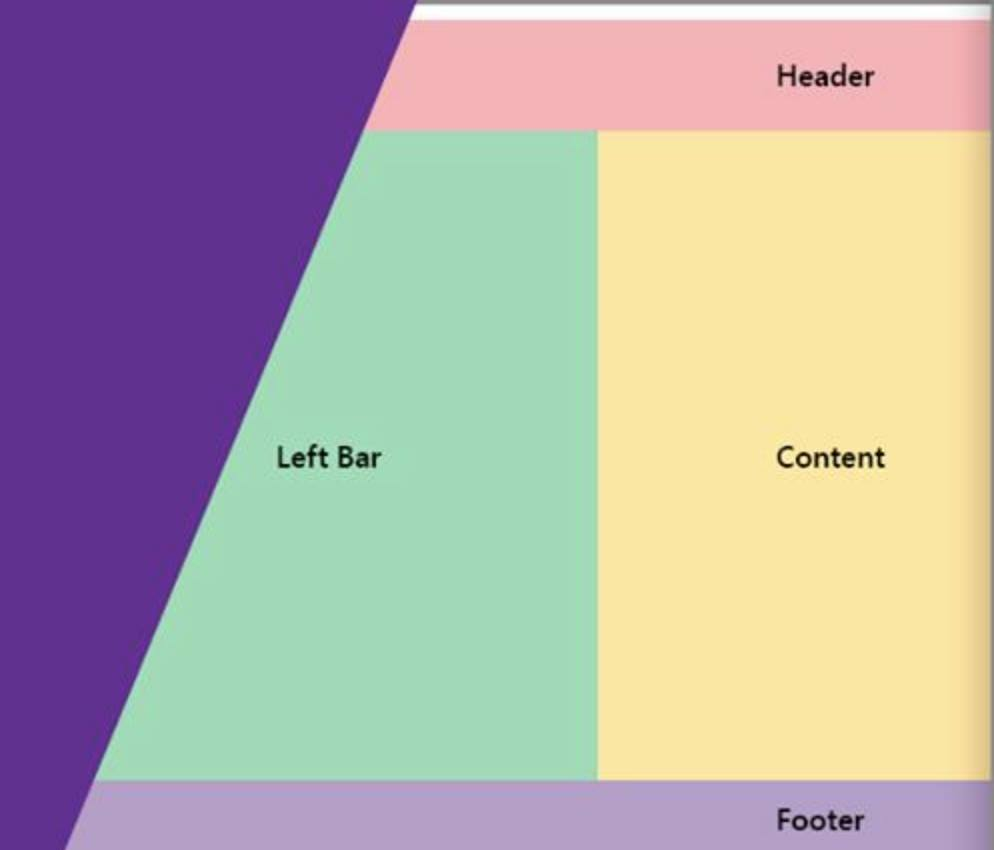
Code for _Layout.cshtml
 <div class="container">
        <main role="main" class="pb-3">
               @RenderSection("sidebar", false)
            @RenderBody()
        </main>
    </div>
Code for Sidebar.cshtml
@{
    Layout = "_Layout.cshtml";
}
@section sidebar{

    <nav class="col-md-2 d-none d-md-block bg-light sidebar">
            <div class="sidebar-sticky">
                <ul class="nav flex-column">
                    <li class="nav-item nav-link">
                        <img src="https://facebook.com/static/logo/cs_logo.png?v=1" class="rounded-circle" style="height: auto; max-width: 100%">
                    </li>
                    <li class="nav-item nav-link">
                        Role: <br><strong>22</strong>
                    </li>
                    <li class="nav-item nav-link">
                        Name:<br><strong>23qe</strong>
                    </li>
                    <li class="nav-item nav-link">
                        User ID:<br><strong>324eef</strong>
                    </li>
                    <li class="nav-item nav-link">
                        Last online:<br><strong>dsffsdf</strong>
                    </li>
                </ul>
            </div>
        </nav>
}
Answers:
Thank you for visiting the Q&A section on Magenaut. Please note that all the answers may not help you solve the issue immediately. So please treat them as advisements. If you found the post helpful (or not), leave a comment & I’ll get back to you as soon as possible.
Method 1
The problem is, sidebar.cshtml is defining sections. This would make sense if you return View("sidebar.cshtml") in your controller. But you want to use another view to get content from sidebar, so the sections should be defined on the other view, not in sidebar.cshtml.
For example, you are calling Account/Maintenance, so let layout to define sections and here we need to provide content to fill these sections.
In Views/Account/Maintenance.cshtml
@{
    Layout = "~/Views/Shared/_Layout.cshtml";
}
<span>Body text</span>
@section sidebar{
    @{
        await Html.RenderPartialAsync("~/Views/Shared/sidebar.cshtml");
    }
}
In Views/Shared/Sidebar.cshtml just provide the content:
<nav class="col-md-2 d-none d-md-block bg-light sidebar">
    <div class="sidebar-sticky">
        <ul class="nav flex-column">
            <li class="nav-item nav-link">
                <img src="https://facebook.com/static/logo/cs_logo.png?v=1" class="rounded-circle" style="height: auto; max-width: 100%">
            </li>
            <li class="nav-item nav-link">
                Role: <br><strong>22</strong>
            </li>
            <li class="nav-item nav-link">
                Name:<br><strong>23qe</strong>
            </li>
            <li class="nav-item nav-link">
                User ID:<br><strong>324eef</strong>
            </li>
            <li class="nav-item nav-link">
                Last online:<br><strong>dsffsdf</strong>
            </li>
        </ul>
    </div>
</nav>
In AccountController:
public IActionResult Maintenance()
{
    return View();
}
So that, sidebar would show in Maintenance, because the view provides content for that section and uses _Layout that defines the section.
_Layout.cshtml
<html>
<body>
    <div class="container">
        <main role="main" class="pb-3">
            @RenderSection("sidebar", false)
            @RenderBody()
        </main>
    </div>
</body>
</html>
All methods was sourced from stackoverflow.com or stackexchange.com, is licensed under cc by-sa 2.5, cc by-sa 3.0 and cc by-sa 4.0