Is there such a thing as list of available D-Bus services?
I’ve stumbled upon a few, like those provided by NetworkManager, Rhythmbox, Skype, HAL.
I wonder if I can find a rather complete list of provided services/interfaces.
Answers:
Thank you for visiting the Q&A section on Magenaut. Please note that all the answers may not help you solve the issue immediately. So please treat them as advisements. If you found the post helpful (or not), leave a comment & I’ll get back to you as soon as possible.
Method 1
On QT setups (short commands and clean, human readable output) you can run:
qdbus
will list list the services available on the session bus and
qdbus --system
will list list the services available on the system bus.
On any setup you can use dbus-send
dbus-send --print-reply --dest=org.freedesktop.DBus /org/freedesktop/DBus org.freedesktop.DBus.ListNames
Just like qdbus, if --session or no message bus is specified, dbus will send to the login session message bus. So the above will list the services available on the session bus.
Use --system if you want instead to use the system wide message bus:
dbus-send --system --print-reply --dest=org.freedesktop.DBus /org/freedesktop/DBus org.freedesktop.DBus.ListNames
You could also use DFeet if you prefer a graphical tool (see the other answers for more GUI options).
Method 2
With Python it can be simpler.
System services:
import dbus
for service in dbus.SystemBus().list_names():
    print(service)
Session services:
import dbus
for service in dbus.SessionBus().list_names():
    print(service)
Method 3
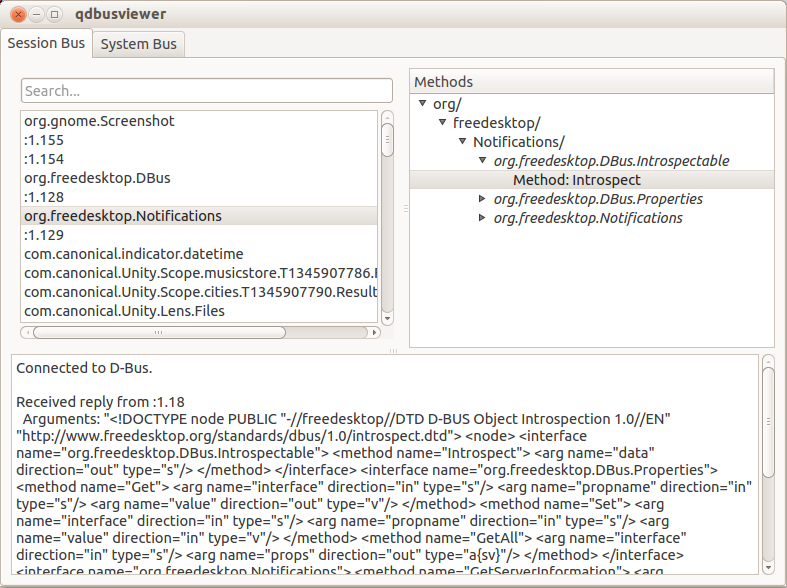
qdbusviewer is your best friend; it allows you to send D-bus messages as well:
Method 4
gdbus is part of glib2 and supports Bash completions. Here is how to use it (on Fedora):
bash-4.4$ source /usr/share/bash-completion/completions/gdbus
bash-4.4$ gdbus call --system --dest <TAB><TAB>
This will show all possible destinations. To get a list of the available interfaces DBus exports the org.freedesktop.DBus.ListNames method. You can call it by running:
gdbus call --system --dest org.freedesktop.DBus
           --object-path /org/freedesktop/DBus
           --method org.freedesktop.DBus.ListNames
Unfortunately this leads to unreadable output. Fortunately the output is valid python, so this is possible:
gdbus call --system --dest org.freedesktop.DBus
           --object-path /org/freedesktop/DBus
           --method org.freedesktop.DBus.ListNames |
    python -c 'import sys, pprint; pprint.pprint(eval(sys.stdin.read()))'
I don’t usually do this, but is a nice trick to keep on sleeve. I use gdbus for introspecting and proving concepts before moving to code. The bash completion saves a lot of typing and avoid typos. Would be nice to have gdbus displaying a nicer output.
Method 5
I would recommend also dasbus
from dasbus.connection import SystemMessageBus

bus = SystemMessageBus()
busproxy = bus.proxy
for i in sorted(busproxy.ListNames()):
    print(i)
(Substitute SessionMessageBus for the session bus.)
From the shell, on systemd systems there is busctl
busctl list
All methods was sourced from stackoverflow.com or stackexchange.com, is licensed under cc by-sa 2.5, cc by-sa 3.0 and cc by-sa 4.0