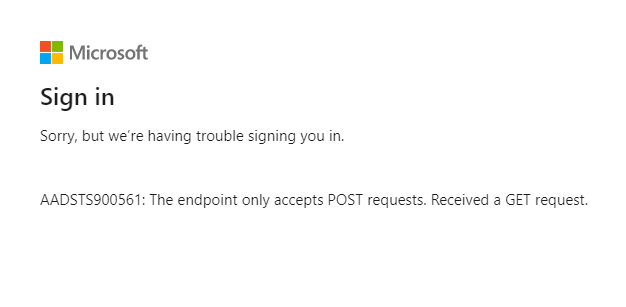
i am having asp.net web application. i am migrating this application to azure and implementing Azure AD Authentication. AD authentication and Approle based authorization are working as expected. i am facing issue while signing-out from Application.
referred msdn-site tried with these settings as well, still i am getting same issue.
need help on resolving this issue!! thanks!!
my signout method in account controller has following
public void SignOut()
    {

        HttpContext.GetOwinContext()
        .Authentication

        .SignOut(CookieAuthenticationDefaults.AuthenticationType);

        HttpContext.GetOwinContext().Authentication.SignOut(
                 CookieAuthenticationDefaults.AuthenticationType, OpenIdConnectAuthenticationDefaults.AuthenticationType);

    }
Startup.cs configauth as belows
public void ConfigureAuth(IAppBuilder app)
    {


        app.SetDefaultSignInAsAuthenticationType(CookieAuthenticationDefaults.AuthenticationType);


        app.UseCookieAuthentication(new CookieAuthenticationOptions());

        app.UseOpenIdConnectAuthentication(
            new OpenIdConnectAuthenticationOptions
            {
                ClientId = clientId,
                Authority = Authority,
                PostLogoutRedirectUri = redirectUri,
                RedirectUri = redirectUri,
                TokenValidationParameters = new TokenValidationParameters
                {
                    ValidateIssuer = true,
                    NameClaimType = "upn",
                    RoleClaimType = "roles",    // The claim in the Jwt token where App roles are provided.
                },
                Notifications = new OpenIdConnectAuthenticationNotifications()
                {
                    //
                    // If there is a code in the OpenID Connect response, redeem it for an access token and refresh token, and store those away.
                    //
                    AuthorizationCodeReceived = OnAuthorizationCodeReceived,
                    AuthenticationFailed = OnAuthenticationFailed
                }

            });

        // Configure the db context, user manager and signin manager to use a single instance per request
        app.CreatePerOwinContext(ApplicationDbContext.Create);


    }
web.config with AD configuration details as follows
<add key="ida:ClientId" value="xxxxx-xxxx-xx-xxxx-xxxxxxx"/>
<add key="ida:Tenant" value="xxxxxx.onmicrosoft.com"/>
<add key="ida:AADInstance" value="https://login.microsoftonline.com/{0}"/>
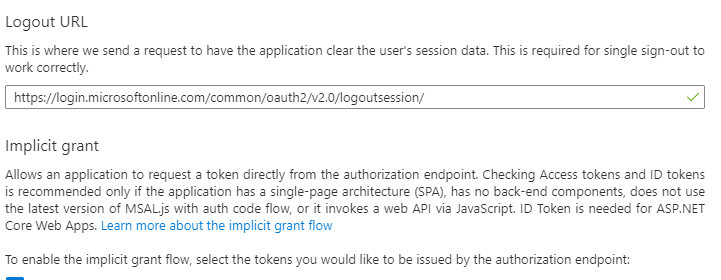
<add key="ida:PostLogoutRedirectUri" value="https://login.microsoftonline.com/common/oauth2/v2.0/logoutsession/"/>
<add key="ida:RedirectUri" value="https://xxxxxxxx.azurewebsites.net/"/>
Answers:
Thank you for visiting the Q&A section on Magenaut. Please note that all the answers may not help you solve the issue immediately. So please treat them as advisements. If you found the post helpful (or not), leave a comment & I’ll get back to you as soon as possible.
Method 1
I tried to re-create your problem, and if you configured the logouturl in the portal like I did, you can try deleting it and then running the program.
All methods was sourced from stackoverflow.com or stackexchange.com, is licensed under cc by-sa 2.5, cc by-sa 3.0 and cc by-sa 4.0