I would like to add a separator to the admin submenu section, NOT in the top level section.
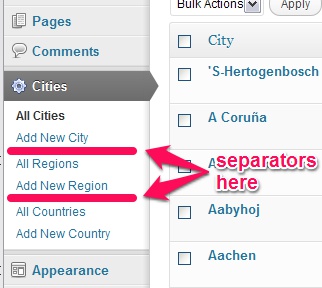
I’m thinking of using javascript and styling to do the job, but I was wondering if there’s a more straightforward method such as that when adding a separator to the top level menu section.
I’m still experimenting on this. I will provide my method once I get it working.
[UPDATED]
Answers:
Thank you for visiting the Q&A section on Magenaut. Please note that all the answers may not help you solve the issue immediately. So please treat them as advisements. If you found the post helpful (or not), leave a comment & I’ll get back to you as soon as possible.
Method 1
After going over it and extending the core API to allow main menu separators in custom positions, I did a quick run through core menu files, dumped the hell out of everything’s that in there and found a solution that allows to use the core API also for custom submenu separators.
The result
This is how our menu will look like, after we added the separators.
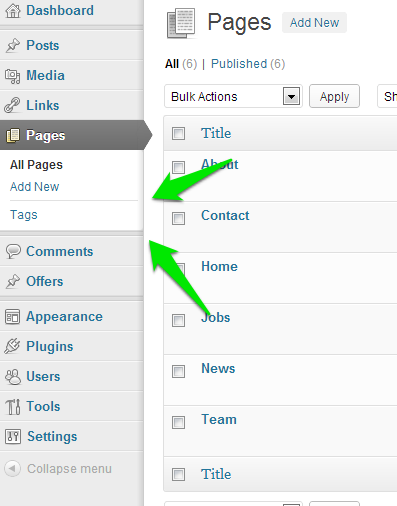
To make this happen, simply add a small plugin, or throw this snippet in your plugins file or functions.php. Here’s an example plugin. As you can see, you’ll have to add the parent page where you want your separator to appear. Then you have to add the identifier wp-menu-separator. You can adjust the visibility for user by changing the read-capability to whatever the other items in this menu have. The 11 is just the priority. Adjust it to wherever you want the separator to appear inside the menu.
<?php
defined( 'ABSPATH' ) OR exit;
/** Plugin Name: Example Admin Menu Separator */

add_action( 'admin_menu', 'add_admin_menu_separator' );
function add_admin_menu_separator()
{
    add_menu_page( '', '', 'read', 'wp-menu-separator', '', '', '21' );
    add_submenu_page( 'edit.php?post_type=page', 'wp-menu-separator', '', 'read', '11', '' );
}
The Plugin itself
Again this plugin can be used as plugin, part of another plugin or (best) as muplugin.
To follow any updates
Please subscribe/star this GitHub Gist. I will post updates only there.
<?php
defined( 'ABSPATH' ) OR exit;
/**
 * Plugin Name: Admin Menu Separator
 * Description: Adds a separator on whatver priority is needed.
 */

add_filter( 'parent_file', 'admin_menu_separator' );
function admin_menu_separator( $parent_file )
{
    $menu = &$GLOBALS['menu'];
    $submenu = &$GLOBALS['submenu'];
    foreach( $submenu as $key => $item )
    {
        foreach ( $item as $index => $data )
        {
            // Check if we got the identifier
            if ( in_array( 'wp-menu-separator', $data, true ) )
            {
                // Set the MarkUp, so it gets used instead of the menu title
                $data[0] = '<div class="separator"></div>';
                // Grab our index and temporarily save it, so we can safely overrid it
                $new_index = $data[2];
                // Set the parent file as new index, so core attaches the "current" class
                $data[2] = $GLOBALS['parent_file'];
                // Reattach to the global with the new index
                $submenu[ $key ][ $new_index ] = $data;
                // Prevent duplicate
                unset( $submenu[ $key ][ $index ] );
                // Get back into the right order
                ksort( $submenu[ $key ] );
            }
        }
    }
    foreach( $menu as $key => $item )
    {
        if (
            in_array( 'wp-menu-separator', $item )
            AND 5 < count( $item )
            )
        {
            $menu[ $key ][2] = 'separator0';
            $menu[ $key ][4] = 'wp-menu-separator';
            unset(
                 $menu[ $key ][5]
                ,$menu[ $key ][6]
            );
        }
    }
    return $parent_file;
}
Method 2
Separators, if this question targets this, are the dividers of the admin menu that separate the menu into sections. Per default it’s divided into a “publish” and an “administration” area.
Plugin for the rescue
Here’s what we’re going to have afterwards: A custom separator.
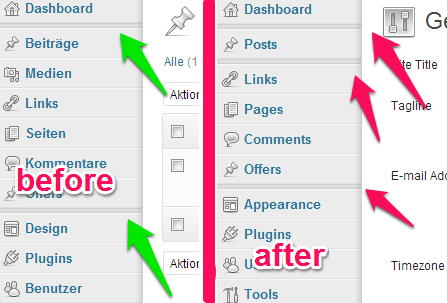
I wrote a pretty simple plugin that I run as mu-plugin. The usage is, as you can see from the example, very easy and fully aligns with the internal API.
// @example
add_action( 'admin_menu', 'add_admin_menu_separator' );
function add_admin_menu_separator()
{
    add_menu_page( '', '', 'read', 'wp-menu-separator', '', '', '10' );
}
Just load this plugin into your mu-plugins or plugins folder and you’re ready to go. The plugin will automatically detect that you want to add a separator and transform the added menu item to one.
<?php
defined( 'ABSPATH' ) OR exit;
/**
 * Plugin Name: Admin Menu Separator
 * Description: Adds a separator on whatver priority is needed.
 */

add_filter( 'parent_file', 'admin_menu_separator' );
function admin_menu_separator( $parent_file )
{
    $menu = &$GLOBALS['menu'];
    foreach( $menu as $key => $item )
    {
        if (
            in_array( 'wp-menu-separator', $item )
            AND 5 < count( $item )
        )
        {
            $menu[ $key ][2] = 'separator0';
            $menu[ $key ][4] = 'wp-menu-separator';
            unset(
                 $menu[ $key ][5]
                ,$menu[ $key ][6]
            );
        }
    }
    return $parent_file;
}
Method 3
NOTE: there might be a more appropriate way to do this, however I am just showing you how another plugin approaches this issue.
The plugin in question is s2Member
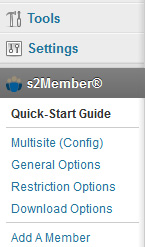
How they achieve this is by adding a submenu page item to the parent menu item itself;
    add_submenu_page(
        $parent_slug,                //parent menu slug to attach to
        "",                          //page title (left blank)
                                     //menu title (inserted span with inline CSS)
       '<span style="display:block;
        margin:1px 0 1px -5px;
        padding:0;
        height:1px;
        line-height:1px;
        background:#CCCCCC;"></span>',
        "create_users",              //capability (set to your requirement)
        "#"                          //slug (URL) shows Hash domain.com/# incase of mouse over
     );
You can find reference to this within the s2Member plugin itself if you want to inspect it at: pluginss2memberincludesclassesmenu-pages.inc.php starting line 138
For reference on add_menu_page function see:
http://codex.wordpress.org/Function_Reference/add_submenu_page
Method 4
CSS Selector Solution:
add a new admin-styles.css file to your theme with:
.wp-submenu a[href="post-new.php?post_type=city" rel="nofollow noreferrer noopener"],
.wp-submenu a[href="post-new.php?post_type=region" rel="nofollow noreferrer noopener"] {
  border-bottom:1px solid #ccc
}
.wp-submenu li:last-child a {
  border-bottom:none
}
and load the styles
wp_register_style( 'my_admin_styles', trailingslashit( get_template_directory_uri() ) . 'admin-styles.css');
add_action( 'admin_print_styles', 'admin_styles' );

function admin_styles() { wp_enqueue_style( 'my_admin_styles' ); }
Method 5
[UPDATED]
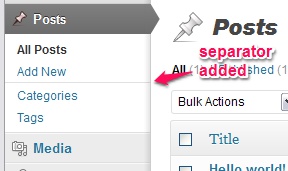
This is what I had came up with. Below is a sample of how I would do it on the post menu section:
(Thanks to @userabuser for the advice)
function add_submenu_separator( $menu_ord ) {
  global $submenu;

  // Create 'separator' array for submenu
  $submenuSep = Array ('<div class="separator"></div>', 'read', '#');

    // Note: Use 'div' with class 'separator' to use
    //       WP's built-in separator styling

  $offset = 2; // Position of separator

  // Insert separator into POST menu array
  $post = $submenu['edit.php'];
  $post = array_slice($post, 0, $offset, true) +
          array($submenuSep) +
          array_slice($post, $offset, NULL, true);
  $submenu['edit.php'] = $post;

  return $menu_ord;
}
add_filter( 'custom_menu_order', 'add_submenu_separator' );
This part is not necessary but if you wish to get rid of the a tag on the separator, you may have to use javascript. So, add the following:
// Add the script
function submenu_scripts() {
  wp_enqueue_script('submenu_script', get_template_directory_uri().'/js/submenu_scripts.js', false, null);
}
add_action('admin_enqueue_scripts', 'submenu_scripts', 100);
Here’s how the javascript looks like which I named submenu_scripts.js & placed it in a folder called js:
(function($){
    $(document).ready( function() {

        // Remove 'a' tag on submenu separators
        $('a div[class="separator"]').unwrap();

    });
})(jQuery);
Here’s how it should look:
All methods was sourced from stackoverflow.com or stackexchange.com, is licensed under cc by-sa 2.5, cc by-sa 3.0 and cc by-sa 4.0