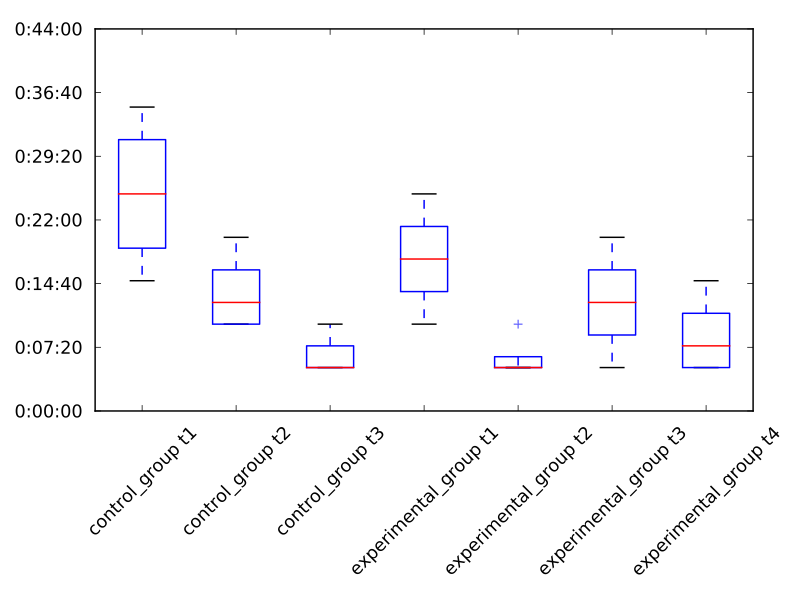
Check the x axis of the figure below. How can I move the labels a bit to the left so that they align with their respective ticks?
I’m rotating the labels using:
ax.set_xticks(xlabels_positions)
ax.set_xticklabels(xlabels, rotation=45)
But, as you can see, the rotation is centered on the middle of the text labels. Which makes it look like they are shifted to the right.
I’ve tried using this instead:
ax.set_xticklabels(xlabels, rotation=45, rotation_mode="anchor")
… but it doesn’t do what I wished for. And "anchor" seems to be the only value allowed for the rotation_mode parameter.
Answers:
Thank you for visiting the Q&A section on Magenaut. Please note that all the answers may not help you solve the issue immediately. So please treat them as advisements. If you found the post helpful (or not), leave a comment & I’ll get back to you as soon as possible.
Method 1
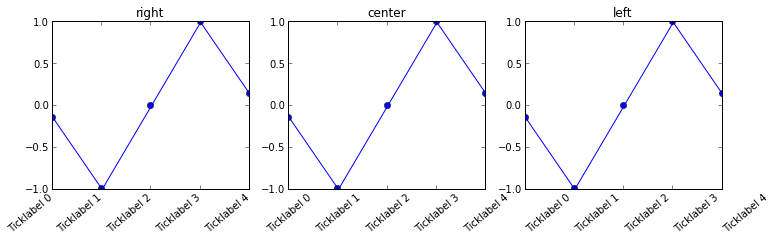
You can set the horizontal alignment of ticklabels, see the example below. If you imagine a rectangular box around the rotated label, which side of the rectangle do you want to be aligned with the tickpoint?
Given your description, you want: ha=’right’
n=5

x = np.arange(n)
y = np.sin(np.linspace(-3,3,n))
xlabels = ['Ticklabel %i' % i for i in range(n)]

fig, axs = plt.subplots(1,3, figsize=(12,3))

ha = ['right', 'center', 'left']

for n, ax in enumerate(axs):
    ax.plot(x,y, 'o-')
    ax.set_title(ha[n])
    ax.set_xticks(x)
    ax.set_xticklabels(xlabels, rotation=40, ha=ha[n])
Method 2
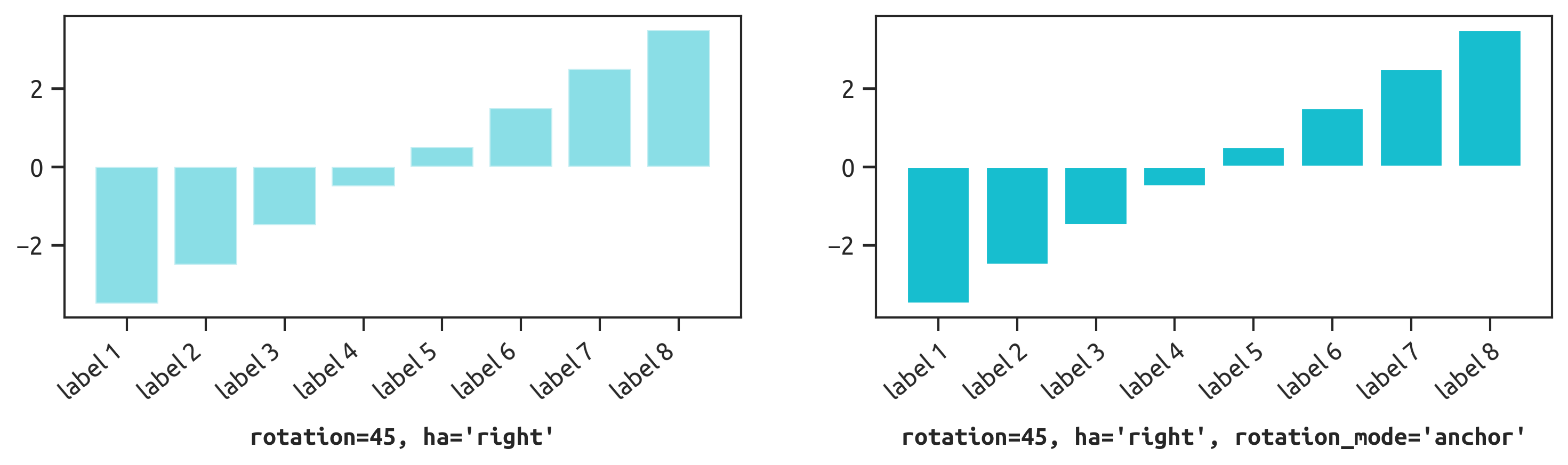
ha='right' is not enough to visually align labels with ticks:
- For
rotation=45, use bothha='right'androtation_mode='anchor' - For other angles, use a
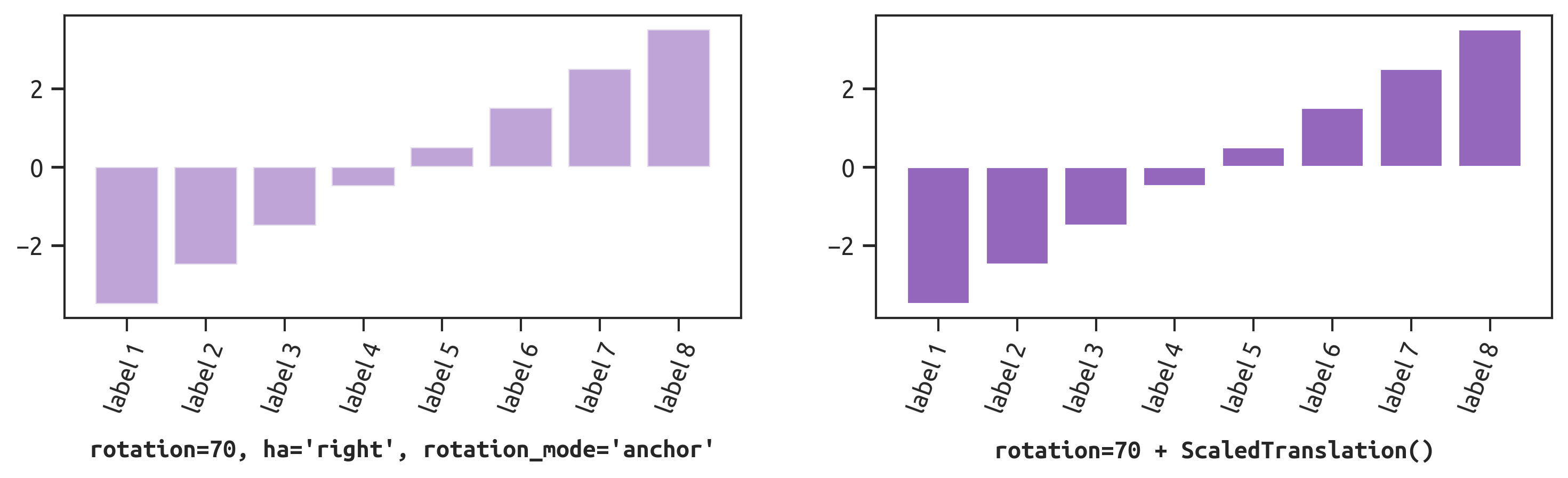
ScaledTranslation()instead
rotation_mode='anchor'
If the rotation angle is roughly 45°, combine ha='right' with rotation_mode='anchor':
ax.set_xticks(ticks)
ax.set_xticklabels(labels, rotation=45, ha='right', rotation_mode='anchor')
Or in matplotlib 3.5.0+, set ticks and labels at once:
ax.set_xticks(ticks, labels, rotation=45, ha='right', rotation_mode='anchor')
ScaledTranslation()
If the rotation angle is more extreme (e.g., 70°) or you just want more fine-grained control, anchoring won’t work well. Instead, apply a linear transform:
ax.set_xticks(ticks)
ax.set_xticklabels(labels, rotation=70)

# create -5pt offset in x direction
from matplotlib.transforms import ScaledTranslation
dx, dy = -5, 0
offset = ScaledTranslation(dx / fig.dpi, dy / fig.dpi, fig.dpi_scale_trans)

# apply offset to all xticklabels
for label in ax.xaxis.get_majorticklabels():
    label.set_transform(label.get_transform() + offset)
Method 3
Rotating the labels is certainly possible. Note though that doing so reduces the readability of the text. One alternative is to alternate label positions using a code like this:
import numpy as np
n=5

x = np.arange(n)
y = np.sin(np.linspace(-3,3,n))
xlabels = ['Long ticklabel %i' % i for i in range(n)]


fig, ax = plt.subplots()
ax.plot(x,y, 'o-')
ax.set_xticks(x)
labels = ax.set_xticklabels(xlabels)
for i, label in enumerate(labels):
    label.set_y(label.get_position()[1] - (i % 2) * 0.075)
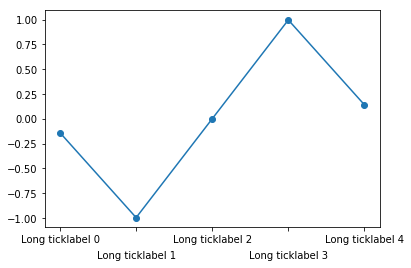
For more background and alternatives, see this post on my blog
Method 4
An easy, loop-free alternative is to use the horizontalalignment Text property as a keyword argument to xticks[1]. In the below, at the commented line, I’ve forced the xticks alignment to be “right”.
n=5
x = np.arange(n)
y = np.sin(np.linspace(-3,3,n))
xlabels = ['Long ticklabel %i' % i for i in range(n)]
fig, ax = plt.subplots()
ax.plot(x,y, 'o-')

plt.xticks(
        [0,1,2,3,4],
        ["this label extends way past the figure's left boundary",
        "bad motorfinger", "green", "in the age of octopus diplomacy", "x"],
        rotation=45,
        horizontalalignment="right")    # here
plt.show()
(yticks already aligns the right edge with the tick by default, but for xticks the default appears to be “center”.)
[1] You find that described in the xticks documentation if you search for the phrase “Text properties”.
Method 5
I am clearly late but there is an official example which uses
plt.setp(ax.get_xticklabels(), rotation=45, ha="right", rotation_mode="anchor")
to rotate the labels while keeping them correctly aligned with the ticks, which is both clean and easy.
See: https://matplotlib.org/stable/gallery/images_contours_and_fields/image_annotated_heatmap.html
Method 6
If you dont want to modify the xtick labels, you can just use:
plt.xticks(rotation=45)
All methods was sourced from stackoverflow.com or stackexchange.com, is licensed under cc by-sa 2.5, cc by-sa 3.0 and cc by-sa 4.0