How to create a menu in a shell script that will display 3 options that a user will use the arrows keys to move the highlight cursor and press enter to select one?
Answers:
Thank you for visiting the Q&A section on Magenaut. Please note that all the answers may not help you solve the issue immediately. So please treat them as advisements. If you found the post helpful (or not), leave a comment & I’ll get back to you as soon as possible.
Method 1
Here is a pure bash script solution in form of the select_option function, relying solely on ANSI escape sequences and the built-in read.
Works on Bash 4.2.45 on OSX. The funky parts that might not work equally well in all environments from all I know are the get_cursor_row(), key_input() (to detect up/down keys) and the cursor_to() functions.
#!/usr/bin/env bash

# Renders a text based list of options that can be selected by the
# user using up, down and enter keys and returns the chosen option.
#
#   Arguments   : list of options, maximum of 256
#                 "opt1" "opt2" ...
#   Return value: selected index (0 for opt1, 1 for opt2 ...)
function select_option {

    # little helpers for terminal print control and key input
    ESC=$( printf "33")
    cursor_blink_on()  { printf "$ESC[?25h"; }
    cursor_blink_off() { printf "$ESC[?25l"; }
    cursor_to()        { printf "$ESC[$1;${2:-1}H"; }
    print_option()     { printf "   $1 "; }
    print_selected()   { printf "  $ESC[7m $1 $ESC[27m"; }
    get_cursor_row()   { IFS=';' read -sdR -p $'E[6n' ROW COL; echo ${ROW#*[}; }
    key_input()        { read -s -n3 key 2>/dev/null >&2
                         if [[ $key = $ESC[A ]]; then echo up;    fi
                         if [[ $key = $ESC[B ]]; then echo down;  fi
                         if [[ $key = ""     ]]; then echo enter; fi; }

    # initially print empty new lines (scroll down if at bottom of screen)
    for opt; do printf "n"; done

    # determine current screen position for overwriting the options
    local lastrow=`get_cursor_row`
    local startrow=$(($lastrow - $#))

    # ensure cursor and input echoing back on upon a ctrl+c during read -s
    trap "cursor_blink_on; stty echo; printf 'n'; exit" 2
    cursor_blink_off

    local selected=0
    while true; do
        # print options by overwriting the last lines
        local idx=0
        for opt; do
            cursor_to $(($startrow + $idx))
            if [ $idx -eq $selected ]; then
                print_selected "$opt"
            else
                print_option "$opt"
            fi
            ((idx++))
        done

        # user key control
        case `key_input` in
            enter) break;;
            up)    ((selected--));
                   if [ $selected -lt 0 ]; then selected=$(($# - 1)); fi;;
            down)  ((selected++));
                   if [ $selected -ge $# ]; then selected=0; fi;;
        esac
    done

    # cursor position back to normal
    cursor_to $lastrow
    printf "n"
    cursor_blink_on

    return $selected
}
Here is an example usage:
echo "Select one option using up/down keys and enter to confirm:"
echo

options=("one" "two" "three")

select_option "${options[@]}"
choice=$?

echo "Choosen index = $choice"
echo "        value = ${options[$choice]}"
Output looks like below, with the currently selected option highlighted using inverse ansi coloring (hard to convey here in markdown). This can be adapted in the print_selected() function if desired.
Select one option using up/down keys and enter to confirm:

  [one]
   two
   three
Update: Here is a little extension select_opt wrapping the above select_option function to make it easy to use in a case statement:
function select_opt {
    select_option "<a href="https://getridbug.com/cdn-cgi/l/email-protection" class="__cf_email__" data-cfemail="cfeb8f">[email protected]</a>" 1>&2
    local result=$?
    echo $result
    return $result
}
Example usage with 3 literal options:
case `select_opt "Yes" "No" "Cancel"` in
    0) echo "selected Yes";;
    1) echo "selected No";;
    2) echo "selected Cancel";;
esac
You can also mix if there are some known entries (Yes and No in this case), and leverage the exit code $? for the wildcard case:
options=("Yes" "No" "${array[@]}") # join arrays to add some variable array
case `select_opt "${options[@]}"` in
    0) echo "selected Yes";;
    1) echo "selected No";;
    *) echo "selected ${options[$?]}";;
esac
Method 2
dialog is a great tool for what you are trying to achieve. Here’s the example of a simple 3-choices menu:
dialog --menu "Choose one:" 10 30 3
    1 Red
    2 Green
    3 Blue
The syntax is the following:
dialog --menu <text> <height> <width> <menu-height> [<tag><item>]
The selection will be sent to stderr. Here’s a sample script using 3 colors.
#!/bin/bash
TMPFILE=$(mktemp)

dialog --menu "Choose one:" 10 30 3
    1 Red
    2 Green
    3 Blue 2>$TMPFILE

RESULT=$(cat $TMPFILE)

case $RESULT in
    1) echo "Red";;
    2) echo "Green";;
    3) echo "Blue";;
    *) echo "Unknown color";;
esac

rm $TMPFILE
On Debian, you can install dialog through the package of the same name.
Method 3
The question is about only one selection.
If you’re looking for a multiple select menu here’s a pure bash implementation of it:
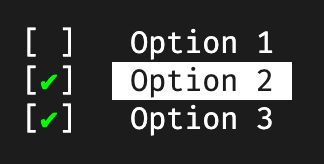
Use
j/k or the ↑/↓ arrow keys to navigate up or down
⎵ (Space) to toggle the selection and
⏎ (Enter) to confirm the selections.
It can be called like this:
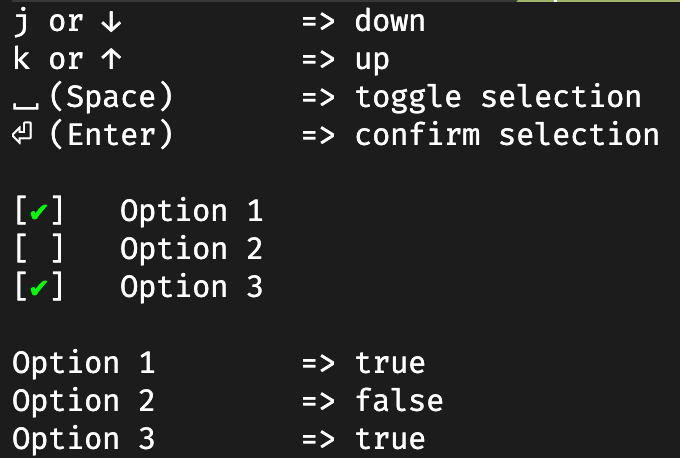
my_options=(   "Option 1"  "Option 2"  "Option 3" )
preselection=( "true"      "true"      "false"    )

multiselect result my_options preselection
The last argument of the multiselect function is optional and can be used to preselect certain options.
The result will be stored as an array in a variable that is passed to multiselect as first argument. Here’s an example to combine the options with the result:
idx=0
for option in "${my_options[@]}"; do
    echo -e "$optiont=> ${result[idx]}"
    ((idx++))
done
function multiselect {
    # little helpers for terminal print control and key input
    ESC=$( printf "33")
    cursor_blink_on()   { printf "$ESC[?25h"; }
    cursor_blink_off()  { printf "$ESC[?25l"; }
    cursor_to()         { printf "$ESC[$1;${2:-1}H"; }
    print_inactive()    { printf "$2   $1 "; }
    print_active()      { printf "$2  $ESC[7m $1 $ESC[27m"; }
    get_cursor_row()    { IFS=';' read -sdR -p $'E[6n' ROW COL; echo ${ROW#*[}; }

    local return_value=$1
    local -n options=$2
    local -n defaults=$3

    local selected=()
    for ((i=0; i<${#options[@]}; i++)); do
        if [[ ${defaults[i]} = "true" ]]; then
            selected+=("true")
        else
            selected+=("false")
        fi
        printf "n"
    done

    # determine current screen position for overwriting the options
    local lastrow=`get_cursor_row`
    local startrow=$(($lastrow - ${#options[@]}))

    # ensure cursor and input echoing back on upon a ctrl+c during read -s
    trap "cursor_blink_on; stty echo; printf 'n'; exit" 2
    cursor_blink_off

    key_input() {
        local key
        IFS= read -rsn1 key 2>/dev/null >&2
        if [[ $key = ""      ]]; then echo enter; fi;
        if [[ $key = $'x20' ]]; then echo space; fi;
        if [[ $key = "k" ]]; then echo up; fi;
        if [[ $key = "j" ]]; then echo down; fi;
        if [[ $key = $'x1b' ]]; then
            read -rsn2 key
            if [[ $key = [A || $key = k ]]; then echo up;    fi;
            if [[ $key = [B || $key = j ]]; then echo down;  fi;
        fi
    }

    toggle_option() {
        local option=$1
        if [[ ${selected[option]} == true ]]; then
            selected[option]=false
        else
            selected[option]=true
        fi
    }

    print_options() {
        # print options by overwriting the last lines
        local idx=0
        for option in "${options[@]}"; do
            local prefix="[ ]"
            if [[ ${selected[idx]} == true ]]; then
              prefix="[e[38;5;46m✔e[0m]"
            fi

            cursor_to $(($startrow + $idx))
            if [ $idx -eq $1 ]; then
                print_active "$option" "$prefix"
            else
                print_inactive "$option" "$prefix"
            fi
            ((idx++))
        done
    }

    local active=0
    while true; do
        print_options $active

        # user key control
        case `key_input` in
            space)  toggle_option $active;;
            enter)  print_options -1; break;;
            up)     ((active--));
                    if [ $active -lt 0 ]; then active=$((${#options[@]} - 1)); fi;;
            down)   ((active++));
                    if [ $active -ge ${#options[@]} ]; then active=0; fi;;
        esac
    done

    # cursor position back to normal
    cursor_to $lastrow
    printf "n"
    cursor_blink_on

    eval $return_value='("${selected[@]}")'
}
Credit: This bash function is a customized version of Denis Semenenko’s implementation.
Method 4
I was searching this king of information. It was great to find it here.
So, I take the opportunity to re-use what I have seen here and to improve it (I hope).
One limitation in the menu was due to the limitation of the number of items linked to the terminal for example.
So, I’ve modified the original script but adding some functionalities:
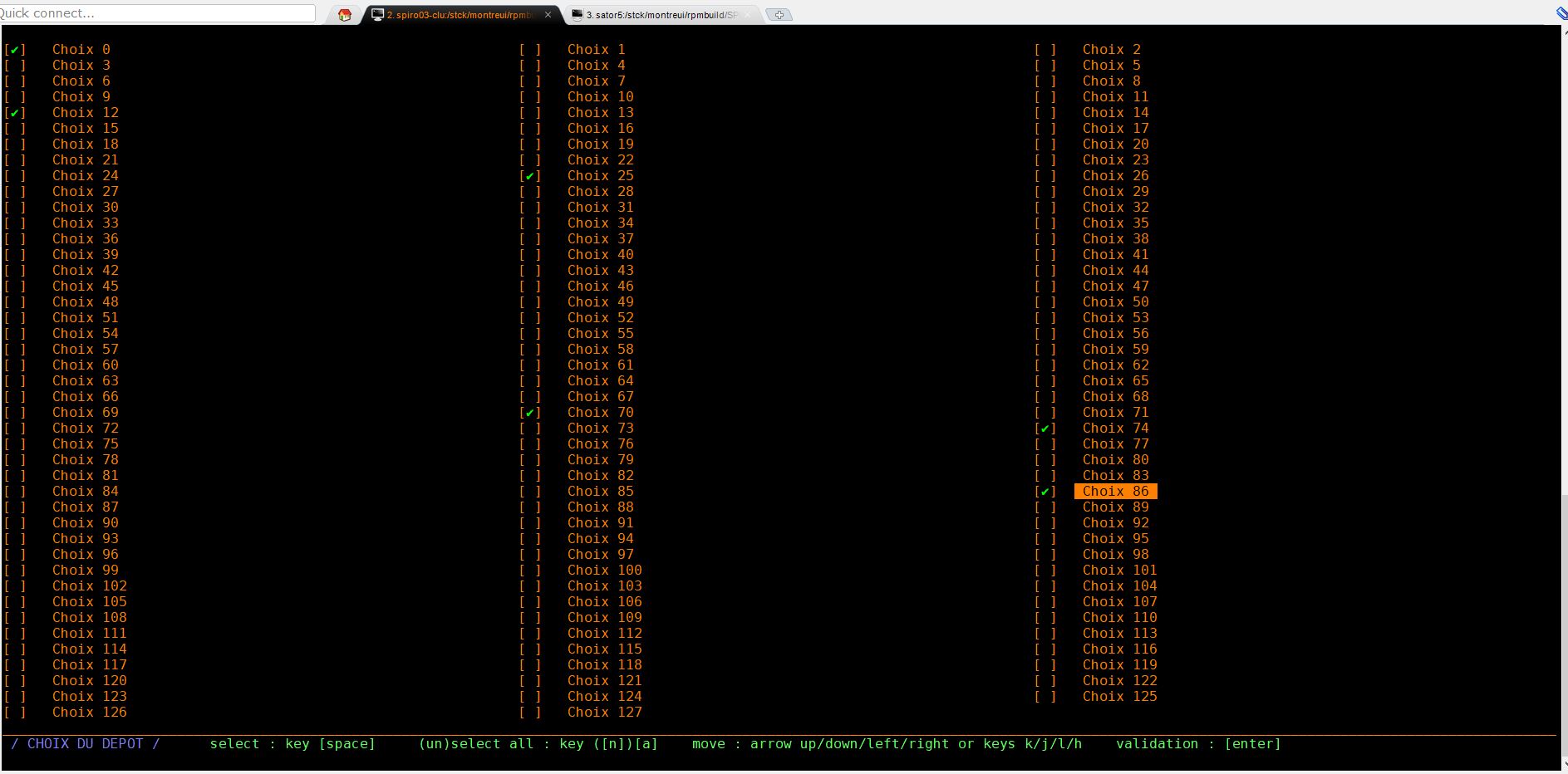
- Multi column menu (to increase the number of items to select)
- Multi selection menu (to improve some features such as “all/none selection”
I share it here in the script files : one with the modified menu and one corresponding with an example of use. Because I had some trouble link to bash version (version < 4.3 and version >= 4.3), you will also find the two version of the scripts that runs of both bash version level.
menu.sh:
#!/bin/bash
#####################################################################################################################
#
#           R5: MAJ 22/11/2021 : EML
#               - Pb d'affichage du menu sur on dépasse la taille de l'écran
#               - On restreint le choix au 40 derniers fichiers
#           R6: MAJ 23/11/2021 : EML
#               - On détermine automatiquement la taille de l'écran pour vérifier que l'affichage est Ok
#               - On affichera le menu compatible du coup
#               - Ajout des flèche gauche/droite pour une évolution sur un menu à plusieurs colonnes parametrables
#           R7: MAJ 24/11/2021 : EML
#               - Correction pour support toute version de bash
#               - version < 4.3 : option "local -n" inconnue ==> fonction xxx_43m
#               - version > 4.3 : option "local -n" reconnue ==> fonction xxx_43p
#               - Possibilité de délectionner tout ou rien
#           R8: MAJ 24/11/2021 : EML
#               - Correction checkwinsize
#               - Correction positionnement sur la fenetre
#
#
# SOURCES :
#   https://www.it-swarm-fr.com/fr/bash/menu-de-selection-multiple-dans-le-script-bash/958779139/
#   https://unix.stackexchange.com/questions/146570/arrow-key-enter-menu/415155#415155
#
#####################################################################################################################
export noir='e[0;30m'
export gris='e[1;30m'
export rougefonce='e[1;31m'
export rouge='e[0;31m'
export rose='e[1;31m'
export vertfonce='e[0;32m'
export vertclair='e[1;32m'
export orange='e[0;33m'
export jaune='e[1;33m'
export bleufonce='e[0;34m'
export bleuclair='e[1;34m'
export violetfonce='e[0;35m'
export violetclair='e[1;35m'
export cyanfonce='e[0;36m'
export cyanclair='e[1;36m'
export grisclair='e[0;37m'
export blanc='e[1;37m'
export neutre='e[0;m'

function checkwinsize {
    local __items=$1
    local __lines=$2
#local __err=$3

    if [ $__items -ge $__lines ]; then
#       echo "La taille de votre fenêtre ne permet d'afficher le menu correctement..."
        return 1
    else
#       echo "La taille de votre fenêtre est de $__lines lignes, compatible avec le menu de $__items items..."
        return 0
    fi
}
function multiselect_43p {
    # little helpers for terminal print control and key input
    ESC=$( printf "33")
    cursor_blink_on()   { printf "$ESC[?25h"; }
    cursor_blink_off()  { printf "$ESC[?25l"; }
    cursor_to()         { printf "$ESC[$1;${2:-1}H"; }
    print_inactive()    { printf "$2   $1 "; }
    print_active()      { printf "$2  $ESC[7m $1 $ESC[27m"; }
    get_cursor_row()    { IFS=';' read -sdR -p $'E[6n' ROW COL; echo ${ROW#*[}; }
    get_cursor_col()    { IFS=';' read -sdR -p $'E[6n' ROW COL; echo ${COL#*[}; }

    local return_value=$1
    local colmax=$2
    local offset=$3
    local -n options=$4
    local -n defaults=$5
    local title=$6
    local LINES=$( tput lines )
    local COLS=$( tput cols )

    clear

#   checkwinsize $(( ${#options[@]}/$colmax )) $LINES
    err=`checkwinsize $(( ${#options[@]}/$colmax )) $(( $LINES - 2)); echo $?`

    if [[ ! $err == 0 ]]; then
        echo "La taille de votre fenêtre est de $LINES lignes, incompatible avec le menu de ${#_liste[@]} items..."
            cursor_to $lastrow
        exit
    fi

    local selected=()
    for ((i=0; i<${#options[@]}; i++)); do
        if [[ ${defaults[i]} = "true" ]]; then
            selected+=("true")
        else
            selected+=("false")
        fi
        printf "n"
    done

    cursor_to $(( $LINES - 2 ))
    printf "_%.s" $(seq $COLS)
    echo -e "$bleuclair / $title / | $vertfonce select : key [space] | (un)select all : key ([n])[a] | move : arrow up/down/left/right or keys k/j/l/h | validation : [enter] $neutren" | column  -t -s '|'

    # determine current screen position for overwriting the options
    local lastrow=`get_cursor_row`
    local lastcol=`get_cursor_col`
    local startrow=1
    local startcol=1

    # ensure cursor and input echoing back on upon a ctrl+c during read -s
    trap "cursor_blink_on; stty echo; printf 'n'; exit" 2
    cursor_blink_off

    key_input() {
        local key
        IFS= read -rsn1 key 2>/dev/null >&2
        if [[ $key = ""      ]]; then echo enter; fi;
        if [[ $key = $'x20' ]]; then echo space; fi;
        if [[ $key = "k" ]]; then echo up; fi;
        if [[ $key = "j" ]]; then echo down; fi;
        if [[ $key = "h" ]]; then echo left; fi;
        if [[ $key = "l" ]]; then echo right; fi;
        if [[ $key = "a" ]]; then echo all; fi;
        if [[ $key = "n" ]]; then echo none; fi;
        if [[ $key = $'x1b' ]]; then
            read -rsn2 key
            if [[ $key = [A || $key = k ]]; then echo up;    fi;
            if [[ $key = [B || $key = j ]]; then echo down;  fi;
            if [[ $key = [C || $key = l ]]; then echo right;  fi;
            if [[ $key = [D || $key = h ]]; then echo left;  fi;
        fi
    }

    toggle_option() {
        local option=$1
        if [[ ${selected[option]} == true ]]; then
            selected[option]=false
        else
            selected[option]=true
        fi
    }

    toggle_option_multicol() {
        local option_row=$1
        local option_col=$2

    if [[ $option_row -eq -10 ]] && [[ $option_row -eq -10 ]]; then
        for ((option=0;option<${#selected[@]};option++)); do
                    selected[option]=true
        done
    else
        if [[ $option_row -eq -100 ]] && [[ $option_row -eq -100 ]]; then
            for ((option=0;option<${#selected[@]};option++)); do
                        selected[option]=false
            done
        else
            option=$(( $option_col + $option_row * $colmax ))

                if [[ ${selected[option]} == true ]]; then
                        selected[option]=false
                else
                    selected[option]=true
                fi
            fi
    fi

    }

    print_options_multicol() {
        # print options by overwriting the last lines
        local curr_col=$1
        local curr_row=$2
        local curr_idx=0

        local idx=0
        local row=0
        local col=0

    curr_idx=$(( $curr_col + $curr_row * $colmax ))

        for option in "${options[@]}"; do
            local prefix="[ ]"
            if [[ ${selected[idx]} == true ]]; then
              prefix="[e[38;5;46m✔e[0m]"
            fi

            row=$(( $idx/$colmax ))
        col=$(( $idx - $row * $colmax ))

            cursor_to $(( $startrow + $row + 1)) $(( $offset * $col + 1))
            if [ $idx -eq $curr_idx ]; then
                print_active "$option" "$prefix"
            else
                print_inactive "$option" "$prefix"
            fi
            ((idx++))
        done
    }


    local active_row=0
    local active_col=0


    while true; do
        print_options_multicol $active_col $active_row

        # user key control
        case `key_input` in
            space)  toggle_option_multicol $active_row $active_col;;
            enter)  print_options_multicol -1 -1; break;;
            up)     ((active_row--));
                    if [ $active_row -lt 0 ]; then active_row=0; fi;;
            down)   ((active_row++));
                    if [ $active_row -ge $(( ${#options[@]} / $colmax ))  ]; then active_row=$(( ${#options[@]} / $colmax )); fi;;
            left)     ((active_col=$active_col - 1));
                    if [ $active_col -lt 0 ]; then active_col=0; fi;;
            right)     ((active_col=$active_col + 1));
                    if [ $active_col -ge $colmax ]; then active_col=$(( $colmax -1 )) ; fi;;
            all)    toggle_option_multicol -10 -10 ;;
            none)   toggle_option_multicol -100 -100 ;;
        esac
    done

    # cursor position back to normal
    cursor_to $lastrow
    printf "n"
    cursor_blink_on

    eval $return_value='("${selected[@]}")'
    clear
}

function multiselect_43m {
    # little helpers for terminal print control and key input
    ESC=$( printf "33")
    cursor_blink_on()   { printf "$ESC[?25h"; }
    cursor_blink_off()  { printf "$ESC[?25l"; }
    cursor_to()         { printf "$ESC[$1;${2:-1}H"; }
    print_inactive()    { printf "$2   $1 "; }
    print_active()      { printf "$2  $ESC[7m $1 $ESC[27m"; }
    get_cursor_row()    { IFS=';' read -sdR -p $'E[6n' ROW COL; echo ${ROW#*[}; }
    get_cursor_col()    { IFS=';' read -sdR -p $'E[6n' ROW COL; echo ${COL#*[}; }

    local return_value=$1
    local colmax=$2
    local offset=$3
    local size=$4
    shift 4

    local options=("[email protected]")
    shift $size

    for i in $(seq 0 $size); do
        unset options[$(( $i + $size ))]
    done

    local defaults=("[email protected]")
    shift $size

    unset defaults[$size]

    local title="[email protected]"

#   local options=("${!tmp_options}")
#   local defauts=("${!tmp_defaults}")

    local LINES=$( tput lines )
    local COLS=$( tput cols )

    clear

#   checkwinsize $(( ${#options[@]}/$colmax )) $LINES
#   echo ${#options[@]}/$colmax
#   exit

    err=`checkwinsize $(( ${#options[@]}/$colmax )) $(( $LINES - 2)); echo $?`

    if [[ ! $err == 0 ]]; then
        echo "La taille de votre fenêtre est de $LINES lignes, incompatible avec le menu de ${#_liste[@]} items..."
            cursor_to $lastrow
        exit
    fi

    local selected=()
    for ((i=0; i<${#options[@]}; i++)); do
        if [[ ${defaults[i]} = "true" ]]; then
            selected+=("true")
        else
            selected+=("false")
        fi
        printf "n"
    done

    cursor_to $(( $LINES - 2 ))
    printf "_%.s" $(seq $COLS)
    echo -e "$bleuclair / $title / | $vertfonce select : key [space] | (un)select all : key ([n])[a] | move : arrow up/down/left/right or keys k/j/l/h | validation : [enter] $neutren" | column  -t -s '|'

    # determine current screen position for overwriting the options
    local lastrow=`get_cursor_row`
    local lastcol=`get_cursor_col`
    local startrow=1
    local startcol=1

    # ensure cursor and input echoing back on upon a ctrl+c during read -s
    trap "cursor_blink_on; stty echo; printf 'n'; exit" 2
    cursor_blink_off

    key_input() {
        local key
        IFS= read -rsn1 key 2>/dev/null >&2
        if [[ $key = ""      ]]; then echo enter; fi;
        if [[ $key = $'x20' ]]; then echo space; fi;
        if [[ $key = "k" ]]; then echo up; fi;
        if [[ $key = "j" ]]; then echo down; fi;
        if [[ $key = "h" ]]; then echo left; fi;
        if [[ $key = "l" ]]; then echo right; fi;
        if [[ $key = "a" ]]; then echo all; fi;
        if [[ $key = "n" ]]; then echo none; fi;
        if [[ $key = $'x1b' ]]; then
            read -rsn2 key
            if [[ $key = [A || $key = k ]]; then echo up;    fi;
            if [[ $key = [B || $key = j ]]; then echo down;  fi;
            if [[ $key = [C || $key = l ]]; then echo right;  fi;
            if [[ $key = [D || $key = h ]]; then echo left;  fi;
        fi
    }

    toggle_option() {
        local option=$1
        if [[ ${selected[option]} == true ]]; then
            selected[option]=false
        else
            selected[option]=true
        fi
    }

    toggle_option_multicol() {
        local option_row=$1
        local option_col=$2

    if [[ $option_row -eq -10 ]] && [[ $option_row -eq -10 ]]; then
        for ((option=0;option<${#selected[@]};option++)); do
                    selected[option]=true
        done
    else
        if [[ $option_row -eq -100 ]] && [[ $option_row -eq -100 ]]; then
            for ((option=0;option<${#selected[@]};option++)); do
                        selected[option]=false
            done
        else
            option=$(( $option_col + $option_row * $colmax ))

                if [[ ${selected[option]} == true ]]; then
                        selected[option]=false
                else
                    selected[option]=true
                fi
            fi
    fi

    }

    print_options_multicol() {
        # print options by overwriting the last lines
        local curr_col=$1
        local curr_row=$2
        local curr_idx=0

        local idx=0
        local row=0
        local col=0

    curr_idx=$(( $curr_col + $curr_row * $colmax ))

        for option in "${options[@]}"; do
            local prefix="[ ]"
            if [[ ${selected[idx]} == true ]]; then
              prefix="[e[38;5;46m✔e[0m]"
            fi

            row=$(( $idx/$colmax ))
        col=$(( $idx - $row * $colmax ))

            cursor_to $(( $startrow + $row + 1)) $(( $offset * $col + 1))
            if [ $idx -eq $curr_idx ]; then
                print_active "$option" "$prefix"
            else
                print_inactive "$option" "$prefix"
            fi
            ((idx++))
        done
    }


    local active_row=0
    local active_col=0
    while true; do
        print_options_multicol $active_col $active_row

        # user key control
        case `key_input` in
            space)  toggle_option_multicol $active_row $active_col;;
            enter)  print_options_multicol -1 -1; break;;
            up)     ((active_row--));
                    if [ $active_row -lt 0 ]; then active_row=0; fi;;
            down)   ((active_row++));
                    if [ $active_row -ge $(( ${#options[@]} / $colmax ))  ]; then active_row=$(( ${#options[@]} / $colmax )); fi;;
            left)     ((active_col=$active_col - 1));
                    if [ $active_col -lt 0 ]; then active_col=0; fi;;
            right)     ((active_col=$active_col + 1));
                    if [ $active_col -ge $colmax ]; then active_col=$(( $colmax -1 )) ; fi;;
            all)    toggle_option_multicol -10 -10 ;;
            none)   toggle_option_multicol -100 -100 ;;
        esac
    done

    # cursor position back to normal
    cursor_to $lastrow
    printf "n"
    cursor_blink_on

    eval $return_value='("${selected[@]}")'
    clear
}
example_menu.sh:
#!/bin/bash

if [ -e ./menu.sh ]; then
    source ./menu.sh
else
    echo "script menu.sh introuvable dans le répertoire courant"
    exit
fi

LINES=$( tput lines )
COLS=$( tput cols )

clear

#Définition de mes listes

for ((i=0; i<128; i++)); do
    _liste[i]="Choix $i"
    _preselection_liste[i]=false
done

colmax=3
offset=$(( $COLS / $colmax ))

VERSION=`echo $BASH_VERSION | awk -F( '{print $1}' | awk -F. '{print $1"."$2}'`

if [ $(echo "$VERSION >= 4.3" | bc -l) -eq 1 ]; then
    multiselect_43p result $colmax $offset _liste _preselection_liste "CHOIX DU DEPOT"
else
    multiselect_43m result $colmax $offset ${#_liste[@]} "${_liste[@]}" "${_preselection_liste[@]}" "CHOIX DU DEPOT"
fi

idx=0
dbg=1
status=1
for option in "${_liste[@]}"; do
    if  [[ ${result[idx]} == true ]]; then
        if [ $dbg -eq 0 ]; then
                echo -e "$optiont=> ${result[idx]}"
        fi
        TARGET=`echo $TARGET ${option}`
        status=0
    fi
        ((idx++))
done

if [ $status -eq 0 ] ; then
    echo -e "$vertfonce Choix des items validé :n$vertclair $TARGET $neutre"
else
    echo -e "$rougefonce Aucun choix d'items détecté... $neutre"
    exit
fi

while true; do
    case `key_input` in
            enter)  break;;
        esac
done

clear
All methods was sourced from stackoverflow.com or stackexchange.com, is licensed under cc by-sa 2.5, cc by-sa 3.0 and cc by-sa 4.0