I am trying to show name in dropdownlist from Model that look like Model.list<AnotherModel>.List<string>.
Model
public class LoginModel
{
public List<ApplicationNames> ApplicationName { get; set; }
}

public class ApplicationNames
{
public string Id { get; set; }
public List<string> Applications { get; set; }//["app1","app2"]
}
CSHTML
@model LoginModel
        @using (Html.BeginForm("ApplicationIndex", "Home", FormMethod.Get))
        {
          @Html.DropDownListFor(m => m.ApplicationName,new SelectList(Model.ApplicationName,"Id","Applications"),"Select Application", new { @class = "textboxStyle", placeholder = "Select your application...", autofocus = "autofocus", autocomplete = "on", onkeypress = "btnFocusActivate(this, event)", id = "un" })
          <input type="submit" value="NEXT" class="rectangle" id="submitNext" disabled="disabled" />
        }
In dropdownlist instead of Applications i m getting Getting GenericList.Object.
what i have to modify to get Applications name in dropdownlist?
Result like:
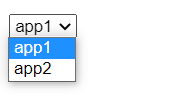
Thanks.
Answers:
Thank you for visiting the Q&A section on Magenaut. Please note that all the answers may not help you solve the issue immediately. So please treat them as advisements. If you found the post helpful (or not), leave a comment & I’ll get back to you as soon as possible.
Method 1
In dropdownlist instead of Applications i m getting Getting GenericList.Object.
what i have to modify to get Applications name in dropdownlist?
public List<string> Applications { get; set; }//["app1","app2"]
You can try to concatenate string item(s) using the specified separator, like below.
@Html.DropDownListFor(m => m.ApplicationName, new SelectList(Model.ApplicationName.Select(a=>new { Id = a.Id, Applications = String.Join(", ", a.Applications.ToArray())}), "Id", "Applications"), "Select Application", new { @class = "textboxStyle", placeholder = "Select your application...", autofocus = "autofocus", autocomplete = "on", onkeypress = "btnFocusActivate(this, event)", id = "un" })
Test Result
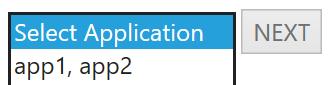
Update:
it’s possible to edit/append random number with id at runtime and result like each app as separate options.
To achieve above requirement, as I mentioned in comment, you can try to generate expected data based on your model data in controller action, then pass it to view to populate your dropdown, like below.
var Applications_list = "";


foreach (var item in model.ApplicationName)
{
    Applications_list += String.Join(",", item.Applications.ToArray()) + ",";
}

ViewBag.AppList = Applications_list.TrimEnd(',').Split(",").Select((a, index) => new { Id = index, AppName = a });
Html code
@Html.DropDownListFor(m => m.ApplicationName, new SelectList(ViewBag.AppList, "Id", "AppName"), "Select Application", new { @class = "textboxStyle", placeholder = "Select your application...", autofocus = "autofocus", autocomplete = "on", onkeypress = "btnFocusActivate(this, event)", id = "un" })
Test Result
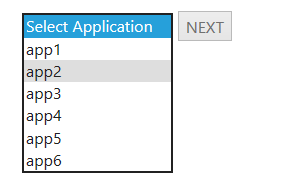
Method 2
Your class has to be plain.
public class LoginModel
{
    public string SelectedApplicationNameItemId { get; set; }
    public List<ApplicationNameItem> ApplicationNames { get; set; }
}
public class ApplicationNameItem
{
     public string Id { get; set; }
     public string Name { get; set; }
}
And code for your Razor page is below. When submitted, selected value can be located in SelectedApplicationNameItemId property
Html.DropDownListFor(m => m.SelectedApplicationNameItemId, new SelectList(Model.ApplicationNames,"Id","Name"))
All methods was sourced from stackoverflow.com or stackexchange.com, is licensed under cc by-sa 2.5, cc by-sa 3.0 and cc by-sa 4.0