So I have an ASP.NET VB website that references several other projects (their DLLS are just put in the site’s bin folder). I need to update a small piece of code in one of the projects, which I have done and it builds fine. However, when I copy over the new DLL to the website’s bin folder it fails to build, and all the Imports statements say “BC40056: Namespace or type specified in the Imports xxx doesn’t contain any public member or cannot be found”, which results in a ton of errors like “is not defined” . There is no reference to the updated DLL in the website project’s properties, but if I put the old version back it’s all fine.
The project was copied from a server and the vbproj file contained references to other DLLs, but the HintPaths were a mixture of mapped drives and ……. I’ve updated these so that they’re all the full server location path, but this has made no difference. I tried adding the project to the same solution as the website and added a reference to the project instead, but this also made no difference.
I’ve done plenty of Googling but have yet to find a solution. Any help would be very welcome!
Answers:
Thank you for visiting the Q&A section on Magenaut. Please note that all the answers may not help you solve the issue immediately. So please treat them as advisements. If you found the post helpful (or not), leave a comment & I’ll get back to you as soon as possible.
Method 1
A few things
You don’t want to just “place” the .dll’s in the bin folder. One big reason is that when you do a “clean” project, the bin folder is deleted. So, anytime you do a clean project, what is in the bin folder is cleaned out. And a developer will often do a clean project if some kind of problem is occuring.
I would place those files in some folder in the project. (create a folder, or if its only one or two .dll’s, then place them in the root of the project). At compile time, the .dll’s will be copied to the bin folder. And if you using web deployment, then you can choose to have the .dll’s all combined into one .dll. So, once again, you can see it makes little sense to place the .dll’s in the bin folder, since during a build, they will not be required, and as noted, the resulting bin folder can and will as a “regular” development process be re-created (emptied out). I seen a good number of projects in which the developer did place the .dll in the bin folder (because they did not know where else to place the .dll’s, and that was seemly the only place that the application worked. But, during a web build + deployment to the production server, those .dll’s can be left behind – they not be copied to the final “deployment” build. (I’m basic saying don’t do this!!).
You can also consider just creating folder called “packages” in the root. This is where all the nuget packages are placed. So, some folder for those .dll’s is the idea here.
The other big issue? Well, just dropping some .dll’s in some place does NOT give you the developer all the methods and properties of those .dll’s when writing code (we are assuming these are managed code – not win x32 .dll’s).
So, without adding a reference to that assembly, then I can’t see how the project will even compile correctly, and how syntax checking, and general use of the assembly will ever work during the development process (so VERY perplexed that you don’t have references to those .dll’s – that as a general rule can’t work).
Now, to use the assemblies? Yes, you want to add the .dll as a reference to the project.
So, in references, add the .dll as a reference.
And then in the property sheet for the refence? Make sure you have the “copy local” set = true.
eg this:
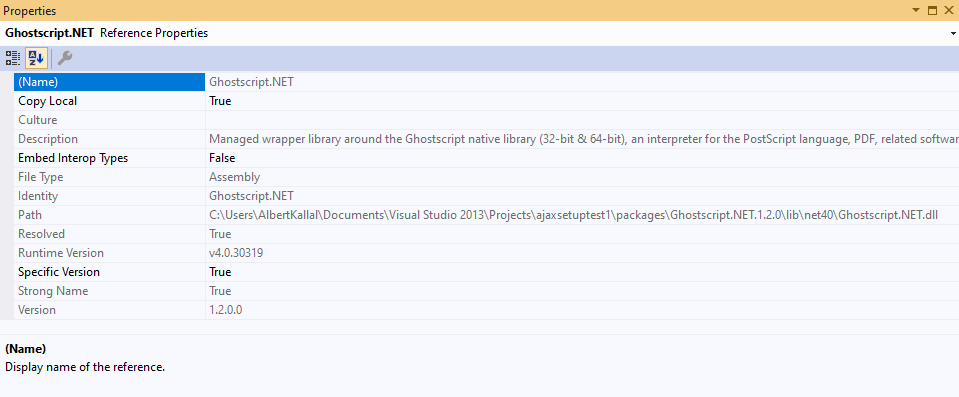
So, above is GhostScript.net reference. (a open source library to manipulate pdf’s).
Note the long path name for the .dll location. But, MOST important is the copy local setting = true. This means during a compile and build (which as noted can clean out the bin folder), then the .dll will be output to the final build in the bin folder.
So, I can’t see how you can compile anything without an actual reference to the .dll. That is quite much assumed and a given – else I see no way how your project can compile under any circumstances.
So, referance the .dll, and that should allow use of the class(s) and objects, and enable your code to compile. And make sure the copy local = true, as that is the process that will copy + place the .dll in the final output (bin) folder when you compile.
Method 2
So it turns out that the project for the DLL I was trying to reference had the Target CPU set to x64. Changing this this to ‘AnyCPU’ then allowed me to reference it.
This post gave me the answer: Could not load file or assembly … An attempt was made to load a program with an incorrect format (System.BadImageFormatException)
All methods was sourced from stackoverflow.com or stackexchange.com, is licensed under cc by-sa 2.5, cc by-sa 3.0 and cc by-sa 4.0