I have the following ASP.NET code:
<%@ Page Language="C#" AutoEventWireup="true" CodeBehind="MainPage.aspx.cs" Inherits="WebApplication.MainPage" %>

<!DOCTYPE html>


<html xmlns="http://www.w3.org/1999/xhtml">
<head runat="server">
    <title></title>
    <style>
        :root {
            height:100%;
            width:100%;
        }
        #div-root {
            position:relative;
            text-align:center;
            height:100%;
        }
        #div {
            position:relative;
            height:10%;
            background-color:yellow;
        }
        #div1 {
            position:relative;
            height:30%;
        }
        #div2 {
            position:relative;
            height:30%;
        }
        #div3 {
            position:relative;
            height:30%;
        }
    </style>
</head>
<body>
    <form id="MainPage" runat="server" style="height:330px; text-align:center">
        <div id="div-root">
            <div id="div">
                <h1 style="height:100%">Welcome</h1>
            </div>
            <div id="div1">
                <asp:LinkButton runat="server" BackColor="Green" Width="20%" Height="100%" Text="Locate nearest instalment" Font-Underline="false" ForeColor="White"/>
            </div>
            <div id="div2">
                <asp:LinkButton runat="server" BackColor="blue" Width="20%" Height="100%" Text="Payments" Font-Underline="false" ForeColor="White"/>
            </div>
            <div id="div3">
                <asp:LinkButton runat="server" BackColor="red" Width="20%" Height="100%" Text="Record Grievances" Font-Underline="false" ForeColor="White"/>
            </div>
        </div>
    </form>
</body>
</html>
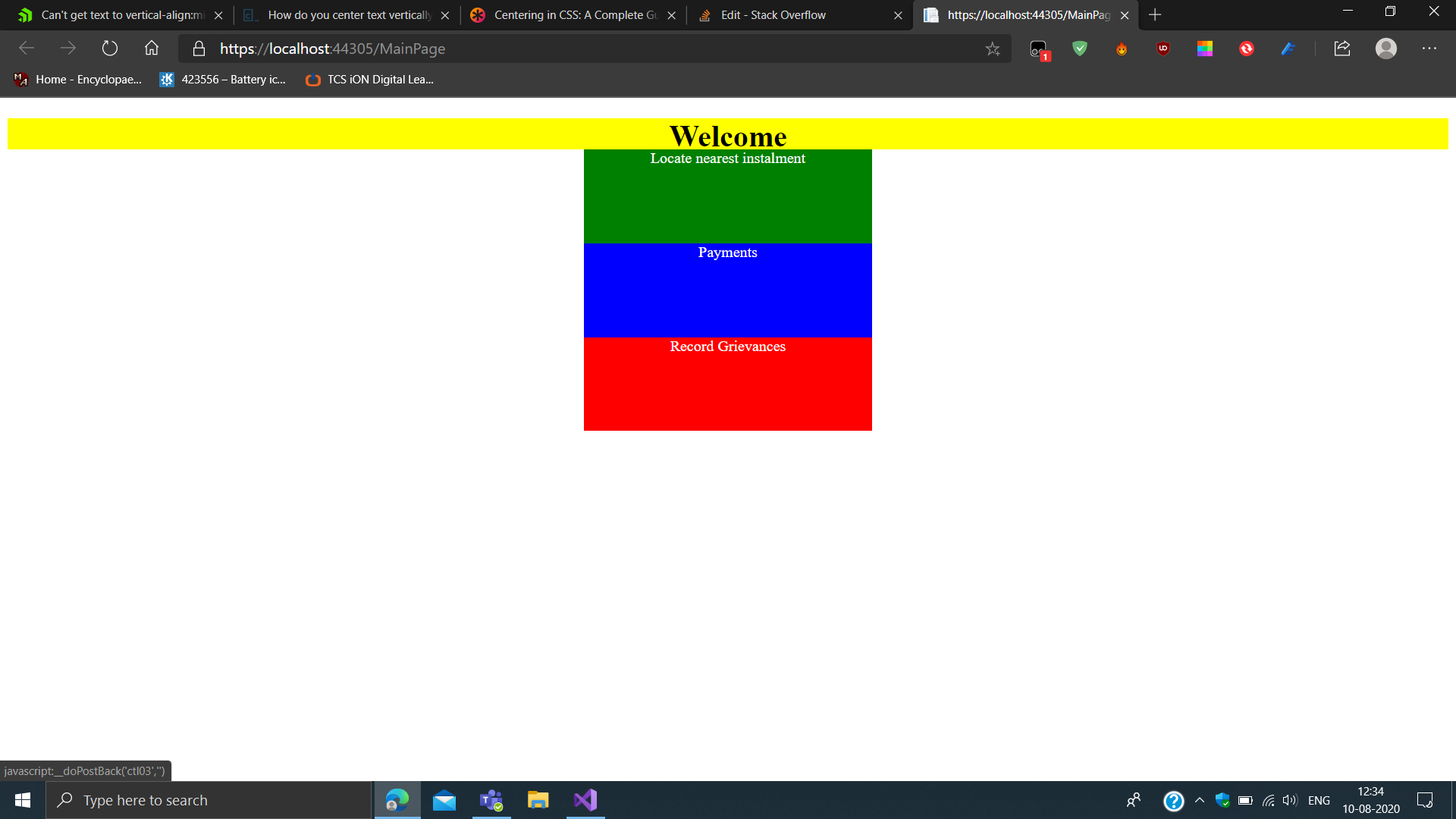
In this code, I want to have all the text in the middle (vertically) of the div element. However, I am not able to do so. I tried stuff like vertical-align:middle but to no avail. How do I go about this?
The rendered output:
<!DOCTYPE html>
<!-- saved from url=(0032)https://localhost:44305/MainPage -->
<html xmlns="http://www.w3.org/1999/xhtml"><head><meta http-equiv="Content-Type" content="text/html; charset=UTF-8"><style data-merge-styles="true"></style><title>

</title>
    <style>
        :root {
            height:100%;
            width:100%;
        }
        #div-root {
            position:relative;
            text-align:center;
            height:100%;
        }
        #div {
            position:relative;
            height:10%;
            background-color:yellow;
        }
        #div1 {
            position:relative;
            height:30%;
        }
        #div2 {
            position:relative;
            height:30%;
        }
        #div3 {
            position:relative;
            height:30%;
        }
    </style>
</head>
<body>
    <form method="post" action="https://localhost:44305/MainPage" id="MainPage" style="height:330px; text-align:center">
<div class="aspNetHidden">
<input type="hidden" name="__EVENTTARGET" id="__EVENTTARGET" value="">
<input type="hidden" name="__EVENTARGUMENT" id="__EVENTARGUMENT" value="">
<input type="hidden" name="__VIEWSTATE" id="__VIEWSTATE" value="oGqW+RYbX0ld1g+np3IIa4+TKK6xYzvIutKaF6KrVVi4g6rE/zquQrU38bIjCkUtDCvDchtXiXb1io8FrEZVBDLFm0+JCg4gm6BFDMPWA0A=">
</div>

<script type="text/javascript">
//<![CDATA[
var theForm = document.forms['MainPage'];
if (!theForm) {
    theForm = document.MainPage;
}
function __doPostBack(eventTarget, eventArgument) {
    if (!theForm.onsubmit || (theForm.onsubmit() != false)) {
        theForm.__EVENTTARGET.value = eventTarget;
        theForm.__EVENTARGUMENT.value = eventArgument;
        theForm.submit();
    }
}
//]]>
</script>


<div class="aspNetHidden">

    <input type="hidden" name="__VIEWSTATEGENERATOR" id="__VIEWSTATEGENERATOR" value="0C7D29E3">
    <input type="hidden" name="__EVENTVALIDATION" id="__EVENTVALIDATION" value="4jERSQFovFlNWeB6S2OimCFDsf52/Ge9ZnV2TgpjYAaF4+3frJiqU1RVTeW+HCtRCZBTed2yjjfs6nvccUl8Gd46PDdnogM37tKUPj0ktVcVZ9+PMXxmbNcdzIIDwweKFcyAoAEER4fnLrq8xCeRxQ4J9Xzp7sFhQX1kbHyNorY=">
</div>
        <div id="div-root">
            <div id="div">
                <h1 style="height:100%">Welcome</h1>
            </div>
            <div id="div1">
                <a href="javascript:__doPostBack('ctl02','')" style="display:inline-block;color:White;background-color:Green;text-decoration:none;height:100%;width:20%;">Locate nearest instalment</a>
            </div>
            <div id="div2">
                <a href="javascript:__doPostBack('ctl03','')" style="display:inline-block;color:White;background-color:Blue;text-decoration:none;height:100%;width:20%;">Payments</a>
            </div>
            <div id="div3">
                <a href="javascript:__doPostBack('ctl04','')" style="display:inline-block;color:White;background-color:Red;text-decoration:none;height:100%;width:20%;">Record Grievances</a>
            </div>
        </div>
    </form>


</body><editor-card style="position: absolute; top: 0px; left: 0px; z-index: auto;"><div dir="ltr" style="all: initial;"><div style="animation: initial; transition: initial; color: initial; color-scheme: initial; font: initial; font-feature-settings: initial; font-kerning: initial; font-optical-sizing: initial; font-variation-settings: initial; forced-color-adjust: initial; text-orientation: initial; text-rendering: initial; -webkit-font-smoothing: initial; -webkit-locale: initial; -webkit-text-orientation: initial; -webkit-writing-mode: initial; writing-mode: initial; zoom: initial; place-content: initial; place-items: initial; place-self: initial; alignment-baseline: initial; appearance: initial; backdrop-filter: initial; backface-visibility: initial; background: initial; background-blend-mode: initial; baseline-shift: initial; block-size: initial; border-block-end: initial; border-block-start: initial; border: initial; border-radius: initial; border-collapse: initial; border-inline-end: initial; border-inline-start: initial; bottom: initial; box-shadow: initial; box-sizing: initial; break-after: initial; break-before: initial; break-inside: initial; buffered-rendering: initial; caption-side: initial; caret-color: initial; clear: initial; clip: initial; clip-path: initial; clip-rule: initial; color-interpolation: initial; color-interpolation-filters: initial; color-rendering: initial; columns: initial; column-fill: initial; gap: initial; column-rule: initial; column-span: initial; contain: initial; contain-intrinsic-size: initial; content: initial; counter-increment: initial; counter-reset: initial; cursor: initial; cx: initial; cy: initial; d: initial; display: initial; dominant-baseline: initial; empty-cells: initial; fill: initial; fill-opacity: initial; fill-rule: initial; filter: initial; flex: initial; flex-flow: initial; float: initial; flood-color: initial; flood-opacity: initial; grid: initial; grid-area: initial; height: initial; hyphens: initial; image-orientation: initial; image-rendering: initial; inline-size: initial; isolation: initial; left: initial; letter-spacing: initial; lighting-color: initial; line-break: initial; list-style: initial; margin-block-end: initial; margin-block-start: initial; margin: initial; margin-inline-end: initial; margin-inline-start: initial; marker: initial; mask: initial; mask-type: initial; max-block-size: initial; max-height: initial; max-inline-size: initial; max-width: initial; min-block-size: initial; min-height: initial; min-inline-size: initial; min-width: initial; mix-blend-mode: initial; object-fit: initial; object-position: initial; offset: initial; opacity: initial; order: initial; origin-trial-test-property: initial; orphans: initial; outline: initial; outline-offset: initial; overflow-anchor: initial; overflow-wrap: initial; overflow: initial; overscroll-behavior-block: initial; overscroll-behavior-inline: initial; overscroll-behavior: initial; padding-block-end: initial; padding-block-start: initial; padding: initial; padding-inline-end: initial; padding-inline-start: initial; paint-order: initial; perspective: initial; perspective-origin: initial; pointer-events: initial; position: absolute; quotes: initial; r: initial; resize: initial; right: initial; ruby-position: initial; rx: initial; ry: initial; scroll-behavior: initial; scroll-margin-block: initial; scroll-margin: initial; scroll-margin-inline: initial; scroll-padding-block: initial; scroll-padding: initial; scroll-padding-inline: initial; scroll-snap-align: initial; scroll-snap-stop: initial; scroll-snap-type: initial; shape-image-threshold: initial; shape-margin: initial; shape-outside: initial; shape-rendering: initial; size: initial; speak: initial; stop-color: initial; stop-opacity: initial; stroke: initial; stroke-dasharray: initial; stroke-dashoffset: initial; stroke-linecap: initial; stroke-linejoin: initial; stroke-miterlimit: initial; stroke-opacity: initial; stroke-width: initial; tab-size: initial; table-layout: initial; text-align: initial; text-align-last: initial; text-anchor: initial; text-combine-upright: initial; text-decoration: initial; text-decoration-skip-ink: initial; text-indent: initial; text-overflow: initial; text-shadow: initial; text-size-adjust: initial; text-transform: initial; text-underline-position: initial; top: initial; touch-action: initial; transform: initial; transform-box: initial; transform-origin: initial; transform-style: initial; user-select: initial; vector-effect: initial; vertical-align: initial; visibility: initial; -webkit-app-region: initial; border-spacing: initial; -webkit-border-image: initial; -webkit-box-align: initial; -webkit-box-decoration-break: initial; -webkit-box-direction: initial; -webkit-box-flex: initial; -webkit-box-ordinal-group: initial; -webkit-box-orient: initial; -webkit-box-pack: initial; -webkit-box-reflect: initial; -webkit-font-size-delta: initial; -webkit-highlight: initial; -webkit-hyphenate-character: initial; -webkit-line-break: initial; -webkit-line-clamp: initial; -webkit-mask-box-image: initial; -webkit-mask: initial; -webkit-mask-composite: initial; -webkit-perspective-origin-x: initial; -webkit-perspective-origin-y: initial; -webkit-print-color-adjust: initial; -webkit-rtl-ordering: initial; -webkit-ruby-position: initial; -webkit-tap-highlight-color: initial; -webkit-text-combine: initial; -webkit-text-decorations-in-effect: initial; -webkit-text-emphasis: initial; -webkit-text-emphasis-position: initial; -webkit-text-fill-color: initial; -webkit-text-security: initial; -webkit-text-stroke: initial; -webkit-transform-origin-x: initial; -webkit-transform-origin-y: initial; -webkit-transform-origin-z: initial; -webkit-user-drag: initial; -webkit-user-modify: initial; white-space: initial; widows: initial; width: initial; will-change: initial; word-break: initial; word-spacing: initial; x: initial; y: initial; z-index: 2147483647;"><link rel="stylesheet" href="chrome-extension://hokifickgkhplphjiodbggjmoafhignh/fonts/fabric-icons.css"><div style="all: initial;"></div></div></div></editor-card></html>
Answers:
Thank you for visiting the Q&A section on Magenaut. Please note that all the answers may not help you solve the issue immediately. So please treat them as advisements. If you found the post helpful (or not), leave a comment & I’ll get back to you as soon as possible.
Method 1
Here is CSS that works for your markup. The centering is achieved through display: flex;.
Try to lose all the inline CSS that you’re currently generating by manually fiddling with properties in Visual Studio.
html, body {
  height: 200px;
  width: 500px;
  margin: 0;
  padding: 0;
}

#div-root {
  text-align: center;
  height: 100%;
}
.myButton {
  height: 30%;
  width: 20%;
  margin: 0 auto;
  padding: 5px;
  display: flex;
  align-items: center;
}
.myButton a {
  width: 100%;
  color: white;
  text-decoration: none;
}
#div1 {
  background-color: green;
}
#div2 {
  background-color: blue;
}
#div3 {
  background-color: red;
}
<div id="div-root">
<div id="div1" class="myButton">
<a href="##" rel="nofollow noreferrer noopener" rel="nofollow noreferrer noopener" rel="nofollow noreferrer noopener">Locate nearest instalment</a>
</div>
<div id="div2" class="myButton">
<a href="##" rel="nofollow noreferrer noopener" rel="nofollow noreferrer noopener" rel="nofollow noreferrer noopener">Payments</a>
</div>
<div id="div3" class="myButton">
<a href="##" rel="nofollow noreferrer noopener" rel="nofollow noreferrer noopener" rel="nofollow noreferrer noopener">Record Grievances</a>
</div>
</div>Method 2
You an always use a flex
  display:flex;
  align-items:center;
  justify-content:center;
in your CSS, to the element you want things to be centered horizontally and vertically, and i highly recommend that you read about flexbox its a must nowadays,
https://css-tricks.com/snippets/css/a-guide-to-flexbox/
take a look at this guide
Method 3
use padding for Align reference from: https://www.w3schools.com/css/tryit.asp?filename=trycss_padding_sides
All methods was sourced from stackoverflow.com or stackexchange.com, is licensed under cc by-sa 2.5, cc by-sa 3.0 and cc by-sa 4.0