After updating my project to “Microsoft.AspNetCore.All” 2.2.0, I get an error when running in IIS, but not when running in Visual Studio.
HTTP-Fehler 500.21 - Internal Server Error

Der Handler "aspNetCore" weist das ungültige Modul "AspNetCoreModuleV2" in der Modulliste auf.
I don’t know what is causing this and the www does not seem to have an answer.
Maybe someone facing the same thing and has a solution
Answers:
Thank you for visiting the Q&A section on Magenaut. Please note that all the answers may not help you solve the issue immediately. So please treat them as advisements. If you found the post helpful (or not), leave a comment & I’ll get back to you as soon as possible.
Method 1
You just need to install this package below. After that you can use the AspNetCoreModuleV2 🙂
When installing, please notice to install as administrator. As part of the installation the applicationHost.config file will be updated to include AspNetCoreModuleV2 and its dll. this is one of the reasons why it’s important to run installation with admin privilege.
Method 2
I have the same issue. it is something wrong with AspNetCoreModuleV2:
modules="AspNetCoreModuleV2"
The site is working when I change the modules to AspNetCoreModule in the web.config:
modules="AspNetCoreModule"
Method 3
I’m publishing to a shared host so not able to install the package mentioned.
Changing AspNetCoreModuleV2 to AspNetCoreModule is the solution recommended by my host and seems to work.
Next task is working out how to get VS to write the correct thing so I don’t have to edit web.config every time.
Method 4
Modify your .csproj file with code below, then republish.
<PropertyGroup>
  <TargetFramework>netcoreapp2.2</TargetFramework>
  <AspNetCoreModuleName>AspNetCoreModule</AspNetCoreModuleName>
  <AspNetCoreHostingModel>OutOfProcess</AspNetCoreHostingModel>
</PropertyGroup>
Refer: how-to-install-and-use-the-aspnet-core-module
Method 5
Not an answer, but an important and critical component of all the answers here. MAKE SURE YOU RESTART IIS after installing the modules needed.
Method 6
You can Add web.config with Solution Explorer -> Add -> New Item -> Search for “config” -> Add Web Configuration File. This will add web.config in your project with default content
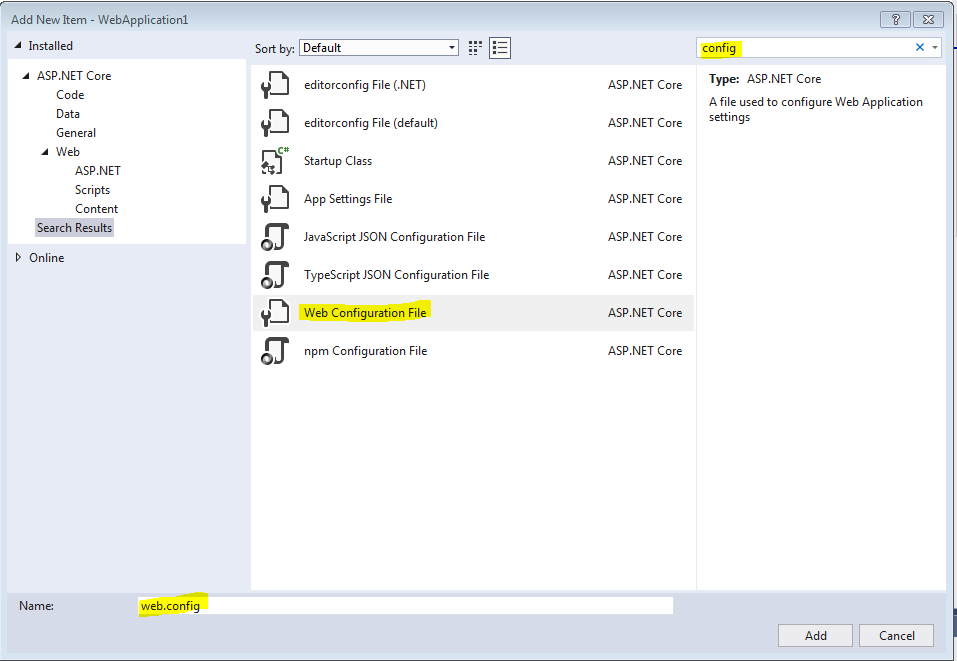
copy ur published config xml in to new webconfig and change modules="AspNetCoreModuleV2" to modules="AspNetCoreModule"
All methods was sourced from stackoverflow.com or stackexchange.com, is licensed under cc by-sa 2.5, cc by-sa 3.0 and cc by-sa 4.0