I have application which I have hosted in IIS 7.0.
Where I have to make sure that it works only on HTTPS and not on HTTP
so I have included below rule in my root config.
<rewrite>
        <rules>
            <rule name="HTTP to HTTPS redirect" stopProcessing="true">
              <match url="(.*)" />
              <conditions>
                <add input="{HTTPS}" pattern="off" />
              </conditions>
              <action type="Redirect" url="https://{HTTP_HOST}{REQUEST_URI}"   redirectType="Found" />
            </rule>
        </rules>
</rewrite>
After adding this rule when i tried to access my application I get below error:
Page has resulted in too many redirects. Clearing your cookies for
this site or allowing third-party cookies may fix the problem. If not,
it is possibly a server configuration issue and not a problem with
your computer. Here are some suggestions: Reload this web page later.
Learn more about this problem.
Answers:
Thank you for visiting the Q&A section on Magenaut. Please note that all the answers may not help you solve the issue immediately. So please treat them as advisements. If you found the post helpful (or not), leave a comment & I’ll get back to you as soon as possible.
Method 1
Put below input condition:
<add input="{HTTPS}" pattern="on" />
Instead of:
<add input="{HTTPS}" pattern="off" />
Method 2
We have our ASP.NET application hosted on AWS with Elastic Load Balancing, and the rule in the question with the accepted answer did not work for us, and kept causing infinite redirects.
This is the rule that finally worked for us:
<rewrite>
   <rules>
      <rule name="HTTPS Rule behind AWS Elastic Load Balancer Rule" stopProcessing="true">
         <match url="^(.*)$" ignoreCase="false" />
         <conditions>
            <add input="{HTTP_X_FORWARDED_PROTO}" pattern="^http$" ignoreCase="false" />
         </conditions>
         <action type="Redirect" url="https://{SERVER_NAME}{URL}" redirectType="Found" />
      </rule>
   </rules>
</rewrite>
Method 3
My case, I needed to put like this:
<rewrite>
<rules>
    <rule name="HTTP to HTTPS redirect" stopProcessing="true">
      <match url="(.*)" ignoreCase="false" />
      <conditions logicalGrouping="MatchAny">
        <add input="{HTTP_X_FORWARDED_PROTO}" pattern="^http$" />
        <add input="{HTTPS}" pattern="on" />
      </conditions>
      <action type="Redirect" url="https://{HTTP_HOST}{REQUEST_URI}"   redirectType="Found" />
    </rule>
</rules>
Method 4
I also faced that problem. All requests to the server were HTTP.
In my case problem was that I use Cloudflare DNS.
There is SSL/TLS setting that by default SSL/TLS encryption mode is set to Flexible.
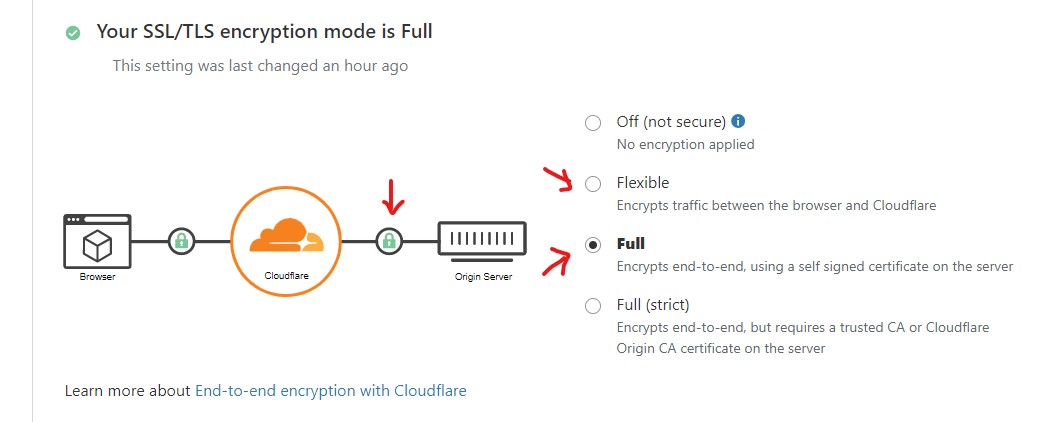
Make sure to change the mode to Full.
Method 5
Also as was mentioned by SNag we had a site that is sitting behind an ELB on Amazon. Attempting to apply a rewrite rule without the following input header was causing infinite redirects. This appears to be a result of needing the input type being HTTP_X_FORWARDED_PROTO as in the following: <add input="{HTTP_X_FORWARDED_PROTO}" pattern="^http$" ignoreCase="false" />.
From AWS documentation “Your application or website can use the protocol stored in the X-Forwarded-Proto request header to render a response that redirects to the appropriate URL.” We are using the ELB with DNS entries to forward to the server with the site on it.
Method 6
For IIS 10 (Windows Server 2016) I have followed instructions from here which generate a slightly different XML configuration for the rewrite:
<rewrite>
    <rules>
        <rule name="HTTP 2 HTTPS" patternSyntax="Wildcard" stopProcessing="true">
            <match url="*" />
            <conditions logicalGrouping="MatchAny">
                <add input="{HTTPS}" pattern="off" />
            </conditions>
            <action type="Redirect" url="https://{HTTP_HOST}{REQUEST_URI}" redirectType="Found" />
        </rule>
    </rules>
</rewrite>
The pattern is off and the match is only *.
Method 7
I am using Liquid Web Cloud Sites, and ran into the exact same issue.
I tried the solution here, but it didn’t work for what I needed because of this condition:
<add input="{HTTPS}" pattern="off" />
As the OP has it, this means is, “match and implement this rule when HTTPS is off”. And the accepted solution for this question just inverts this, and matches the rule when HTTPS is on. It solved the infinite loop issue, but only because my rule was incorrectly matched – I actually only want to change the request to HTTPS when HTTPS is off. Thus none of my HTTP requests were getting forwarded.
Interestingly, none of my HTTPS requests were getting forwarded either, and from this (and a few other tests I did) I determined that although the browser shows HTTPS, the server is treating it like an HTTP request. Thus the server always believes it is receiving an HTTP request, and always ignored the rule (which now specified only match requests where HTTPS is on – i.e. never).
Hours of research and tests later, I deduced that its a similar issue as described here, summarised here:
To reduce costs [many hosting providers install the] SSL certificate on the TMG Gateway and this gateway is simply rewriting the request to standard HTTP when passing it to the actual web server. So by the time the request hits IIS and your web application it is a standard plain HTTP request.
.
TLDR;
Eventually I spoke to the team at Liquid Web who pointed me in the direction of a help article buried in their own site which solved the issue. They suggested I use the following rewrite rule which fixed it:
<system.webServer>
 <rewrite>
  <rules>
   <rule name="Redirect to HTTPS" stopProcessing="true">
     <match url=".*"/>
    <conditions>
     <add input="{HTTP_CLUSTER_HTTPS}" pattern="^on$" negate="true"/>
     <add input="{HTTP_CLUSTER_HTTPS}" pattern=".+" negate="true"/>
    </conditions>
    <action type="Redirect" url="https://{HTTP_HOST}{SCRIPT_NAME}" redirectType="SeeOther"/>
   </rule>
  </rules>
 </rewrite>
</system.webServer>
I hope this might work for others in a similar situation.
Original liquidweb help article
Method 8
I figured out something regarding this issue. Basically, if the incoming request is HTTPS do nothing.
          <rule name="No Redirect if https" enabled="true" stopProcessing="true">
                <match url=".*" />
                <conditions logicalGrouping="MatchAny" trackAllCaptures="false">
                    <add input="{HTTPS}" pattern="^ON$" />
                </conditions>
                <action type="None" />
            </rule>
            <rule name="Redirect to https" enabled="true" stopProcessing="true">
                <match url="(.*)" />
                <conditions logicalGrouping="MatchAll" trackAllCaptures="false">
                    <add input="{HTTP_HOST}" pattern="^example.com$" />
                    <add input="{HTTPS}" pattern="^OFF$" />
                </conditions>
                <action type="Redirect" url="https://{HTTP_HOST}{R:0}" />
            </rule>
Method 9
If you use cloudflare for SSL , put it on Full mode
Cloudflare -> SSL/TLS -> Overview -> Full
All methods was sourced from stackoverflow.com or stackexchange.com, is licensed under cc by-sa 2.5, cc by-sa 3.0 and cc by-sa 4.0