I am having some trouble with a URL value that’s set, I have below URL:
http://localhost/myapp/Admin/ScheduleTaskDetail.aspx?id=1&mode=v
The modes are:
- v – View
- e – Edit
- a – New
I want to allow changes to the view page so when I click a button they can edit. I have managed to get this working by using the function that reads from the URL and changing its behavior there. However I don’t know how to update the URL without a response.redirect().
Is there a way to add code to a onclick event that will change the &mode=??
Unfortunately, I can’t share code as its not my code to share.
This is part of a MVC c# / aspx project.
If there is a question answering this please let me know I couldn’t find a match that was applicable.
Answers:
Thank you for visiting the Q&A section on Magenaut. Please note that all the answers may not help you solve the issue immediately. So please treat them as advisements. If you found the post helpful (or not), leave a comment & I’ll get back to you as soon as possible.
Method 1
Change Browser URL without reloading using JavaScript
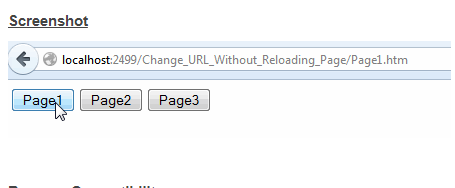
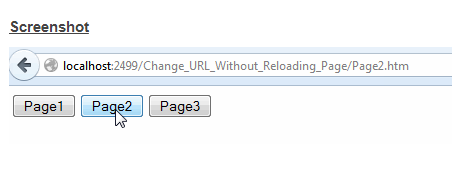
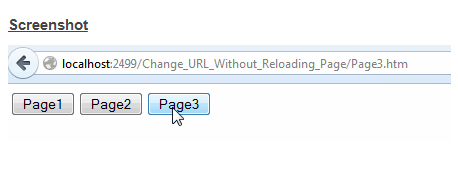
The HTML Markup consists of 3 buttons which make a call to a function ChangeUrl. This function accepts the page Title and URL as parameters.
It first checks whether browser supports HTML5 and if yes then a State object containing the page Title and URL is created and is passed to the HTML5 History pushState method along with the page Title and URL as the other two parameters.
<script type="text/javascript">
function ChangeUrl(title, url) {
    if (typeof (history.pushState) != "undefined") {
        var obj = { Title: title, Url: url };
        history.pushState(obj, obj.Title, obj.Url);
    } else {
        alert("Browser does not support HTML5.");
    }
}
</script>
<input type="button" value="Page1" onclick="ChangeUrl('Page1', 'Page1.htm');" />
<input type="button" value="Page2" onclick="ChangeUrl('Page2', 'Page2.htm');" />
<input type="button" value="Page3" onclick="ChangeUrl('Page3', 'Page3.htm');" />
Change Browser URL without reloading using jQuery
The HTML Markup consists of 3 buttons to which the jQuery click event handler has been assigned. Inside the jQuery click event handler, a function ChangeUrl is being called which accepts the page Title and URL as parameters.
This function first checks whether browser supports HTML5 and if yes then a State object containing the page Title and URL is created and is passed to the HTML5 History pushState method along with the page Title and URL as the other two parameters.
<script type="text/javascript" src="http://ajax.googleapis.com/ajax/libs/jquery/1.8.3/jquery.min.js"></script>
<script type="text/javascript">
    function ChangeUrl(page, url) {
        if (typeof (history.pushState) != "undefined") {
            var obj = { Page: page, Url: url };
            history.pushState(obj, obj.Page, obj.Url);
        } else {
            alert("Browser does not support HTML5.");
        }
    }
    $(function () {
        $("#button1").click(function () {
            ChangeUrl('Page1', 'Page1.htm');
        });
        $("#button2").click(function () {
            ChangeUrl('Page2', 'Page2.htm');
        });
        $("#button3").click(function () {
            ChangeUrl('Page3', 'Page3.htm');
        });
    });
</script>
<input type="button" value="Page1" id="button1" />
<input type="button" value="Page2" id="button2" />
<input type="button" value="Page3" id="button3" />
Method 2
Perhaps a better approach instead of trying to shoe horn in the use of URL query strings is to just use a control on the page which triggers the V, E, A values and fires the appropriate event depending on what the user clicks/selects. So for example a dropdownlist with V, E, and A. User selects the value they want then the binding is done at the selectedindexchange event. You can use updatePanels if you only want to refresh a applicable section of the page.
All methods was sourced from stackoverflow.com or stackexchange.com, is licensed under cc by-sa 2.5, cc by-sa 3.0 and cc by-sa 4.0