I just ran across a screenshot of someone’s terminal:
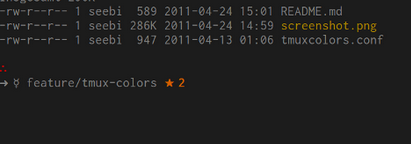
Is there a list of all of the characters which can be used in a Bash prompt, or can someone get me the character for the star and the right arrow?
Answers:
Thank you for visiting the Q&A section on Magenaut. Please note that all the answers may not help you solve the issue immediately. So please treat them as advisements. If you found the post helpful (or not), leave a comment & I’ll get back to you as soon as possible.
Method 1
You can use any printable character, bash doesn’t mind. You’ll probably want to configure your terminal to support Unicode (in the form of UTF-8).
There are a lot of characters in Unicode, so here are a few tips to help you search through the Unicode charts:
- You can try to draw the character on Shapecatcher. It tries to recognize a Unicode character in what you draw.
- You can try to figure out which block the character is in. For example, that weird-looking symbol and that star would be in a block of miscellaneous symbols; characters like
Ǫandıare latin letters with modifiers;∉is a mathematical symbol, and so on. - You can try to think of a word in the description of the character and look for it in a list of unicode symbol names and descriptions. Gucharmap or Kcharselect can help.
P.S. On Shapecatcher, I got U+2234 THEREFORE for ∴, U+2192 RIGHTWARDS ARROW for →, U+263F MERCURY for ☿ and U+2605 BLACK STAR for ★.
In a bash script, up to bash 4.1, you can write a byte by its code point, but not a character. If you want to avoid non-ASCII characters to make your .bashrc resilient to file encoding changes, you’ll need to enter the bytes corresponding to these characters in the UTF-8 encoding. You can see the hexidecimal values by running echo ∴ → ☿ ★ | hexdump -C in a UTF-8 terminal, e.g. ∴ is encoded by xe2x88xb4 in UTF-8.
if [[ $LC_CTYPE =~ '.[Uu][Tt][Ff]-?8' ]]; then
  PS1=$'\[e[31m\]xe2x88xb4\[e[0m\]nxe2x86x92 xe2x98xbf \~ \[e[31m\]xe2x98x85 $? \[e[0m\]'
fi
Since bash 4.2, you can use u followed by 4 hexadecimal digits in a $'…' string.
PS1=$'\[e[31m\]u2234\[e[0m\]nu2192 u263f \~ \[e[31m\]u2605 $? \[e[0m\]'
Method 2
You can find the unicode symbols on lots of sites, like this one:
http://panmental.de/symbols/info.htm
You just have to make sure that your term supports UTF-8.
Method 3
i like using these tools — they have a nice experience, and it’s easy to search through:
- unicode character table
- amp-what, scoped to unicode characters
All methods was sourced from stackoverflow.com or stackexchange.com, is licensed under cc by-sa 2.5, cc by-sa 3.0 and cc by-sa 4.0