I have over 4000 posts. I am trying to query all the posts and get the count of tags each post has and sum up posts count based on number of tags the post has in dashboard. The posts count shows up properly when post_per_page is less than 2000 but beyond 2000 , the query timesout . It just shows ‘0’ for all.
Code
  $args = array(
    'posts_per_page' => 4000,
    'post_status'  => 'publish',
  );

  $zerotags = 0;
  $onetag = 0;
  $twotags = 0;
  $morethantwo = 0;
  $sixtags_plus = 0;

  $query = new WP_Query( $args );
  while ( $query->have_posts() ) : $query->the_post();

     $posttags = get_the_tags();
     $tag_count = 0;

     foreach($posttags as $tag) {
       $tag_count++;
     }
     if ($tag_count == 0) {
       $zerotags++;
     }
     if ($tag_count == 1) {
       $onetag++;
     }
     if ($tag_count == 2) {
       $twotags++;
     }
     if ($tag_count > 2 && $tag_count < 6) {
       $morethantwo++;
     }
     if ($tag_count >= 6) {
       $sixtags_plus++;
     }

 endwhile;

 echo 'Zero Tags : '.$zerotags.'posts';
 echo 'One Tag : '.$onetag.'posts';
 echo 'Two Tags : '.$twotags.'posts';
 echo 'More than 2 and less than 6 : '.$morethantwo.'posts';
 echo 'More than 6 tags : '.$sixtags_plus.'posts';
Is there a better approach to query this so that the timeout doesn’t occur?
Answers:
Thank you for visiting the Q&A section on Magenaut. Please note that all the answers may not help you solve the issue immediately. So please treat them as advisements. If you found the post helpful (or not), leave a comment & I’ll get back to you as soon as possible.
Method 1
I addressed a similar problem not long ago – it’s all in the memory:
$post_ids = get_posts(
    array(
        'posts_per_page' => -1,
        'post_status'  => 'publish',
        'fields' => 'ids', // Just grab IDs instead of pulling 1000's of objects into memory
    )
);

update_object_term_cache( $post_ids, 'post' ); // Cache all the post terms in one query, memory should be ok

foreach ( $post_ids as $post_id ) {
    if ( ! $tags = get_object_term_cache( $post_id, 'post_tag' ) ) {
       $zerotags++;
    } else {
        $tag_count = count( $tags );

        if ( $tag_count === 1 ) {
            $onetag++;
        } elseif ( $tag_count === 2 ) {
            $twotags++;
        } elseif ( $tag_count >= 6 ) {
            $sixtags_plus++;
        }

        if ( $tag_count > 2 && $tag_count < 6 ) {
            $morethantwo++;
        }
    }
}
Update: Switched get_the_tags to get_object_term_cache – otherwise we lose all our hard work! (the former hits get_post, which will hit the db on every iteration and chuck the post object into memory – props @Pieter Goosen).
Update 2: The second argument for update_object_term_cache should be the post type, not the taxonomy.
Method 2
You are hiting the db with a 500 mile per hour hurricane, no wonder your query times out.
Here is an idea or two to speed things up
-
Add
'fields' => 'ids',to yourWP_Queryarguments. This will speed up your query dramatically. This will only return the post id’s, and this is the only thing that you actually need -
Use
wp_get_post_terms()to get the post tags. The third parameter takes an array of arguments, one beignfieldswhich you can also set to just returnidswhich will also speed up your query as it will also just return tag ID’s and not the complete tag object -
Use transients to save your results and flush them when a new post is published, or when a post is deleted, undeleted or updated. Use
transition_post_status
EDIT- IDEA TO CODE TRANSITION
Setup the function to delete the tansient if a new post is published, or when a post is deleted or undeleted or updated
In your functions.php
add_action( 'transition_post_status', function ()
{
        global $wpdb;
        $wpdb->query( "DELETE FROM $wpdb->options WHERE `option_name` LIKE ('_transient%_tag_list_%')" );
        $wpdb->query( "DELETE FROM $wpdb->options WHERE `option_name` LIKE ('_transient_timeout%_tag_list_%')" );
});
Get the tag count and add it to a transient
function get_term_post_count( $taxonomy = 'post_tag', $post_type = 'post' )
{
    if ( false === ( $total_counts = get_transient( 'tag_list_' . md5( $taxonomy . $post_type ) ) ) ) {

        if ( !taxonomy_exists( $taxonomy ) )
            return $total_counts = null;

        $args = [
            'nopaging' => true, //Gets all posts
            'fields' => 'ids'
        ];
        $q = new WP_Query( $args );

        if ( empty( $q->posts ) )
              return $total_counts = null;

        update_object_term_cache( $q->posts, $post_type );

        foreach ( $q->posts as $single_post ) {

            $tags = get_object_term_cache( $single_post, $taxonomy );

            if ( empty( $tags ) ) {
                $no_tags[] = $single_post;
            } else {
                $count = count( $tags );
                if ( $count == 1 ) {
                    $one[] = $single_post;
                 } elseif ( $count == 2 ) {
                     $two[] = $single_post;
                 } elseif ( $count >= 3 && $count <= 6 ) {
                     $more_than_two[] = $single_post;
                 } elseif ( $count > 6 ) {
                      $more_than_six[] = $single_post;
                 }
            }
        }

       $total_counts = [
            'none' => isset( $no_tags ) ? ( (int) count( $no_tags ) ) : 0,
            'one' => isset( $one ) ? ( (int) count( $one ) ) : 0,
            'two' => isset( $two ) ? ( (int) count( $two ) ) : 0,
            'more_than_two' => isset( $more_than_two ) ? ( (int) count( $more_than_two ) ) : 0,
            'more_than_six' => isset( $more_than_six ) ? ( (int) count( $more_than_six) ) : 0
        ];


    set_transient( 'tag_list_' . md5( $taxonomy . $post_type ), $total_counts, 24 * HOUR_IN_SECONDS );

    return $total_counts;
}
You can use the function as follows in your template
$q = get_term_post_count();
if ( $q !== null ) {
     echo 'Zero Tags : '.$q['none'].'posts </br>';
     echo 'One Tag : '.$q['one'].'posts </br>';
     echo 'Two Tags : '.$q['two'].'posts </br>';
     echo 'More than 2 and less than 6 : '.$q['more_than_two'].'posts </br>';
     echo 'More than 6 tags : '.$q['more_than_six'].'posts </br>';
}
FEW IMPORTANT NOTES
- The code above is untested and might be buggy
- Requires PHP 5.4 +
-
The first parameter is
$taxonomy. You can pass any taxonomy to the code, the deafault ispost_tag. The second parameter is$post_typewhich is set to defaultpost. You can pass any post type to the parameter - Modify and abuse as you see fit
EDIT 1
Fixed a couple of minor bugs, the code is now tested and is working
EDIT 2 – PERFORMANCE TESTING
—SCRAPPED—
EDIT 3 thanks to @TheDeadMedic
I have also learned a bit from @TheDeadMedic about update_object_term_cache and get_object_term_cache which increases the performance a lot. I have updated ( stole a bit from @TheDeadMedic, upvoted his answer in return 🙂) my answer with this info. It does hit the memory a bit, but this problem is partly overcome with the use of transients.
The code now gives me
2 queries in 0.09766 seconds.
without using transients
Method 3
Frequency table – custom SQL query:
You can try the following custom query for your posts/terms statistics for a given taxonomy, post status and type:
/**
 * Frequency data: Count how many posts have a given number of terms,
 * for a given post type, post status and taxonomy.
 *
 * @param string   $taxonomy    Taxonomy slug
 * @param string   $post_status Post status (draft, publish, ...)
 * @param string   $post_type   Post type (post, page, ...)
 * @return array   Array containing freq. data with 'total' (posts) and 'term' counts
 */

function get_post_terms_stats_wpse_184993(
    $taxonomy = 'post_tag',
    $post_status = 'publish',
    $post_type = 'post'
){
    global $wpdb;
    $sql = "
        SELECT COUNT( s.terms_per_post ) as total, s.terms_per_post
        FROM (
            SELECT COUNT( tr.object_id ) terms_per_post, tr.object_id
            FROM {$wpdb->term_relationships} tr
            LEFT JOIN {$wpdb->term_taxonomy} tt USING( term_taxonomy_id )
            LEFT JOIN {$wpdb->posts} p ON p.ID = tr.object_id
            WHERE     tt.taxonomy = '%s'
                  AND p.post_status = '%s'
                  AND p.post_type = '%s'
            GROUP BY tr.object_id
         ) as s
         GROUP by s.terms_per_post
         ORDER BY total DESC";

    return $wpdb->get_results(
        $wpdb->prepare( $sql, $taxonomy, $post_status, $post_type ),
        ARRAY_A
    );
}
Example on an install with ~10k posts:
Here’s an example for category in published posts:
$stats = get_post_terms_stats_wpse_184993(
    $taxonomy    = 'category',
    $post_status = 'publish',
    $post_type   = 'post'
);

print_r( $stats );
with the following output:
Array
(
    [0] => Array
        (
            [total] => 8173
            [terms_per_post] => 1
        )

    [1] => Array
        (
            [total] => 948
            [terms_per_post] => 2
        )

    [2] => Array
        (
            [total] => 94
            [terms_per_post] => 3
        )

    [3] => Array
        (
            [total] => 2
            [terms_per_post] => 4
        )

    [4] => Array
        (
            [total] => 1
            [terms_per_post] => 6
        )

    [5] => Array
        (
            [total] => 1
            [terms_per_post] => 8
        )

)
We can output it in a HTML table:
foreach( $stats as $row )
{
    $rows .= sprintf(
        "<tr><td>%d</td><td>%d</td></tr>",
        $row['total'],
        $row['terms_per_post']
    );
}
printf( "<table><tr><th>#Posts</th><th>#Terms</th></tr>%s</table>", $rows );
with the following output:
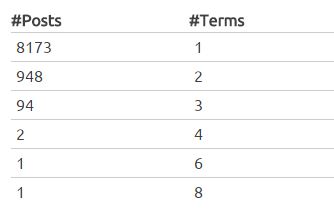
So here we can see how many posts have a given number of terms, in order.
Currently the SQL query uses temporary and filesort, so there are definitely opportunities to adjust it. On a 10k posts install this took under 0.2s to run on my small VPS. We could for example remove the post table join to make it faster, but then it would be less flexible.
We can also cache the output, for example with the transients API, as mentioned by @Pieter Goosen in his answer.
All methods was sourced from stackoverflow.com or stackexchange.com, is licensed under cc by-sa 2.5, cc by-sa 3.0 and cc by-sa 4.0