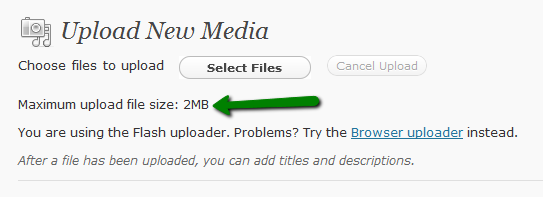
How can I change the Maximum upload file size? I would like to be able to upload 10Mb at a time.
Answers:
Thank you for visiting the Q&A section on Magenaut. Please note that all the answers may not help you solve the issue immediately. So please treat them as advisements. If you found the post helpful (or not), leave a comment & I’ll get back to you as soon as possible.
Method 1
This is due to the PHP limitations on file size uploads. If you have access to your php.ini file, you can modify the following lines:
upload_max_filesize = 10M
post_max_size = 10M
max_execution_time = 300
If you don’t have access to the php.ini file (such as a hosting situation), you may need to contact your webhost and see if they will increase it for you. I have also seen users create a php.ini file with just these values and place it in the file where WordPress is installed. If your PHP instance allows for “inherited configurations” it will allow these local settings to override the global.
The other solution would be to add the code dynamically into WordPress to make this change for you. This article has a nice way of doing it through a “plugin”. I’ve seen dubious results from this approach (some report success, some report no success) so I can’t say for sure if it will work for you.
Method 2
I had the issue where I couldn’t update/add to the php.ini file. I ended up adding the following lines to my .htaccess file to change the upload size:
 php_value upload_max_filesize 5M
 php_value post_max_size 5M
 php_value max_execution_time 200
 php_value max_input_time 200
That changes the upload limit to 5, and allows extends the timeout time while uploading larger files.
Method 3
This worked for me. I just went into cpanel /file manager and created a new php.ini file. Then i entered the text below:
upload_max_filesize = 10M
post_max_size = 10M
max_execution_time = 300
Works 100%
Just put the php.ini file in the wp-admin directory
Method 4
Somehow I had to create a php.ini file which I uploaded to the wp-admin directory but I also had to add the memory_limit = 32M line. Without that line, the limit is not increased in in WordPress 3.3.1
memory_limit = 32M
upload_max_filesize = 16M
post_max_size = 16M
max_execution_time = 300
Method 5
If the above solutions are not working, then you can go with this .only you have to find the php.ini file in /etc or root folder.
Step 1:
Find php.ini file in /etc folder or / folder by running below cmd:
grep -rl "post_max_size" | xargs ls -lrth
Here I have used the post_max_size keyword to search the “php.ini” file in /etc folder ,but in some systems you can find this on /var/www/html or /var/www/wordpress folders.
We have multiple posts on the internet as if the php.ini file is not present in the WordPress folder then you can create but in my case that doesn’t work.
Step 2:
Edit the php.ini file and change the value like this.
post_max_size = 100M
upload_max_filesize = 100M
In the above, you can set any value as per your requirement.
Step 3:
Restart the httpd or Nginx or apache and PHP service, or as per setup, you can restart the web service.
For me httpd and php-fpm service restart worked in centos 8:
service httpd restart
service php-fpm restart
All methods was sourced from stackoverflow.com or stackexchange.com, is licensed under cc by-sa 2.5, cc by-sa 3.0 and cc by-sa 4.0