I use Alt+Space in Emacs, but in Xfce it pops up window manager menu at the upper left corner of a window. How do i disable Alt+Space for Xfce and change global keyboard shortcuts in general?
Answers:
Thank you for visiting the Q&A section on Magenaut. Please note that all the answers may not help you solve the issue immediately. So please treat them as advisements. If you found the post helpful (or not), leave a comment & I’ll get back to you as soon as possible.
Method 1
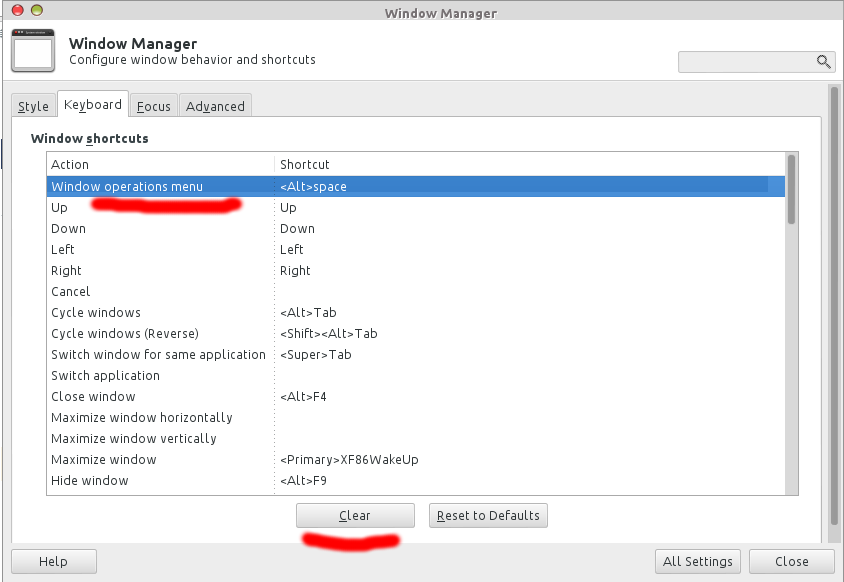
Here, in Xfce4 Settings Manager or launch xfce4-settings-manager from terminal,
In Window Manager configuration, find the keyboard part, look for Window operations menu, and then hit on Clear button, which will remove that shortcut key, effects immedately
Method 2
Go to Menu → Settings → Settings Editor, select “xfce4-keyboard-shortcuts”, select xfwm4 → custom → <Alt>Space, then press “Reset property” button. Every other key combination can be set and unset there too.
Settings Editor is the general way to configure everything in Xfce4, though not user friendly.
All methods was sourced from stackoverflow.com or stackexchange.com, is licensed under cc by-sa 2.5, cc by-sa 3.0 and cc by-sa 4.0