I’m using merge cap to create a merge pcap file from 15 files. For the merged file, I have changed the name to that of the first of the 15 files. But I would also like to change the merged file’s attributes like “Date Created” and “Last Modified” to that of the first one. Is there anyway to do this?
FILES_dcn=($(find  $dir_dcn -maxdepth 1 -type f -name "*.pcap"  -print0 | xargs -0 ls -lt | tail -15 | awk '{print $9}'))
TAG1_dcn=$(basename "${FILES_dcn[14]}" | sed 's/.pcap//')
mergecap -w  "${dir_dcn}"/merge_dcn.pcap "${FILES_dcn[@]}"
mv  "${dir_dcn}"/merge_dcn.pcap  "${dir_dcn}"/"${TAG1_dcn}".pcap
I try to access the merged files over a samba server (Ubuntu). So that an extractor function can access auto extract the files to D folder. But as the created date will be changed for the merged file the extraction fails. Is there anyway to fix this?
Answers:
Thank you for visiting the Q&A section on Magenaut. Please note that all the answers may not help you solve the issue immediately. So please treat them as advisements. If you found the post helpful (or not), leave a comment & I’ll get back to you as soon as possible.
Method 1
You can use the touch command along with the -r switch to apply another file’s attributes to a file.
NOTE: There is no such thing as creation date in Unix, there are only access, modify, and change. See this U&L Q&A titled: get age of given file for further details.
$ touch -r goldenfile newfile
Example
For example purposes here’s a goldenfile that was created with some arbitrary timestamp.
$ touch -d 20120101 goldenfile
$ ls -l goldenfile
-rw-rw-r--. 1 saml saml 0 Jan  1  2012 goldenfile
Now I make some new file:
$ touch newfile
$ ls -l newfile
-rw-rw-r--. 1 saml saml 0 Mar  7 09:06 newfile
Now apply goldenfile‘s attributes to newfile.
$ touch -r goldenfile newfile
$ ls -l goldenfile newfile
-rw-rw-r--. 1 saml saml 0 Jan  1  2012 newfile
-rw-rw-r--. 1 saml saml 0 Jan  1  2012 goldenfile
Now newfile has the same attributes.
Modify via Samba
I just confirmed that I’m able to do this using my Fedora 19 laptop which includes version 1.16.3-2 connected to a Thecus N12000 NAS (uses a modified version of CentOS 5.x).
I was able to touch a file as I mentioned above and it worked as I described. Your issue is likely a problem with the either the mounting options being used, which may be omitting the tracking of certain time attributes, or perhaps it’s related to one of these bugs:
- Bug 461505 – can’t set timestamp on samba shares
- Bug 693491 – Unable to set attributes/timestamps on CIFS/Samba share
Method 2
Easiest way – accessed modified will be the same:
touch -a -m -t 201512180130.09 fileName.ext
Where:
-a = accessed
-m = modified
-t  = timestamp - use [[CC]YY]MMDDhhmm[.ss] time format
If you wish to use NOW just drop the t and the timestamp
To verify they are all the same:
stat fileName.ext
See: touch man
Method 3
The easiest way you can do …
Suppose you
change date and time
of meta data of your file.

When your teacher sees this, if she or he/she is smart, she will notice your cheating by 0x.000000000 this nano seconds.
So, What do we can do?
All you have to do is put back your date and time of your system to any date and time you want, create again your file with touch command or anything and edit it content.
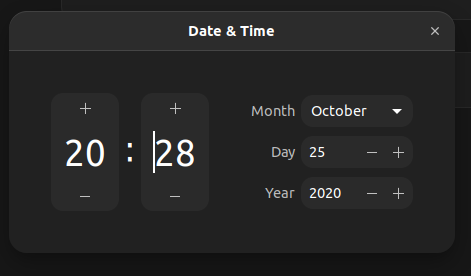
Now send this file to him/her.
Good Luck.
All methods was sourced from stackoverflow.com or stackexchange.com, is licensed under cc by-sa 2.5, cc by-sa 3.0 and cc by-sa 4.0