I am working on a project created as “Web Application Project” in C#, I am trying to implement new functionality to existing pages. Changes done on aspx page are working properly but when I add code into code behind file, changes are not reflecting. Things I have tried:
- Deleted Temporary system and Visual studio files.
- Deleted Code behind file of the page (Project is still successfully
build and working on browser)
Below is the message I am getting when I try to put break point:
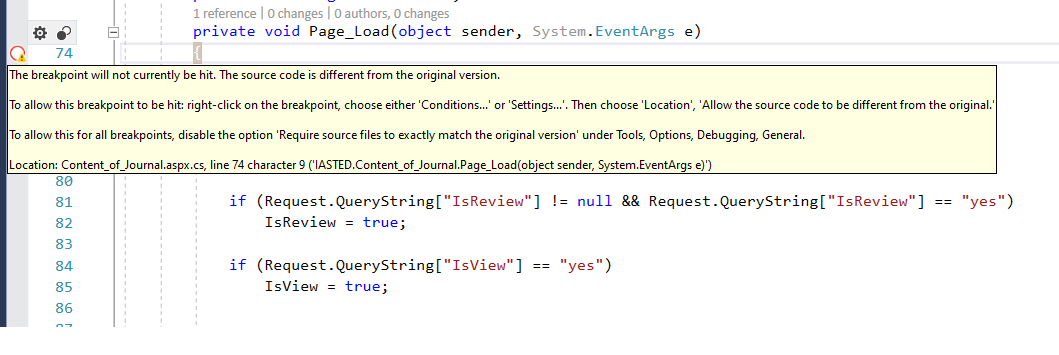
Answers:
Thank you for visiting the Q&A section on Magenaut. Please note that all the answers may not help you solve the issue immediately. So please treat them as advisements. If you found the post helpful (or not), leave a comment & I’ll get back to you as soon as possible.
Method 1
Please try the following suggestions:
1) disable the option Require source files to exactly match the original version under Tools–>Options–>Debugging–>General
and also disable Enable Just My Code under Tools–>Options–>Debugging–>General
2) close VS, delete .vs hidden folder under the solution folder, bin and obj folder. And then restart your project to test again.
3) right-click on the project Properties–>Build–>Advanced–> and make sure that you have set Debugging information to Full.
4) delete all files under C:WINDOWSMicrosoft.NETFramework64v*.*.****Temporary ASP.NET Files
and
C:Usersxxx(current user)AppDataLocalTempTemporary ASP.NET Files
================================================
Update from MaxPayne:
There was some kind of DLL reference issue in my project(Project is using DLLs from some unknown location). And it seems that the symbol files of them are missing.
Delete the project and fetched from TFS. Now it is working fine.
Method 2
What are you seeing here is very simple… the process that you have attached is not matching this code, this could be to many reasons:
- You have the code deployed to another location and you have not updated one or more dll’s.
- Your pdb file could be outdated.
- You are attaching the wrong process (very common in web applications, as you can see more than one w3wp process.
- You have the build location changed to another wrong place.
- Also try to clear the temp file for ASP.NET.
Bottom line make sure that all dll’s are rebuilt and updated successfully and should work fine.
All methods was sourced from stackoverflow.com or stackexchange.com, is licensed under cc by-sa 2.5, cc by-sa 3.0 and cc by-sa 4.0