I have been trying to create a bootable debian (jessie/8.4) image for the past 2 days, and as far as I can tell I have the procedure right, but I can not get the filesystem right. I am relatively sure that I am doing something wrong here, missing something with mounting or /etc/fstab (there isn’t one in my image). I was hoping someone with some experience would be able to help me out/show me what I am missing.
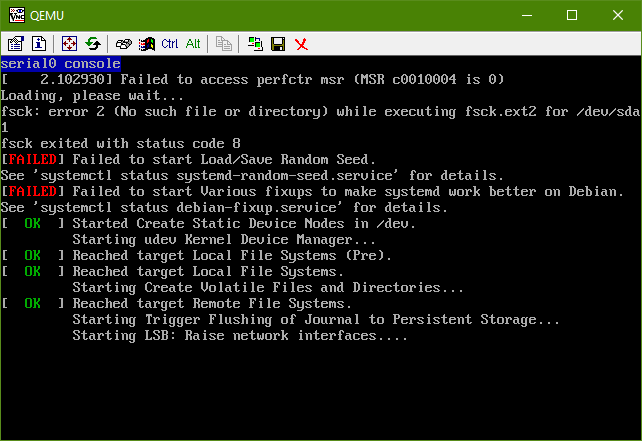
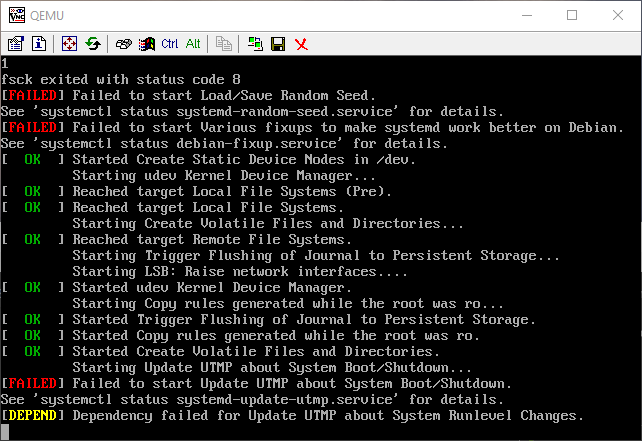
Here are the errors I see as I’m booting into qemu-system-x86:
As text and then as the actual screenshots:
Errors:
fsck: error 2 (No such file or directory) while executing fsck.ext2 for /dev/sda1
fsck exited with status code 8
[FAILED] Failed to start Load/Save Random Seed
See `systemctl status systemd-random-seed.service` for details.
[FAILED] Failed to start Various fixups to make systemd work better on Debian.
See `systemctl status debian-fixup.service` for details.
...
[FAILED] Failed to start Update UTMP about System Boot/Shutdown.
See `systemctl status systemd-update-utmp.service` for details.
[DEPEND] Dependency failed for Update UTMP about System Runlevel Changes.
Here are the instructions I’ve written up for myself / steps I’ve taken:
cd ~
mkdir debootstrap
cd debootstrap/
# get newest
wget http://ftp.debian.org/debian/pool/main/d/debootstrap/debootstrap_1.0.80_all.deb
ar -x debootstrap_1.0.80_all.deb
zcat /root/debootstrap/data.tar.gz | tar xv

apt-get install parted


# 1.5Gbytes
dd if=/dev/zero of=1445.img bs=1024 count=1 seek=1536k

parted -s 1445.img -- mklabel msdos mkpart primary 1m 1.5g toggle 1 boot
losetup --show -f 1445.img
# prints out `/dev/loopX`, enter this on the next lin
partprobe /dev/loop0
# only have to make the filesytem once --> if you are troubleshooting steps, do not redo this line
mkfs -t ext2 /dev/loop0p1
mount /dev/loop0p1 /mnt

debootstrap --verbose --components=main,contrib,non-free
--include=firmware-realtek,linux-image-amd64,grub-pc,ssh,vim
--exclude=nano
--arch amd64 jessie /mnt http://ftp.us.debian.org/debian
source for information on using –components
-
Ensure that the kernel is installed, it should appear in
/bootwithin the chroot, that is/mnt/bootwith the following files:initrd.img-3.16.0-4-amd64vmlinuz-3.16.0-4-amd64config-3.16.0-4-amd64System.map-3.16.0-4-amd64
-
install grub
grub-install --boot-directory=/mnt/boot --modules=part_msdos /dev/loop0
-
Set up APT
-
copy over the apt sources
cp /etc/apt/sources.list /mnt/etc/apt/sources.list
- ensure the cdrom source is commented out
-
add the line:
deb http://ftp.debian.org/debian stable-backports main contrib non-free
-
copy over the apt sources
Setup a chroot
mount --bind /dev/pts /mnt/dev/pts
mount --bind /proc /mnt/proc
mount --bind /sys /mnt/sys
mount --bind /dev /mnt/dev

# if you want your pushprofilesettings
cp ~/.bashrc /mnt/root/
cp ~/.vimrc /mnt/root/

# chroot -- enter the system as if it were thy own
chroot /mnt /bin/bash
export HOME=/root
export LC_ALL=C
export LANG=C.UTF-8
export TERM=xterm-256color
mount from man mount:
--bind Remount a subtree somewhere else (its contents are available in both places).
-t <type> Mount of filesystem type, with this, mount will attempt to auto determine
setup serial/console access
edit /etc/default/grub:
-
Set
GRUB_CMDLINE_LINUX=""to:GRUB_CMDLINE_LINUX="console=tty0 console=ttyS0,115200n8"
-
Uncomment
GRUB_TERMINAL=console -
Beneath, add the line:
GRUB_SERIAL_COMMAND="serial --speed=115200 --unit=0 --word=8 --parity=no --stop=1"
Make the grub config – This MUST be done in a non-systemd-nspawn shell (that means chroot)
grub-mkconfig -o /boot/grub/grub.cfg
Exit chroot
exit
Clean up for chroot’ed
umount /mnt/sys
umount /mnt/dev
umount /mnt/dev/pts
umount /mnt/proc
Can check for additional mounts with: mount | grep /mnt and then unmount them with umount
Enter systemd-nspawn
systemd-nspawn -D /mnt
# not you are in a special container
Set the password for root with passwd
In /etc/ssh/sshd_config comment out PermitRootLogin without-password to read #PermitRootLogin without-password and insert PermitRootLogin yes beneath it
Now enable ssh on startup
systemctl enable ssh
clean up
# this is needed to clean up both chroot and systemd-nspawn -D /mnt
# once this is run you can not do systemd-nspawn either so wait until you are entirely done
exit
umount /mnt
losetup -d /dev/loop0
Check for additional mounts with: mount | grep /mnt If ANYTHING is returned, unmount them with umount
Recover (only necessary in ERROR)
If you broke something, or need to retry, RE-MOUNT / SETUP CHROOT on existing .img:
losetup --show -f 1445.img
# prints out `/dev/loopX`, enter this on the next lin
partprobe /dev/loop0
mount /dev/loop0p1 /mnt
testing img
qemu-system-x86_64 -hda 1445.img -m 1024 -vnc :0
Answers:
Thank you for visiting the Q&A section on Magenaut. Please note that all the answers may not help you solve the issue immediately. So please treat them as advisements. If you found the post helpful (or not), leave a comment & I’ll get back to you as soon as possible.
Method 1
Kept at it and figured it out, relatively straight forward from here, but not just a matter of setting up /etc/fstab, here is the rest:
not necessary but a good idea to clean things up
apt-get autoclean
set up /etc/fstab – check with mount to ensure you are on the right filesystem type
echo "/dev/sda1 / ext4 defaults,errors=remount-ro 0 1" > /etc/fstab
this will rebuild the initramfs and allow it to boot clean
update-initramfs -u -k all
Do that and the machine boots clean, tested in QEMU and then I am running it right now on hardware.
Method 2
Automated Debian 9 setup without any systemd errors
This setup does not have any systemd errors or warnings, and I get the Internet connection and a shell at the end.
This setup is just not perfect as I’m not using the Debian kernel, errors when I tried explained in a later section. I then just tried a kernel I had lying around, with config based on Buildroot and it worked. The config is provided in this setup. Therefore, it is possible that some packages that rely on missing kernel configs will fail, although I haven’t observed any errors so far.
An analogous setup worked perfectly with the Ubuntu kernel however: https://askubuntu.com/questions/281763/is-there-any-prebuilt-qemu-ubuntu-image32bit-online/1081171#1081171 The Ubuntu kernel must have the missing configs compared to the Debian one. The Debian kernel failures can likely be fixed by compiling the Debian kernel with extra options like CONFIG_VIRTIO_BLK=y as I’ve done for Ubuntu.
#!/usr/bin/env bash

set -eux

debootstrap_dir=debootstrap
root_filesystem=img.ext2.qcow2

sudo apt-get install
  debootstrap
  libguestfs-tools
  git
  qemu-system-x86
;

if [ ! -d "$debootstrap_dir" ]; then
  # Create debootstrap directory.
  # - linux-image-amd64: downloads the kernel image
  sudo debootstrap
    --include linux-image-amd64
    stretch
    "$debootstrap_dir"
    http://deb.debian.org/debian/
  ;
  sudo rm -f "$root_filesystem"
fi

if [ ! -f "$root_filesystem" ]; then
  # Set root password.
  echo 'root:root' | sudo chroot "$debootstrap_dir" chpasswd

  # Remount root filesystem as rw.
  # Otherwise, systemd shows:
  #     [FAILED] Failed to start Create Volatile Files and Directories.
  # and then this leads to further failures in the network setup.
  cat << EOF | sudo tee "${debootstrap_dir}/etc/fstab"
/dev/sda / ext4 errors=remount-ro,acl 0 1
EOF

  # Network.
  # We use enp0s3 because the kernel boot prints:
  #     8139cp 0000:00:03.0 enp0s3: renamed from eth0
  # This can also be observed with:
  #     ip link show
  # Without this, systemd shows many network errors, the first of which is:
  #     [FAILED] Failed to start Network Time Synchronization.
  cat << EOF | sudo tee "${debootstrap_dir}/etc/network/interfaces.d/00mytest"
auto lo
iface lo inet loopback
auto enp0s3
iface enp0s3 inet dhcp
EOF

  # Generate image file from debootstrap directory.
  # Leave 1Gb extra empty space in the image.
  sudo virt-make-fs
    --format qcow2
    --size +1G
    --type ext2
    "$debootstrap_dir"
    "$root_filesystem"
  ;
  sudo chmod 666 "$root_filesystem"
fi

# linux_image="$(printf "${debootstrap_dir}/boot/vmlinuz-"*)"

linux_img=linux/arch/x86_64/boot/bzImage
if [ ! -f "$linux_img" ]; then
  # Build the Linux kernel.
  git clone --depth 1 --branch v4.18 git://git.kernel.org/pub/scm/linux/kernel/git/stable/linux.git
  cd linux
  wget https://gist.githubusercontent.com/cirosantilli/6e2f4975c1929162a86be09f839874ca/raw/6d151d231a233408a6e1b541bf4a92fd55bf5338/.config
  make olddefconfig
  make -j`nproc`
  cd -
fi

qemu-system-x86_64
  -append 'console=ttyS0 root=/dev/sda'
  -drive "file=${root_filesystem},format=qcow2"
  -enable-kvm
  -serial mon:stdio
  -m 2G
  -kernel "$linux_img"
  -device rtl8139,netdev=net0
  -netdev user,id=net0
;
Now from the terminal, login with root / root, and then check that the Internet works with the following commands:
printf 'GET / HTTP/1.1rnHost: example.comrnrn' | nc example.com 80
apt-get update
apt-get install hello
hello
We used nc as explained at https://stackoverflow.com/questions/32341518/how-to-make-an-http-get-request-manually-with-netcat/52662497#52662497 because:
wgetandcurlare not installed by defaultpingdoes not work from QEMU by default: How to ping from the QEMU guest to an external URL?
Tested on an Ubuntu 18.04 host.
What happens if I try to use the Debian kernel
TODO understand and fix. If I replace the Linux kernel compilation above with the Debian packaged Linux kernel:
linux_img="${debootstrap_dir}/boot/vmlinuz-"*
then boot fails with:
Kernel panic - not syncing: VFS: Unable to mount root fs on unknown-block(0,0)
and an empty list for:
List of all partitions:
so the disk is not being recognized at all. I’ve also tried to use the exact same kernel that the Debian ISO installer installs as done here but for Debian, and it fails in the same way, even though the Debian ISO install worked fine with the same QEMU options (it generates GRUB install in a disk with multiple partitions, the root one being ext4).
Method 3
Can’t comment, but your “guide” worked wonders for making a Minimal Ubuntu 16 thumbdrive. The only things I changed were the debootstrap and I had to manually get networking working (networkd).
My debootstrap line was:
#> sudo debootstrap --components=main,contrib,nonfree  --variant=minbase
                    --include=linux-generic,grub-pc --arch=i386 xenial /mnt
All methods was sourced from stackoverflow.com or stackexchange.com, is licensed under cc by-sa 2.5, cc by-sa 3.0 and cc by-sa 4.0