I’ve got a strange issue with my Conky setup:
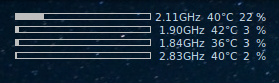
What I’m looking to get rid of/fix is the fact that my CPU percentages (using ${cpu cpuX}) won’t seem to pad properly. I’d like all values to be aligned vertically so that statuses never wiggle. Here’s excerpts from my conky file:
# ...
pad_percents 3
# ...
${cpubar cpu1 6,135}$alignr${...}${cpu cpu1}%
How can I right align and pad CPU percentage values so they stop throwing off my layout? The equivalent printf would be %3.0f so that values will appear like this:
$ "%3.0f" % (1,)
'  1'
$ "%3.0f" % (13,)
' 13'
$ "%3.0f" % (100,)
'100'
How can I make this happen in Conky for my CPU percentage?
Answers:
Thank you for visiting the Q&A section on Magenaut. Please note that all the answers may not help you solve the issue immediately. So please treat them as advisements. If you found the post helpful (or not), leave a comment & I’ll get back to you as soon as possible.
Method 1
A solution provided by @jasonwryan above:
-
Create a Lua script for Conky to use. I created mine in a folder I made in
~/.config/conky/scripts, but you can create yours wherever you’d like:$ mkdir -p ~/.config/conky/scripts/ $ vim ~/.config/conky/scripts/conky_lua_scripts.lua
-
Fill the file with the following Lua function:
function conky_format( format, number ) return string.format( format, conky_parse( number ) ) end -
Import your Lua script file into your Conky configuration file using the
lua_loaddirective# ... lua_load ~/.config/conky/scripts/conky_lua_scripts.lua TEXT # ...
-
Whenever you’d like to format a value, call the
formatfunction we defined earlier. Note that though we named itconky_format, we access it asformatusing thelua_parsevariable:# ... lua_load ~/.config/conky/scripts/conky_lua_scripts.lua TEXT # ... ${lua_parse format %3.0f ${cpu cpu1}}%
This nice script allows you to call into Lua formatting engine with any value and format string. The output now looks as expected:
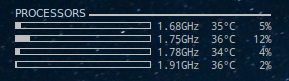
If you’re familiar with printf, you can use the utility to do other awesome formatting hacks.
Method 2
Almost same effect can be achieved also without lua script by using conditions:
${if_match ${cpu cpu1} < 10}${offset 10}${cpu cpu1}%
Your code would be something similar to:
${cpubar cpu1 6,135}$alignr${...}${if_match ${cpu cpu1} < 10}${offset 10}${endif}${cpu cpu1}%
Note: Offset value (in above case 10) needs to be tweaked according to used font.
More complete example can also use more conditions:
${cpubar cpu1 6,135}$alignr${...}${if_match ${cpu cpu1} < 10}${offset 20}${else}${if_match ${cpu cpu1} < 100}${offset 10}${endif}${cpu cpu1}%
All methods was sourced from stackoverflow.com or stackexchange.com, is licensed under cc by-sa 2.5, cc by-sa 3.0 and cc by-sa 4.0