I know that there is a lot of answers on this question, but i am new in Django and i dont know how to implement these solutions. First what i want to do. This is my models:
class Region(models.Model):

    name = models.CharField(max_length=255, verbose_name=_("Name"))
    slug = models.SlugField(max_length=150, unique=True, null=True)

    def save(self,*args, **kwargs):
        if not self.slug:
            self.slug = slugify(self.name)
        super(Region,self).save(*args,**kwargs)

    def __unicode__(self):
        return u'%s' % (self.name)

    class Meta:
        verbose_name = _('Region')
        verbose_name_plural = _('Regions')

class District(models.Model):

    name = models.CharField(max_length=255, verbose_name=_("Name"))
    slug = models.SlugField(max_length=150, unique=True, null=True)
    region = models.ForeignKey(Region,verbose_name=_("Region"))

    def save(self, *args, **kwargs):
        if not self.slug:
            self.slug = slugify(self.name)
        super(District, self).save(*args, **kwargs)

    def is_in_region(self, region):
        if self.region == region:
            return True
        else:
            return False

    def __unicode__(self):
        return u'%s' % (self.name)

    class Meta:
        verbose_name = _("District")
        verbose_name_plural = _("Districts")
In frontend page I want to choose one region and select with districts will show districts of this region. This my views:
class SearchView(ListView):

    template_name = 'advert/list_view.html'

    def all_json_models(self, request, region):
        current_reg = Region.objects.get(slug=region)
        districts = District.objects.all().filter(region=current_reg)
        json_models = serializers.serialize("json", districts)
        return http.HttpResponse(json_models, mimetype="application/javascript")

    def get(self, request, *args, **kwargs):
        return self.post(request, *args, **kwargs)

    def post(self, request, *args, **kwargs):
        self.request = request
        try:
            self.page = int(self.request.GET.get('page','1'))
        except:
            self.page = 1
        self.queryset = ""
        return super(SearchView, self).get(request, *args, **kwargs)

    def get_queryset(self):
        """We have to bypass the queryset because
        we are joining several object lists together. """
        return None

    def get_context_data(self, **kwargs):
        context['regions'] = Region.objects.all().order_by("name")
        return context
the get_context_data method is much longer but i write here only simple one. I use for this solution from this website http://www.devinterface.com/blog/en/2011/02/how-to-implement-two-dropdowns-dependent-on-each-other-using-django-and-jquery/ . But still select with districts is not working. I try to write method all_json_models to this class in views but still its not calling this method. Is here any one who can tell me why? Thx a lot
Answers:
Thank you for visiting the Q&A section on Magenaut. Please note that all the answers may not help you solve the issue immediately. So please treat them as advisements. If you found the post helpful (or not), leave a comment & I’ll get back to you as soon as possible.
Method 1
well , i coded a whole project just for you , hope this could help 🙂 :
in this project i we have countries which have many cities
as shown in pictures, each time you select a country , only related cities shown in next combo box 🙂
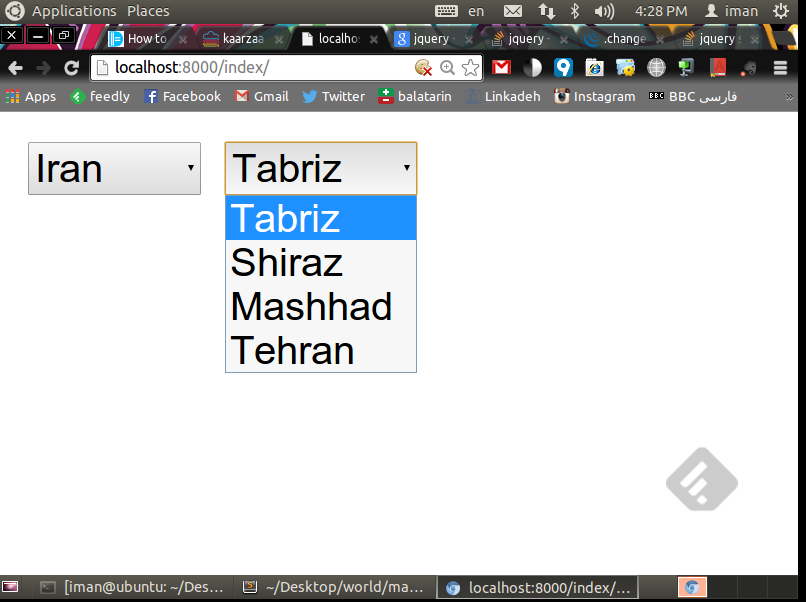
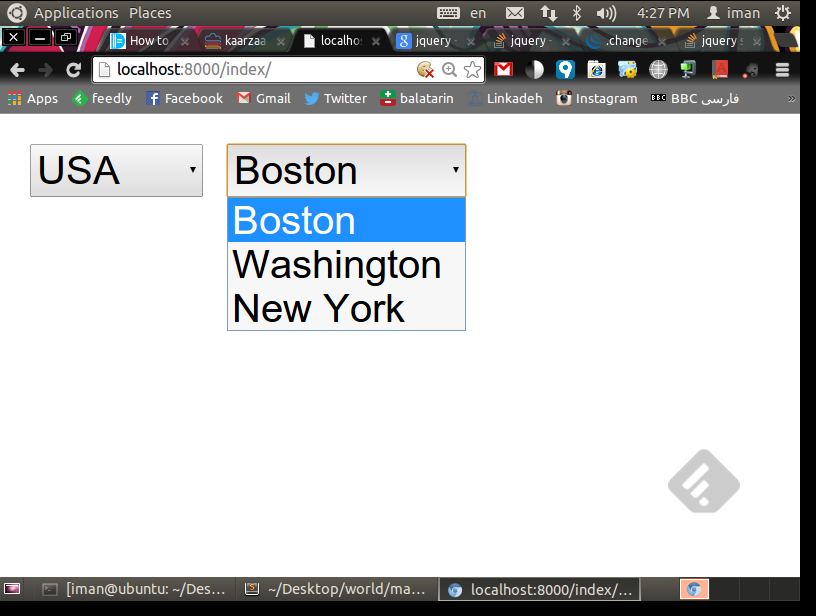
ok , no let’s see the code
(full project source code is on my github : https://github.com/nodet07/Django-Related-DropDowns)
models.py :
just 2 simple models , a country which can have many cities !
 from django.db import models
    class City(models.Model):
        name = models.CharField(max_length=50)
        country = models.ForeignKey("Country")
        def __unicode__(self):
            return u'%s' % (self.name)

    class Country(models.Model):
        name = models.CharField(max_length=50)
        def __unicode__(self):
            return u'%s' % (self.name)
views.py:
from django.shortcuts import render
from map.models import *
from django.utils import simplejson
from django.http import HttpResponse

def index(request):
    countries = Country.objects.all()
    print countries
    return render(request, 'index.html', {'countries': countries})

def getdetails(request):
    #country_name = request.POST['country_name']
    country_name = request.GET['cnt']
    print "ajax country_name ", country_name

    result_set = []
    all_cities = []
    answer = str(country_name[1:-1])
    selected_country = Country.objects.get(name=answer)
    print "selected country name ", selected_country
    all_cities = selected_country.city_set.all()
    for city in all_cities:
        print "city name", city.name
        result_set.append({'name': city.name})
    return HttpResponse(simplejson.dumps(result_set), mimetype='application/json',     content_type='application/json')
index.html :
<html>
    <head>
    <script type="text/javascript" src="https://code.jquery.com/jquery-latest.min.js"></script>
    <script type="text/javascript" src="https://yourjavascript.com/7174319415/script.js"></script>
        <script>
            $(document).ready(function(){
                 $('select#selectcountries').change(function () {
                     var optionSelected = $(this).find("option:selected");
                     var valueSelected  = optionSelected.val();
                     var country_name   = optionSelected.text();


                     data = {'cnt' : country_name };
                     ajax('/getdetails',data,function(result){

                            console.log(result);
                            $("#selectcities option").remove();
                            for (var i = result.length - 1; i >= 0; i--) {
                                $("#selectcities").append('<option>'+ result[i].name +'</option>');
                            };


                         });
                 });
            });
        </script>
    </head>

    <body>
        <select name="selectcountries" id="selectcountries">
        {% for item in countries %}
            <option val="{{ item.name }}"> {{ item.name }} </option>
        {% endfor %}
        </select>


        <select name ="selectcities" id="selectcities">


        </select>

    </body>
</html>
Method 2
You can use Jquery plugin chained.
Example:
http://codepen.io/anon/pen/EapNPo?editors=101
HTML
<select id="id_country" name="country">
    <option value="" selected="selected">---------</option>
    <option value="1">Colombia</option>
    <option value="2">Rusia</option>
</select>
<select id="id_city" name="city">
    <option value="" selected="selected">---------</option>
    <option value="1" class="1">Bogotá</option>
    <option value="2" class="2">Moscú</option>
    <option value="3" class="2">San Petersburgo</option>
    <option value="4" class="1">Valledupar</option>
</select>
js
$("#id_city").chained("#id_country");
Generate form with models (ForeignKey)
Go to https://axiacore.com/blog/django-y-selects-encadenados/ complete tutorial
Method 3
I got fed up with the non-DRY solutions to this, so I wrote something maybe flexible enough for most use cases:
Right now it only handles online/AJAX related select boxes. I eventually plan (maybe this week or next) to add an offline mode that pushes a bit of rendered JS with the widget to track the onchange event of the parent and translate it to the child choices via a map of value -> list(choices). The AJAX solution is great for things like car make/model (1000s of choices) while the offline solution is great for product/color (maybe 10s of choices).
Method 4
An updated answer here for AJAX code, as well as some additions for clarity. From the below, just change #selectyear to your select id, as well as rename variable schedule_year to something that makes sense for your data. Then change #selectschedule in success to the name of your second select id. note that result[i].schedule_name, corresponds to the name of the value passed back from the view. See views.py result_set and change names accordingly for your data.
If you are looking to implement more than 2 chained selects, it is simple. Just duplicate the code below chaining each sequence together for as many relationships needed. Reuse the same view with conditional statements or just add another view that returns new results.
javascript and AJAX
<script>
$(document).ready(function(){
    //handle selected year
    $('select#selectyear').change(function () {
        var optionSelected = $(this).find("option:selected");
        var valueSelected  = optionSelected.val();
        var schedule_year   = optionSelected.text();
        $.ajax({
            url: 'getdetails/',
            type: 'GET',
            data: {'year' : JSON.stringify(schedule_year)},
            success:    function(result){
                            //remove previous selections
                            $("#selectschedule option").remove();
                            //add a blank option
                            $("#selectschedule").append('<option></option>');
                            //append new options returned
                            for (var i = result.length - 1; i >= 0; i--) {
                                $("#selectschedule").append('<option>'+ result[i].schedule_name +'</option>');
                            };
                        },
        });
    });
});
</script>
HTML
<table width="100%" class="table">
   <tr>
      <td class="align-middle" style="width: 50%;">
         <label for="#selectyear" value="calendar_year" style="width:100%">
            <span class="small pl-1">Select Calendar Year</span>
            <select class="form-control" name="selectyear" id="selectyear">
               <option value="blank"></option>
                  {% for schedule in schedules|dictsort:'fee_schedule_calendar_year' %}
                     {% ifchanged %}<!--used to only show unique values-->
                     <option value="{{ schedule.fee_schedule_calendar_year }}">{{ schedule.fee_schedule_calendar_year }}</option>
                     {% endifchanged %}
                  {% endfor %}
            </select>
         </label>
      </td>
      <td class="align-middle" style="width: 50%;">
         <label for="#selectschedule" value="fee_schedule" style="width: 100%;">
         <span class="small pl-1">Select Fee Schedule</span>
            <select class="form-control" name="selectschedule" id="selectschedule"></select>
         </label>
      </td>
   </tr>
</table>
Views.py
# Handle AJAX request for fee schedule calendar year select
def getdetails(request, file_upload_id, file_header_id):
    schedule_year = json.loads(request.GET.get('year'))
    result_set = []
    schedules = FeeSchedule.objects.filter(fee_schedule_calendar_year=schedule_year)
    for schedule in schedules:
        result_set.append({'schedule_name': schedule.fee_schedule_name})
    return HttpResponse(json.dumps(result_set, indent=4, sort_keys=True, default=str), content_type='application/json')
urls.py
path('whatever_your_current_path_is_for_this_view/getdetails/', login_required(views.getdetails), name='get_details'),
All methods was sourced from stackoverflow.com or stackexchange.com, is licensed under cc by-sa 2.5, cc by-sa 3.0 and cc by-sa 4.0