I’m working on a web application that is using Forms authentication.
    <authentication mode="Forms">
        <forms slidingExpiration="true"
         loginUrl="~/User.aspx/LogOn"
         timeout="15"
         name="authToken"  />
    </authentication>
I’m seeing this cookie set in my browser when I log in:
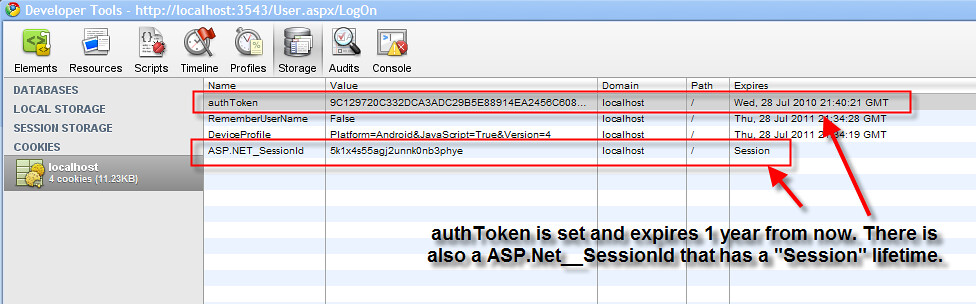
The question is what happens when I put this website in a load balanced model? Where is the ASP.net session cookie being set? I didn’t explicitly do it in code, so I assume it’s happening behind the scenes somewhere in ASP.Net.
Also, If the session cookie is set by web server A, I assume web server B won’t recognize it and treat it as an invalid session. If this is the case, I probably don’t want to use it, right?
Answers:
Thank you for visiting the Q&A section on Magenaut. Please note that all the answers may not help you solve the issue immediately. So please treat them as advisements. If you found the post helpful (or not), leave a comment & I’ll get back to you as soon as possible.
Method 1
You’ll have to set the machine key to be the same and the name to be the same on both machines…if this is done you should have no problems load balancing with forms auth.
        <authentication mode="Forms">
        <forms loginUrl="~/Login/Index" defaultUrl="~/"
                     name=".myportal"
                     protection="All" slidingExpiration="true" timeout="20" path="/"
                     requireSSL="false"></forms>
    </authentication>

    <machineKey validationKey="534766AC57A2A2F6A71E6F0757A6DFF55526F7D30A467A5CDE102D0B50E0B58D613C12E27E7E778D137058E" decryptionKey="7059303602C4B0B3459A20F9CB631" decryption="Auto" validation="SHA1"/>
Sessions can get slightly more complicated. You can store the ASP.Net session state in the database or use a shared session provider to make it available for load balancing as well.
Here is a good article on storing session state in the DB: http://idunno.org/articles/277.aspx
All methods was sourced from stackoverflow.com or stackexchange.com, is licensed under cc by-sa 2.5, cc by-sa 3.0 and cc by-sa 4.0