I am working on big ASP.NET project(we using ASP.NET 3.5) which comprised of 5 different WebSites and some shared assemblies. Recently I added custom section into web.config files for each site. When I deploy all these applications, each site is deployed separately under same app pool.
Is there any way to make this section editable in IIS on site level, just like you can edit ConnectionString section for each site?
Sections I added all look like this:
<sectionGroup name="RegistriesCustomSettings">
  <section name="RegistriesSettings"
           type="Registries.Business.Utilities.RegistriesConfigurations"/>
</sectionGroup >

<RegistriesCustomSettings>
    <RegistriesSettings ContextCommandTimeout="30"
           logLinq="true" DisplayUser="true" BaseReportPath="/DDD/"
           ReportingServer="http://patriot-regdev:8000/ReportServer"
           TopInstitution="1000001" />
</RegistriesCustomSettings>
We using are IIS 7.0, 2008 RC 2.
Answers:
Thank you for visiting the Q&A section on Magenaut. Please note that all the answers may not help you solve the issue immediately. So please treat them as advisements. If you found the post helpful (or not), leave a comment & I’ll get back to you as soon as possible.
Method 1
Yes there is a way to do this by extending the IIS configuration schema.
-
Create a file called
RegistriesSchema.xmland copy and paste the following XML:<configSchema> <sectionSchema name="RegistriesCustomSettings"> <element name="RegistriesSettings"> <attribute name="ContextCommandTimeout" type="int" validationType="integerRange" validationParameter="1,600" allowInfinite="true" defaultValue="30" /> <attribute name="logLinq" type="bool" defaultValue="True" /> <attribute name="DisplayUser" type="bool" defaultValue="True" /> <attribute name="BaseReportPath" type="string" validationType="nonEmptyString" /> <attribute name="ReportingServer" type="string" validationType="nonEmptyString" /> <attribute name="TopInstitution" type="string" validationType="nonEmptyString" /> </element> </sectionSchema> </configSchema> -
Grab a copy of a tool called
IisSchema.exefrom here:IISSCHEMA.EXE – A tool to register IIS7 configuration sections
Unzip and make sure both the exe and the xml schema file are in the same folder.
-
From an administrator command line (i.e. open
cmd.exeusing “Run As Administrator”):IISSCHEMA.EXE /install RegistriesSchema.xml
This will do two things:
- drops the schema file into
%systemroot%system32inetsrvconfigschema -
adds the following XML to
applicationHost.config:<section name="RegistriesCustomSettings" overrideModeDefault="Allow" allowDefinition="Everywhere" />
- drops the schema file into
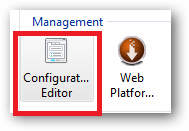
4 . Launch IIS Manager and open the feature settings for your website and open the Configuration Editor:
5 . Select the Section drop down list:
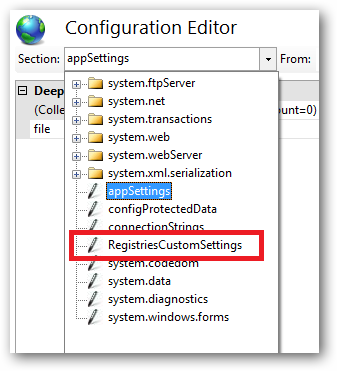
If all is good you should see “RegistriesCustomSettings”, select this item.
6 . You can now edit these settings and they’ll be added to your site’s web.config file:
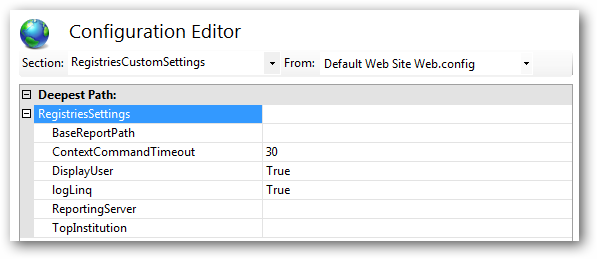
This is just a demonstration so the schema settings may not be quite right and will probably need some fine tuning.
What To Do With <sectionGroup name="RegistriesCustomSettings">?:
You will still need to add the configSection/sectionGroup xml to your web.config file for each site or you could add it to the root machine.config file for whatever version of ASP.NET you’re using, i.e.:
For .NET Framework 2.0 (which also applies to .NET3.0 and 3.5):
%systemroot%Microsoft.NETFrameworkv2.050727CONFIGmachine.config
%systemroot%Microsoft.NETFramework64v2.050727CONFIGmachine.config
For .NET Framework 4.0:
%systemroot%Microsoft.NETFrameworkv4.0.30319CONFIGmachine.config
%systemroot%Microsoft.NETFramework64v4.0.30319CONFIGmachine.config
If you put your assembly’s configSection/sectionGroup in your machine.config file(s) then you don’t need to declare it in every site’s web.config. If quite a few sites are going to be using this assembly then this may be good timesaver.
Update:
There seems to be a bug or limitation in the IIS7.5 Configuration Editor. It appears that if you have your own custom configSections <sectionGroup> or <section> declarations in your site’s web.config file this breaks the IIS7.5 Configuration Editor. I’m trying to get to the bottom of this:
ASP.NET custom configuration section declaration breaks IIS Manager Configuration Editor
Update 2:
I think the MS docs on this are a bit bogus particularly where your custom config section needs to be consumable by ASP.NET and editable in the IIS Manager Configuration Editor. The trick seems to be to declare the schema as follows in the RegistriesSchema.xml file:
<configSchema>
<sectionSchema name="RegistriesCustomSettings/RegistriesSettings">
<attribute name="ContextCommandTimeout"
type="int"
validationType="integerRange"
validationParameter="1,600"
allowInfinite="true"
defaultValue="30" />
<attribute name="logLinq"
type="bool"
defaultValue="True" />
<attribute name="DisplayUser"
type="bool"
defaultValue="True" />
<attribute name="BaseReportPath"
type="string"
validationType="nonEmptyString" />
<attribute name="ReportingServer"
type="string"
validationType="nonEmptyString" />
<attribute name="TopInstitution"
type="string"
validationType="nonEmptyString" />
</sectionSchema>
</configSchema>
Also, and importantly, remove the section reference from applicationHost.config:
<section name="RegistriesCustomSettings"
             overrideModeDefault="Allow"
             allowDefinition="Everywhere" />
This is not required.
Additionally, you don’t actually need to use the iisschema.exe tool, just grab a copy of NotePad2 (it’s a 64bit editor, you need this to edit anything in inetsrvconfig) and create the RegistriesSchema.xml file directly in inetsrvconfigschema.
You can find out more about extending the IIS7 schema here:
Extending IIS 7.0 Schema and Accessing the Custom Sections Using MWA
You can poke about the existing schema files to learn more about how to construct these settings. They can be found in:
%systemroot%system32inetsrvconfigschema
Caveat: The example above was tested on IIS7.5 x64 RTM on Windows 7 x64 Ultimate. You mention that you’re running a release candidate so your mileage may vary because of that.
All methods was sourced from stackoverflow.com or stackexchange.com, is licensed under cc by-sa 2.5, cc by-sa 3.0 and cc by-sa 4.0