I have a script that does a number of different things, most of which do not require any special privileges. However, one specific section, which I have contained within a function, needs root privileges.
I don’t wish to require the entire script to run as root, and I want to be able to call this function, with root privileges, from within the script. Prompting for a password if necessary isn’t an issue since it is mostly interactive anyway. However, when I try to use sudo functionx, I get:
sudo: functionx: command not found
As I expected, export didn’t make a difference. I’d like to be able to execute the function directly in the script rather than breaking it out and executing it as a separate script for a number of reasons.
Is there some way I can make my function “visible” to sudo without extracting it, finding the appropriate directory, and then executing it as a stand-alone script?
The function is about a page long itself and contains multiple strings, some double-quoted and some single-quoted. It is also dependent upon a menu function defined elsewhere in the main script.
I would only expect someone with sudo ANY to be able to run the function, as one of the things it does is change passwords.
Answers:
Thank you for visiting the Q&A section on Magenaut. Please note that all the answers may not help you solve the issue immediately. So please treat them as advisements. If you found the post helpful (or not), leave a comment & I’ll get back to you as soon as possible.
Method 1
I will admit that there’s no simple, intuitive way to do this, and this is a bit hackey. But, you can do it like this:
function hello()
{
    echo "Hello!"
}

# Test that it works.
hello

FUNC=$(declare -f hello)
sudo bash -c "$FUNC; hello"
Or more simply:
sudo bash -c "$(declare -f hello); hello"
It works for me:
$ bash --version
GNU bash, version 4.3.42(1)-release (x86_64-apple-darwin14.5.0)
$ hello
Hello!
$
$ FUNC=$(declare -f hello)
$ sudo bash -c "$FUNC; hello"
Hello!
Basically, declare -f will return the contents of the function, which you then pass to bash -c inline.
If you want to export all functions from the outer instance of bash, change FUNC=$(declare -f hello) to FUNC=$(declare -f).
Edit
To address the comments about quoting, see this example:
$ hello()
> {
> echo "This 'is a' test."
> }
$ declare -f hello
hello ()
{
    echo "This 'is a' test."
}
$ FUNC=$(declare -f hello)
$ sudo bash -c "$FUNC; hello"
Password:
This 'is a' test.
Method 2
The “problem” is that sudo clears the environment (except for a handful of allowed variables) and sets some variables to pre-defined safe values in order to protect against security risks. in other words, this is not actually a problem. It’s a feature.
For example, if you set PATH="/path/to/myevildirectory:$PATH" and sudo didn’t set PATH to a pre-defined value then any script that didn’t specify the full pathname to ALL commands it runs (i.e. most scripts) would look in /path/to/myevildirectory before any other directory. Put commands like ls or grep or other common tools in there and you can easily do whatever you like on the system.
The easiest / best way is to re-write the function as a script and save it somewhere in the path (or specify the full path to the script on the sudo command line – which you’ll need to do anyway unless sudo is configured to allow you to run ANY command as root), and make it executable with chmod +x /path/to/scriptname.sh
Rewriting a shell function as a script is as simple as just saving the commands inside the function definition to a file (without the function ..., { and } lines).
Method 3
I’ve written my own Sudo bash function to do that, it works to call functions and aliases :
function Sudo {
        local firstArg=$1
        if [ $(type -t $firstArg) = function ]
        then
                shift && command sudo bash -c "$(declare -f $firstArg);$firstArg $*"
        elif [ $(type -t $firstArg) = alias ]
        then
                alias sudo='sudo '
                eval "sudo <a href="https://getridbug.com/cdn-cgi/l/email-protection" class="__cf_email__" data-cfemail="210561">[email protected]</a>"
        else
                command sudo "<a href="https://getridbug.com/cdn-cgi/l/email-protection" class="__cf_email__" data-cfemail="1b3f5b">[email protected]</a>"
        fi
}
Method 4
You can combine functions and aliases
Example:
function hello_fn() {
    echo "Hello!"
}

alias hello='bash -c "$(declare -f hello_fn); hello_fn"'
alias sudo='sudo '
then sudo hello works
Method 5
Here’s a variation on Will’s answer. It involves an additional cat process, but offers the comfort of heredoc. In a nutshell it goes like this:
f ()
{
    echo ok;
}

cat <<EOS | sudo bash
$(declare -f f)
f
EOS
If you want more food for thought, try this:
#!/bin/bash

f ()
{
    x="a b";
    menu "$x";
    y="difficult thing";
    echo "a $y to parse";
}

menu ()
{
    [ "$1" == "a b" ] &&
    echo "here's the menu";
}

cat <<EOS | sudo bash
$(declare -f f)
$(declare -f menu)
f
EOS
The output is:
here's the menu
a difficult thing to pass
Here we’ve got the menu function corresponding with the one in the question, which is “defined elsewhere in the main script”. If the “elsewhere” means its definition has already been read at this stage when the function demanding sudo is being executed, then the situation is analogous. But it might not have been read yet. There may be another function that will yet trigger its definition. In this case declare -f menu has to be replaced with something more sophisticated, or the whole script corrected in a way that the menu function is already declared.
Method 6
New Answer. Add this to your ~/.bashrc to run functions. As a bonus, it can run aliases too.
ssudo () # super sudo
{
  [[ "$(type -t $1)" == "function" ]] &&
    ARGS="<a href="https://getridbug.com/cdn-cgi/l/email-protection" class="__cf_email__" data-cfemail="3c187c">[email protected]</a>" && sudo bash -c "$(declare -f $1); $ARGS"
}
alias ssudo="ssudo "
Method 7
Assuming that your script is either (a) self-contained or (b) can source its components based on its location (rather than remembering where your home directory is), you could do something like this:
- use the
$0pathname for the script, using that in thesudocommand, and pass along an option which the script will check, to call the password updating. As long as you rely on finding the script in the path (rather than just run./myscript), you should get an absolute pathname in$0. - since the
sudoruns the script, it has access to the functions it needs in the script. - at the top of the script (rather, past the function declarations), the script would check its
uidand realize that it was run as the root user, and seeing that it has the option set to tell it to update the password, go and do that.
Scripts can recur on themselves for various reasons: changing privileges is one of those.
Method 8
Entirely transparent, it has the same behavior as the real sudo command, apart from adding an additional parameter:
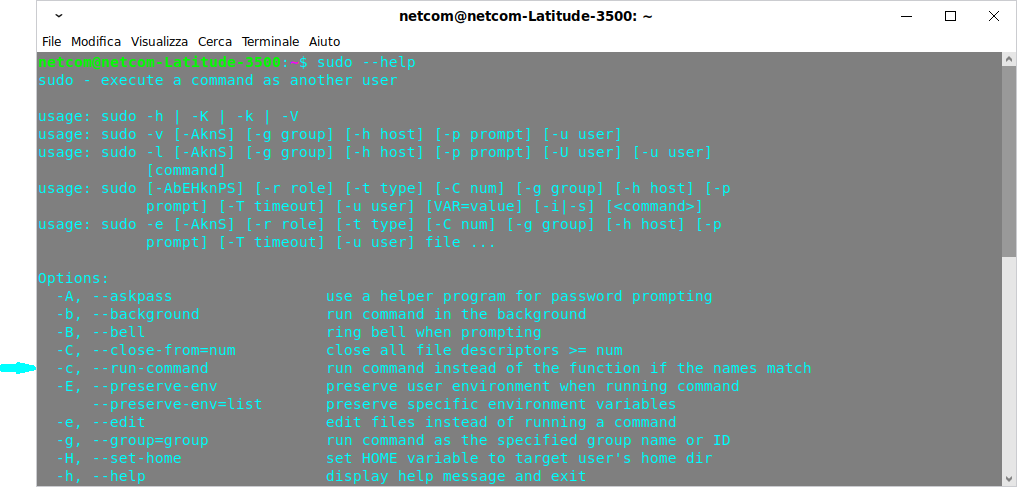
It is necessary to create the following function first:
cmdnames () {
    { printf '%s' "$PATH" | xargs -d: -I{} -- find -L {} -maxdepth 1 -executable -type f -printf '%Pn' 2>/dev/null; compgen -b; } | sort -b | uniq
    return 0
}
The function
sudo () {
    local flagc=0
    local flagf=0
    local i
    if [[ $# -eq 1 && ( $1 == "-h" || ( --help == $1* && ${#1} -ge 4 ) ) ]]; then
        command sudo "<a href="https://getridbug.com/cdn-cgi/l/email-protection" class="__cf_email__" data-cfemail="ecc8ac">[email protected]</a>" | perl -lpe '$_ .= "n  -c, --run-command             run command instead of the function if the names match" if /^  -C, / && ++$i == 1'
        return ${PIPESTATUS[0]}
    fi
    for (( i=1; i<=$#; i++ )); do
        if [[ ${!i} == -- ]]; then
            i=$((i+1))
            if [[ $i -gt $# ]]; then break; fi
        else
            if [[ ${!i} == --r ]]; then
                command sudo "<a href="https://getridbug.com/cdn-cgi/l/email-protection" class="__cf_email__" data-cfemail="4f6b0f">[email protected]</a>" 2>&1 | perl -lpe '$_ .= " '"'"'--run-command'"'"'" if /^sudo: option '"'"'--r'"'"' is ambiguous/ && ++$i == 1'
                return ${PIPESTATUS[0]}
            fi
            if [[ ${!i} == -c || ( --run-command == ${!i}* && $(expr length "${!i}") -ge 4 ) ]]; then
                flagf=-1
                command set -- "${@:1:i-1}" "${@:i+1}"
                i=$((i-1))
                continue
            fi
            command sudo 2>&1 | grep -E -- "[${!i} [A-Za-z]+]" > /dev/null && { i=$((i+1)); continue; }
        fi
        cmdnames | grep "^${!i}$" > /dev/null && flagc=1
        if [[ ! ( flagc -eq 1 && flagf -eq -1 ) ]]; then
            if declare -f -- "${!i}" &> /dev/null; then flagf=1; fi
        fi
        break
    done
    if [[ $flagf -eq 1 ]]; then
        command sudo "${@:1:i-1}" bash -sc "shopt -s extglob; $(declare -f); $(printf "%q " "${@:i}")"
    else
        command sudo "<a href="https://getridbug.com/cdn-cgi/l/email-protection" class="__cf_email__" data-cfemail="4a6e0a">[email protected]</a>"
    fi
    return $?
}
All methods was sourced from stackoverflow.com or stackexchange.com, is licensed under cc by-sa 2.5, cc by-sa 3.0 and cc by-sa 4.0