I have an html table (Not Gridview) and that has no proper Header and rows. Instead it has customized structure and data. I want to export this table to Excel. How can I do using ASP.NET?
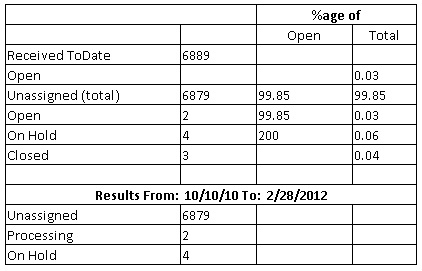
The labels are fixed text and the integer values are coming from database. So the table structure is fixed only the integer/decimal values change.
Answers:
Thank you for visiting the Q&A section on Magenaut. Please note that all the answers may not help you solve the issue immediately. So please treat them as advisements. If you found the post helpful (or not), leave a comment & I’ll get back to you as soon as possible.
Method 1
You want Export HTML table (Not Gridview) customized structure and data to Excel using ASP.NET.
Try the following Approach
-
Provide the
IDand addrunat="server"attribute<table id="tbl" runat="server" > -
Add the following code
Response.ContentType = "application/x-msexcel";
Response.AddHeader("Content-Disposition", "attachment;
filename=ExcelFile.xls");
Response.ContentEncoding = Encoding.UTF8;
StringWriter tw = new StringWriter();
HtmlTextWriter hw = new HtmlTextWriter(tw);
tbl.RenderControl(hw);
Response.Write(tw.ToString());
Response.End();
Method 2
You can use below code:
Response.ContentType = "application/force-download";
Response.AddHeader("content-disposition", "attachment; filename=Print.xls");
Response.Write("<html xmlns:x="urn:schemas-microsoft-com:office:excel">");
Response.Write("<head>");
Response.Write("<META http-equiv="Content-Type" content="text/html; charset=utf-     8">");
Response.Write("<!--[if gte mso 9]><xml>");
Response.Write("<x:ExcelWorkbook>");
Response.Write("<x:ExcelWorksheets>");
Response.Write("<x:ExcelWorksheet>");
Response.Write("<x:Name>Report Data</x:Name>");
Response.Write("<x:WorksheetOptions>");
Response.Write("<x:Print>");
Response.Write("<x:ValidPrinterInfo/>");
Response.Write("</x:Print>");
Response.Write("</x:WorksheetOptions>");
Response.Write("</x:ExcelWorksheet>");
Response.Write("</x:ExcelWorksheets>");
Response.Write("</x:ExcelWorkbook>");
Response.Write("</xml>");
Response.Write("<![endif]--> ");
StringWriter tw = new StringWriter();
HtmlTextWriter hw = new HtmlTextWriter(tw);
tbl.RenderControl(hw);
Response.Write(tw.ToString());
Response.Write("</head>");
Response.flush();
Also it is advicable to give inline css if you want the exported output look exactly same as your UI. If you apply css classes to the table then it would not be displayed in exported excel.
Method 3
If dtReport contains the table(i.e data to be exported) then we can export the table to excel by using the following LOC and also we can format the header
    if (dtReports != null && dtReports.Rows.Count > 0 && !string.IsNullOrEmpty(formName))
            {
                string filename = formName.ToUpper() + ParsConstant.XLS_EXTENSION;
                StringWriter tw = new StringWriter();

                using (HtmlTextWriter hw = new HtmlTextWriter(tw))
                {

                    //Binding Datatable to DataGrid.
                    DataGrid dgGrid = new DataGrid();
                    dgGrid.DataSource = dtReports;
                    dgGrid.DataBind();

                    //Some Properties for the Header
                    dgGrid.HeaderStyle.Font.Bold = true;
                    dgGrid.HeaderStyle.Font.Size = 13;

                    //Get the HTML for the control.
                    dgGrid.RenderControl(hw);


                    Response.ContentType = "application/vnd.ms-excel";
                    Response.AppendHeader("Content-Disposition", "attachment; filename=" + filename + "");
                    //Response.Write("<style> TD { mso-number-format:\@; } </style>");


                    Response.Write(tw.ToString());
                    Response.End();
                }
            }
using MSO Format will not be avoiding leading zero’s,but it will convert the text to string which is not advisable for doing operations.
Method 4
If your data is databased (if not you could store in an XML file), then look at a similar question I posted recently.
Writing DataReader Rows to Excel File
Method 5
There’s no automated way. But you could use the same code to create the table and write it to the output instead. If you write it as a simple CSV file, then the user can load it into Excel by simply clicking the downloaded file.
By setting the correct headers, you can direct the browser to treat the content as a download instead of a web page. I posted the code to do this in this article.
All methods was sourced from stackoverflow.com or stackexchange.com, is licensed under cc by-sa 2.5, cc by-sa 3.0 and cc by-sa 4.0