I am trying to open Firefox in CentOS, but I’m getting the following message:
Firefox is already running but is not responding
and Firefox doesn’t open. I tried this in command line:
kill Firefox
but it didn’t work. Also, I don’t know in which directory I must execute the right commands.
How can I fix this?
Answers:
Thank you for visiting the Q&A section on Magenaut. Please note that all the answers may not help you solve the issue immediately. So please treat them as advisements. If you found the post helpful (or not), leave a comment & I’ll get back to you as soon as possible.
Method 1
From http://kb.mozillazine.org/Profile_in_use – Check for:
1) A file called .parentlock
-AND-
2) A symlink called lock
…in ~/.mozilla/firefox/random string of alphanumeric characters.default/
The former is present while Firefox is running to prevent more than one different instance from trying to simultaneously write to the same set of profile files, and if Firefox is not closed cleanly, neither may be removed.
Error message received in this case should be:
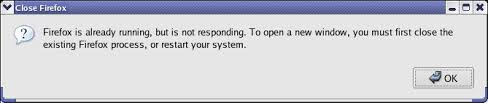
From anywhere in the filesystem (or removing this if pwd reports ~/.mozilla/firefox/random string of alphanumeric characters.default), replacing random string of alphanumeric characters with the FF profile folder on your computer, do rm ~/.mozilla/firefox/random string of alphanumeric characters.default/.parentlock ~/.mozilla/firefox/random string of alphanumeric characters.default/lock` (assuming the first sentence pans out) to remove them, if there isn’t a Firefox process running.
More less-authoritative information here.
Method 2
-
First find the process id of firefox using the following command in any directory:
pidof firefox
-
Kill firefox process using the following command in any directory:
kill [firefox pid]
Then start firefox again.
Or you can do the same thing in just one command.As don_crissti said:
kill $(pidof firefox)
Method 3
Usually, many users say this command helps:
killall -SIGTERM firefox
The killall command will killall processes that are named “firefox”. SIGTERM is the kill-signal type. This command works well for me and other Linux users.
Also, it may help to wait thirty seconds after closing Firefox before it is turned back on.
Method 4
open a terminal and enter:
firefox -P
Or using a shell scipt:
#!/bin/bash
files=`find ~/.mozilla -name "*lock"`
for file in `echo $files`
do
  echo "removing $file..."
  rm "$file"
done
Method 5
If you don’t find any firefox instances running when you search with pgrep or htop, and want to force restart your firefox, just delete the profiles.ini file and restart firefox.
Caution: Do this if you do not care about profiles. The file can be found in ~/.mozilla/firefox/ (if this profiles.ini does not make any sense to you, you can go ahead and delete).
Method 6
If none of the above works, make sure your Firefox profile is owned by your user and not, say, by root. I got this exact error after I copied my profile over from somewhere else, forgetting that I was running in a root shell at the time.
Method 7
A really easy way is to just open a terminal, run firefox -P, and either delete the user profile that won’t run or to just create another profile and set that as your default one.
All methods was sourced from stackoverflow.com or stackexchange.com, is licensed under cc by-sa 2.5, cc by-sa 3.0 and cc by-sa 4.0