It appears that I have data in the format of a list of NumPy arrays (type() = np.ndarray):
[array([[ 0.00353654]]), array([[ 0.00353654]]), array([[ 0.00353654]]),
array([[ 0.00353654]]), array([[ 0.00353654]]), array([[ 0.00353654]]),
array([[ 0.00353654]]), array([[ 0.00353654]]), array([[ 0.00353654]]),
array([[ 0.00353654]]), array([[ 0.00353654]]), array([[ 0.00353654]]),
array([[ 0.00353654]])]
I am trying to put this into a polyfit function:
m1 = np.polyfit(x, y, deg=2)
However, it returns the error: TypeError: expected 1D vector for x
I assume I need to flatten my data into something like:
[0.00353654, 0.00353654, 0.00353654, 0.00353654, 0.00353654, 0.00353654 ...]
I have tried a list comprehension which usually works on lists of lists, but this as expected has not worked:
[val for sublist in risks for val in sublist]
What would be the best way to do this?
Answers:
Thank you for visiting the Q&A section on Magenaut. Please note that all the answers may not help you solve the issue immediately. So please treat them as advisements. If you found the post helpful (or not), leave a comment & I’ll get back to you as soon as possible.
Method 1
You could use numpy.concatenate, which as the name suggests, basically concatenates all the elements of such an input list into a single NumPy array, like so –
import numpy as np
out = np.concatenate(input_list).ravel()
If you wish the final output to be a list, you can extend the solution, like so –
out = np.concatenate(input_list).ravel().tolist()
Sample run –
In [24]: input_list
Out[24]:
[array([[ 0.00353654]]),
 array([[ 0.00353654]]),
 array([[ 0.00353654]]),
 array([[ 0.00353654]]),
 array([[ 0.00353654]]),
 array([[ 0.00353654]]),
 array([[ 0.00353654]]),
 array([[ 0.00353654]]),
 array([[ 0.00353654]]),
 array([[ 0.00353654]]),
 array([[ 0.00353654]]),
 array([[ 0.00353654]]),
 array([[ 0.00353654]])]

In [25]: np.concatenate(input_list).ravel()
Out[25]:
array([ 0.00353654,  0.00353654,  0.00353654,  0.00353654,  0.00353654,
        0.00353654,  0.00353654,  0.00353654,  0.00353654,  0.00353654,
        0.00353654,  0.00353654,  0.00353654])
Convert to list –
In [26]: np.concatenate(input_list).ravel().tolist()
Out[26]:
[0.00353654,
 0.00353654,
 0.00353654,
 0.00353654,
 0.00353654,
 0.00353654,
 0.00353654,
 0.00353654,
 0.00353654,
 0.00353654,
 0.00353654,
 0.00353654,
 0.00353654]
Method 2
Can also be done by
np.array(list_of_arrays).flatten().tolist()
resulting in
[0.00353654, 0.00353654, 0.00353654, 0.00353654, 0.00353654, 0.00353654, 0.00353654, 0.00353654, 0.00353654, 0.00353654, 0.00353654, 0.00353654, 0.00353654]
Update
As @aydow points out in the comments, using numpy.ndarray.ravel can be faster if one doesn’t care about getting a copy or a view
np.array(list_of_arrays).ravel()
Although, according to docs
When a view is desired in as many cases as possible,
arr.reshape(-1)may be preferable.
In other words
np.array(list_of_arrays).reshape(-1)
The initial suggestion of mine was to use numpy.ndarray.flatten that returns a copy every time which affects performance.
Let’s now see how the time complexity of the above-listed solutions compares using perfplot package for a setup similar to the one of the OP
import perfplot

perfplot.show(
    setup=lambda n: np.random.rand(n, 2),
    kernels=[lambda a: a.ravel(),
             lambda a: a.flatten(),
             lambda a: a.reshape(-1)],
    labels=['ravel', 'flatten', 'reshape'],
    n_range=[2**k for k in range(16)],
    xlabel='N')
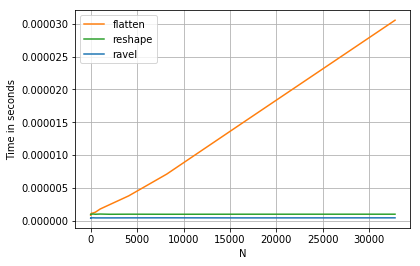
Here flatten demonstrates piecewise linear complexity which can be reasonably explained by it making a copy of the initial array compare to constant complexities of ravel and reshape that return a view.
It’s also worth noting that, quite predictably, converting the outputs .tolist() evens out the performance of all three to equally linear.
Method 3
Another simple approach would be to use numpy.hstack() followed by removing the singleton dimension using squeeze() as in:
In [61]: np.hstack(list_of_arrs).squeeze()
Out[61]:
array([0.00353654, 0.00353654, 0.00353654, 0.00353654, 0.00353654,
       0.00353654, 0.00353654, 0.00353654, 0.00353654, 0.00353654,
       0.00353654, 0.00353654, 0.00353654])
Method 4
Another way using itertools for flattening the array:
import itertools

# Recreating array from question
a = [np.array([[0.00353654]])] * 13

# Make an iterator to yield items of the flattened list and create a list from that iterator
flattened = list(itertools.chain.from_iterable(a))
This solution should be very fast, see https://stackoverflow.com/a/408281/5993892 for more explanation.
If the resulting data structure should be a numpy array instead, use numpy.fromiter() to exhaust the iterator into an array:
# Make an iterator to yield items of the flattened list and create a numpy array from that iterator
flattened_array = np.fromiter(itertools.chain.from_iterable(a), float)
Docs for itertools.chain.from_iterable():
https://docs.python.org/3/library/itertools.html#itertools.chain.from_iterable
Docs for numpy.fromiter():
https://docs.scipy.org/doc/numpy/reference/generated/numpy.fromiter.html
Method 5
I came across this same issue and found a solution that combines 1-D numpy arrays of variable length:
np.column_stack(input_list).ravel()
See numpy.column_stack for more info.
Example with variable-length arrays with your example data:
In [135]: input_list
Out[135]:
[array([[ 0.00353654,  0.00353654]]),
 array([[ 0.00353654]]),
 array([[ 0.00353654]]),
 array([[ 0.00353654,  0.00353654,  0.00353654]])]

In [136]: [i.size for i in input_list]    # variable size arrays
Out[136]: [2, 1, 1, 3]

In [137]: np.column_stack(input_list).ravel()
Out[137]:
array([ 0.00353654,  0.00353654,  0.00353654,  0.00353654,  0.00353654,
        0.00353654,  0.00353654])
Note: Only tested on Python 2.7.12
All methods was sourced from stackoverflow.com or stackexchange.com, is licensed under cc by-sa 2.5, cc by-sa 3.0 and cc by-sa 4.0