I am aware of following thread and supposedly an answer to it. Except an answer is not an answer in generic sense. It tells what the problem was in one particular case, but not in general.
My question is: is there a way to debug ordering cycles in a generic way? E.g.: is there a command which will describe the cycle and what links one unit to another?
For example, I have following in journalctl -b (please disregard date, my system has no RTC to sync time with):
Jan 01 00:00:07 host0 systemd[1]: Found ordering cycle on sysinit.target/start
Jan 01 00:00:07 host0 systemd[1]: Found dependency on local-fs.target/start
Jan 01 00:00:07 host0 systemd[1]: Found dependency on cvol.service/start
Jan 01 00:00:07 host0 systemd[1]: Found dependency on basic.target/start
Jan 01 00:00:07 host0 systemd[1]: Found dependency on sockets.target/start
Jan 01 00:00:07 host0 systemd[1]: Found dependency on dbus.socket/start
Jan 01 00:00:07 host0 systemd[1]: Found dependency on sysinit.target/start
Jan 01 00:00:07 host0 systemd[1]: Breaking ordering cycle by deleting job local-fs.target/start
Jan 01 00:00:07 host0 systemd[1]: Job local-fs.target/start deleted to break ordering cycle starting with sysinit.target/start
where cvol.service (the one that got introduced, and which breaks the cycle) is:
[Unit]
Description=Mount Crypto Volume
After=boot.mount
Before=local-fs.target

[Service]
Type=oneshot
RemainAfterExit=no
ExecStart=/usr/bin/cryptsetup open /dev/*** cvol --key-file /boot/***

[Install]
WantedBy=home.mount
WantedBy=root.mount
WantedBy=usr-local.mount
According to journalctl, cvol.service wants basic.service, except that it doesn’t, at least not obviously. Is there a command which would demonstrate where this link is derived from? And in general, is there a command, which would find the cycles and show where each link in the cycle originates?
Answers:
Thank you for visiting the Q&A section on Magenaut. Please note that all the answers may not help you solve the issue immediately. So please treat them as advisements. If you found the post helpful (or not), leave a comment & I’ll get back to you as soon as possible.
Method 1
You can visualise the cycle with the commands systemd-analyze verify , systemd-analyze dot and the GraphViz dot tool:
systemd-analyze verify default.target |&
perl -lne 'print $1 if m{Found.*?ons+([^/]+)}' |
xargs --no-run-if-empty systemd-analyze dot |
dot -Tsvg >cycle.svg
You should see something like this:
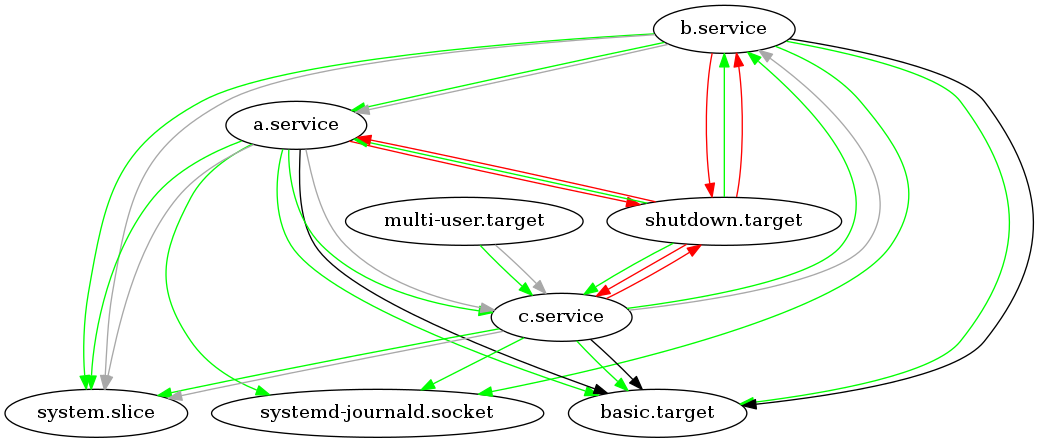
Here you can see the cycle: c.service->b.service->a.service->c.service
Color legend:
    black     = Requires
    dark blue = Requisite
    dark grey = Wants
    red       = Conflicts
    green     = After
Links:
Method 2
Is there a command which would demonstrate where this link is derived from?
The closest you can do is systemctl show -p Requires,Wants,Requisite,BindsTo,PartOf,Before,After cvol.service, which will show the resulting (effective) dependency lists for a given unit.
is there a command, which would find the cycles and show where each link in the cycle originates?
To my knowledge, there is no such command. Actually systemd offers nothing to aid in debugging ordering cycles (sigh).
According to journalctl, cvol.service wants basic.service, except that it doesn’t, at least not obviously.
First, the requirement dependencies (Wants=, Requires=, BindsTo= etc.) are independent of ordering dependencies (Before= and After=). What you see here is an ordering dependency cycle, i. e. it has nothing to do with Wants= etc.
Second, there is a number of “default dependencies” created between units of certain types. They are controlled by DefaultDependencies= directive in the [Unit] section (which is enabled by default).
In particular, unless this directive is explicitly disabled, any .service-type unit gets implicit Requires=basic.target and After=basic.target dependencies, which is exactly what you see. This is documented in systemd.service(5).
Method 3
step 1: run verification command for default.target
systemd-analyze verify default.target
step 2: observe which service or target mentioned in the message “systemd Breaking ordering cycle by deleting job” and display it’s complete dependency list
systemctl show -p Requires,Wants,Requisite,BindsTo,PartOf,Before,After <service or target name mentioned in the "breaking cycle" message>
step 3: look at “after” and “before” groups inside the service or target file usually defined in
/lib/systemd/system
and find the services or targets well known to be sequential but are in outbound order for this one.
example:
dbus.service
is usually marked “after”
multi-user.target
but “before”
sockets.target
such dependency could be easily observed by calling
systemctl list-dependencies default.target
however if the file
/lib/systemd/system/dbus.service
contain lines like:
Before=multi-user.target
or
After=sockets.target
or both simultaneously, means dbus.service is defined outbound and it’s causing an systemd endless cycle.
the cure is simple – change word “After” to “Before” and vice-versa if necessary.
All methods was sourced from stackoverflow.com or stackexchange.com, is licensed under cc by-sa 2.5, cc by-sa 3.0 and cc by-sa 4.0