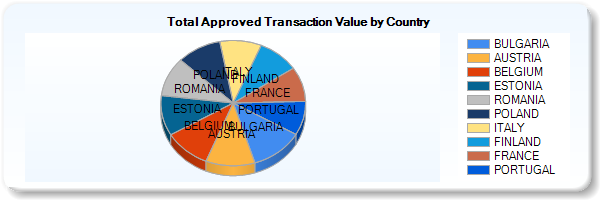
I can’t seem to find the property that controls visibility of labels in pie charts. I need to turn the labels off as the information is available in the legend.
Anyone know what property I can use in code behind?
I tried setting the series labels to nothing Chart1.Series[i].Label = string.Empty; but the labels seem to show up anyway.
Answers:
Thank you for visiting the Q&A section on Magenaut. Please note that all the answers may not help you solve the issue immediately. So please treat them as advisements. If you found the post helpful (or not), leave a comment & I’ll get back to you as soon as possible.
Method 1
Chart1.Series[i]["PieLabelStyle"] = "Disabled";
works too, and doesn’t need to be set for each datapoint.
Method 2
Found the answer here: http://social.msdn.microsoft.com/Forums/en-US/MSWinWebChart/thread/32ccd993-5f43-47a3-bcbc-e772a13a87fe
It turns out there is an obscure DataPointCustomProperty called PieLabelStyle that governs label visibility in pie charts. Worse still, the property must be set on each data point.
for (var i = 0; i < chart.Series.Count; i++)
    for (var j = 0; j < chart.Series[i].Points.Count; j++)
        chart.Series[i].Points[j]["PieLabelStyle"] = "Disabled";
Method 3
Changing chart custom properties will do the trick as well and no coding is needed
<asp:Series Name="Series1" ChartType="Pie" CustomProperties="PieLabelStyle=Disabled">
Method 4
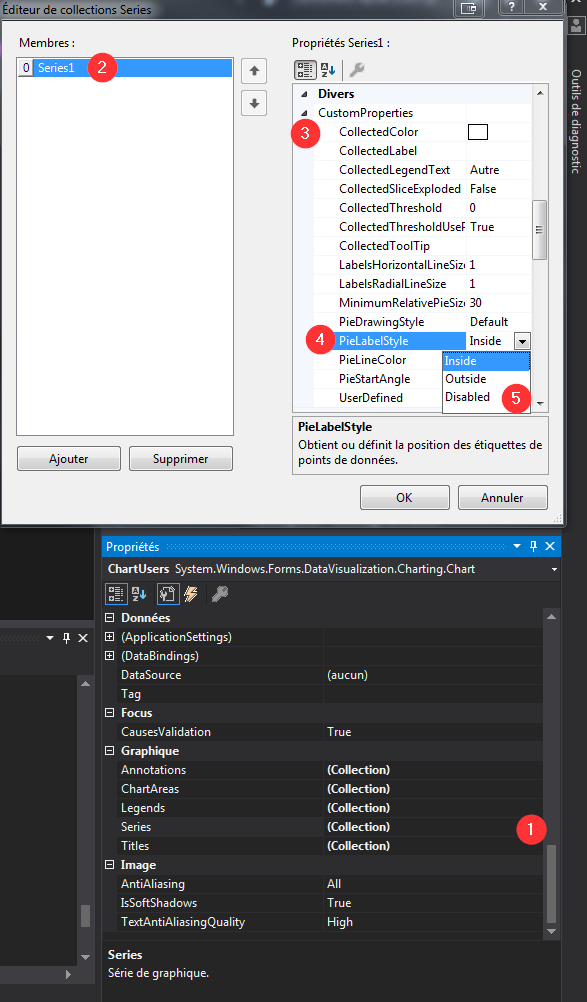
This can also be done in the UI by
- Opening the Series editor window (ellipsis button in the main properties panel)
- Selecting the wanted series
- Expanding the
CustomPropertiesproperty - Choosing
Disabled
Method 5
…and Ben’s answer in VB.NET format:
Chart1.Series(0)("PieLabelStyle") = "Disabled"
works fine for setting whole series
Method 6
May be this website solve your problem
protected void Page_Load(object sender, EventArgs e)
{
// Insert code to create basic pie chart
// See my blog post entitled “Pie Charts in ASP.NET” for full source code
     // Set pie labels to be outside the pie chart
     this.Chart2.Series[0]["PieLabelStyle"] = "Outside";

     // Set border width so that labels are shown on the outside
     this.Chart2.Series[0].BorderWidth = 1;
     this.Chart2.Series[0].BorderColor = System.Drawing.Color.FromArgb(26, 59, 105);

     // Add a legend to the chart and dock it to the bottom-center
     this.Chart2.Legends.Add("Legend1");
     this.Chart2.Legends[0].Enabled = true;
     this.Chart2.Legends[0].Docking = Docking.Bottom;
     this.Chart2.Legends[0].Alignment = System.Drawing.StringAlignment.Center;

     // Set the legend to display pie chart values as percentages
     // Again, the P2 indicates a precision of 2 decimals
     this.Chart2.Series[0].LegendText = "#PERCENT{P2}";

     // By sorting the data points, they show up in proper ascending order in the legend
     this.Chart2.DataManipulator.Sort(PointSortOrder.Descending, Chart2.Series[0]);
 }
Also visit this website i also take this code from that website very nice tutorial on mscharts
http://betterdashboards.wordpress.com/2009/02/04/display-percentages-on-a-pie-char
Method 7
objChart.ChartAreas[0].AxisY.LabelStyle.Enabled = false;
Method 8
For C# the following code works well for all points in the serie.
chart1.Series[seriesname]["PieLabelStyle"] = "Disabled";
All methods was sourced from stackoverflow.com or stackexchange.com, is licensed under cc by-sa 2.5, cc by-sa 3.0 and cc by-sa 4.0