ssh-add -l shows you all ssh-keys that have been added with ssh-add ~/.ssh/id_yourkey. How do I do the analogous thing with gpg and gpg-agent, in other words, ask it to show a list of cached keys?
Answers:
Thank you for visiting the Q&A section on Magenaut. Please note that all the answers may not help you solve the issue immediately. So please treat them as advisements. If you found the post helpful (or not), leave a comment & I’ll get back to you as soon as possible.
Method 1
You may not be able to do this, at least not yet, or at least not in the general case. However, I will share what I have learned, and look forward to updating this answer in due course.
First of all, unlike the ssh-agent capability, which actually caches private keys, gpg-agent can cache either keys or passphrases. It is up to each client which to cache, and gpg just uses gpg-agent to cache the passphrase.
You can interact with gpg-agent using the gpg-connect-agent utility. In the example that follows, I am passing commands one at a time via STDIN.
$ CACHEID="ThisIsTheTrickyPart"
$ ERRSTR="Error+string+goes+here"
$ PMTSTR="Prompt"
$ DESSTR="Description+string+goes+here"
$ echo "GET_PASSPHRASE --data $CACHEID $ERRSTR $PMTSTR $DESSTR" | gpg-connect-agent
D MyPassPhrase
OK
Upon invoking gpg-connect-agent and passing in this command, the pinentry command configured on my system uses the error, prompt, and description strings to prompt for a passphrase. In this case I entered “MyPassPhrase” which is what is returned in the structured output (see image below). If I send GET_PASSPHRASE to gpg-agent again with the same $CACHEID, it returns the cached passphrase instead of using pinentry.
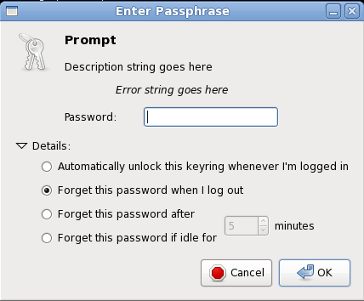
GET_PASSPHRASE also accepts a --no-ask option which will return an error on a cache miss. Here I use “NotCachedID” as the cache ID, and use dummy strings for the required arguments that gpg-agent will not use.
$ echo "GET_PASSPHRASE --no-ask NotCachedID Err Pmt Des" | gpg-connect-agent
ERR 67108922 No data <GPG Agent>
In principle, then, you could ask the agent for each maybe-cached passphrase in turn, and check for OK or ERR in the output. The question then becomes, how do I generate the cache ID? As we see in the example above, gpg-agent is liberal in what it accepts as the cache ID. It turns out that gpg computes a fingerprint on the public key and uses a hex-coded string representation as the cache ID, but the trouble is that this fingerprint is not the same as the fingerprint you can learn via gpg --fingerprint --list-secret-keys. This digest is called keygrip (because it is computed over the raw key material only whereas the fingerprint is calculcated over the key material and the creation timestamp). If you really want to continue down this path, you will have to find out how to generate the correct fingerprint for each of the keys you wish to check (this will be easy using the next generation of GnuPG, 2.1, with the option --with-keygrip).
Warning: The output from GET_PASSPHRASE actually contains the passphrase in the clear. Even if you leave off the --data option, the passphrase is plainly visible as a hex-coded string. It is probably a Very Bad Idea(tm) to muck around with this unless you know what you are doing, and take the appropriate precautions.
Method 2
On later versions of GnuPG (tested with 2.2.9) it is also possible to list the keygrips that are currently cached by the agent using the command keyinfo --list with gpg-connect-agent.
$ gpg-connect-agent 'keyinfo --list' /bye
S KEYINFO 866C3DE249CF81E31A3691845DBADE2809487FF5 D - - 1 P - - -
S KEYINFO 04278155E72CAE8FF1548FE161F1B8F7673824F4 D - - - P - - -
OK
The 1 in the seventh column indicates that the keygrip is cached.
The association between a keygrip and the key it represents can be retrieved with gpg --list-secret-keys --with-keygrip.
Source: https://demu.red/blog/2016/06/how-to-check-if-your-gpg-key-is-in-cache/
Method 3
On later versions of gnupg (tested with 2.1.18) use:
gpg --fingerprint --with-keygrip <email>
to get the keygrip, then
echo "KEYINFO --no-ask <keygrip> Err Pmt Des" | gpg-connect-agent
to see whether it’s cached or not.
Method 4
To get the cacheid you need to mention --fingerprint twice, for example:
$ gpg --fingerprint --fingerprint <a href="https://getridbug.com/cdn-cgi/l/email-protection" class="__cf_email__" data-cfemail="650311150401080c0b250e00170b00094b0a1702">[email protected]</a>
pub   1024D/517D0F0E 2000-10-10
      Key fingerprint = C75D C40A 11D7 AF88 9981  ED5B C86B A06A 517D 0F0E
uid                  Linux Kernel Archives Verification Key <<a href="https://getridbug.com/cdn-cgi/l/email-protection" class="__cf_email__" data-cfemail="0761737766636a6e69476c627569626b29687560">[email protected]</a>>
sub   4096g/E50A8F2A 2000-10-10
      Key fingerprint = E851 4C25 10C6 0291 0D47  A008 7C8B 4360 E50A 8F2A
The cacheid in this case would be E8514C2510C602910D47A0087C8B4360E50A8F2A.
Method 5
In windows (using gpg4win) you can list the keys with:
gpg-connect-agent "KEYINFO --ssh-list --ssh-fpr" /bye
If you want SHA1 fingerprints you use:
gpg-connect-agent "KEYINFO --ssh-list --ssh-fpr=sha1" /bye
I don’t know how to list the comments of the keys, but they can be seen in the stored keys in %APPDATA%gnupgprivate-keys-v1.d
Method 6
http://lists.gnupg.org/pipermail/gnupg-users/2010-January/037876.html
The cacheid is the full fingerprint of the key.
gpg --fingerprint <a href="https://getridbug.com/cdn-cgi/l/email-protection" class="__cf_email__" data-cfemail="c3b6b0a6b183a5acaceda1a2b1">[email protected]</a>
Method 7
Building on @GeoffreyFrogeye’s great answer, here is a shell function I use:
is_key_cached(){
    [[
      $(
        gpg-connect-agent 'keyinfo --list' /bye
        | awk '/D34DB33FD34DB33FD34DB33FD34DB33FD34DB33F/{print $7}'
      ) == 1
    ]]
}

if is_key_cached; then
    use_key
else
    cache_key
    use_key
fi
I condense the function to a one-liner, but I have broken it out here for readability.
All methods was sourced from stackoverflow.com or stackexchange.com, is licensed under cc by-sa 2.5, cc by-sa 3.0 and cc by-sa 4.0