I use the watch command to see the contents of my directory changing as a script runs on it (via watch ls dir/)
It’s a great tool, except that I can’t seem to scroll down or up to see all of the contents once the number of entries fills the vertical length of the screen.
Is there a way to do this?
Answers:
Thank you for visiting the Q&A section on Magenaut. Please note that all the answers may not help you solve the issue immediately. So please treat them as advisements. If you found the post helpful (or not), leave a comment & I’ll get back to you as soon as possible.
Method 1
watch is great, but this is one of the things it can’t do. You can use tail to show the latest entries:
watch "ls -rtx dir/ | tail -n $(($LINES - 2))"
Method 2
I’ve created a small program that does exactly what you want in python.
Find it here, it’s called pwatch.
Method 3
You could use watchall python package; its usage is the same as watch.
sudo pip install watchall
Method 4
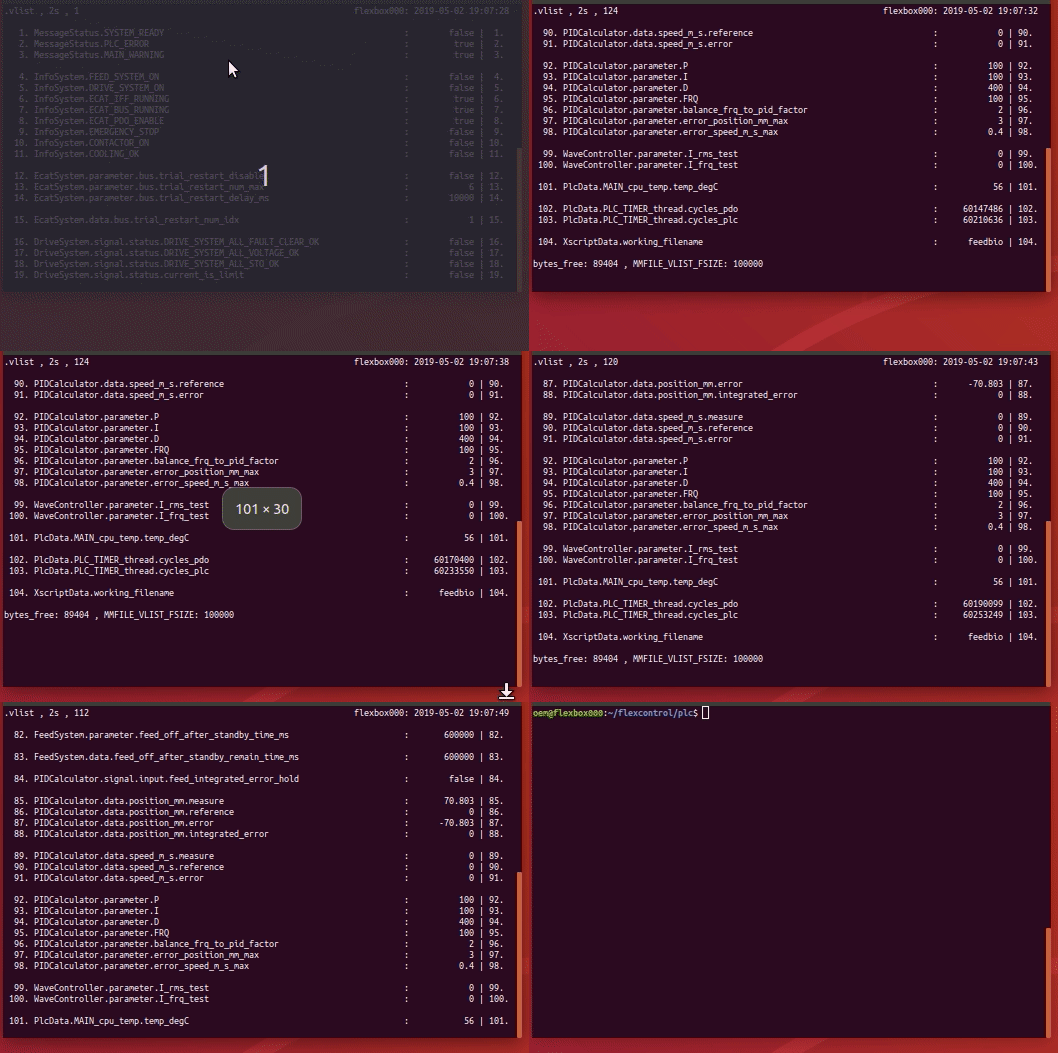
I’ve created a bash ** swatch ** program that does exactly what you want in bash. In the gif video, you can see how to scroll through a changing mmio file.
#!/bin/bash
#
# watch a file and scroll
#
# keys => arrow-up/down, page-up/down, pos1, end
#
# usages:
#           swatch -n <timeout_watch> <file>
#           swatch <file>
#
# version:          1.1
# dependencies:     awk , tput , clear, read
# published:        https://unix.stackexchange.com/questions/3842/how-can-i-scroll-within-the-output-of-my-watch-command
# gif recording:    peek , https://github.com/phw/peek

#
# =============================================
# KEYCODES
# =============================================
# https://unix.stackexchange.com/questions/294908/read-special-keys-in-bash
# showkey -a


# =============================================
# DEFAULTS
# =============================================
fname=""
line_show_begin=1
line_show_begin_last=-1
console_lines_correction=4
timeout_watch=2
timeout_read=.1


# =============================================
# DEFINE Escape-Sequences
# =============================================

# http://ascii-table.com/ansi-escape-sequences-vt-100.php

ESC_clr_line='33[K'
ESC_reset_screen='33c'
ESC_clr_screen='33[2J'
ESC_cursor_pos='33[0;0f'
ESC_cursor_home='33[H'


# =============================================
# FUNCTIONS
# =============================================


function fn_help() {
cat << EOF
Usage: ./$0 [-n <timeout>] [<file>]  ,  timeout >0.1s , default 2s
EOF
}


function get_options() {

    [[ "$1" == "" ]] && { fn_help ; exit 1 ; }

    while [ -n "$1" ]; do

        case "$1" in

        -h|--help)
            fn_help
            ;;

        -n)
            [[ "$2" == "" ]] && { echo "Error: option -n required <timeout>" ; exit 1 ; }
            if [[ "$(echo "$2<0.1"|bc)" == "0" ]] ; then
                timeout_watch="$2"
                shift
            else
                echo "Error: timeout <0.1 not allowed"
                exit 1
            fi
            ;;

        -*)
                echo "Error: unknown option »$1«"
                exit 1
            ;;

        *)
            if [[ -f "$1" ]] ; then
                fname=$1
            else
                echo "Error: file not found »$1«"
                exit 1
            fi
            ;;

        esac

        shift

    done

    [[ "$fname" == "" ]] && { echo "Error: file required" ; exit 1 ; }

}


function fn_print_headline() {

    hdl_txt_right="${HOSTNAME}: $(date "+%Y-%m-%d %H:%M:%S")"
    hdl_txt_left="$fname , ${timeout_watch}s , $line_show_begin"

    hdl_txt_left_length=${#hdl_txt_left}

    printf '%s%*snn' "$hdl_txt_left" "$(($console_columns-$hdl_txt_left_length))" "$hdl_txt_right"

}


function fn_print_file() {

    # ---------------------------------------------------
    # file lenght can change while watch
    # ---------------------------------------------------

    lines_fname=$(awk 'END {print NR}' $fname)

    line_last=$(($lines_fname-$console_lines))

    (( "$line_last" < "1" )) && { line_last=1; clear; }

    (( "$line_show_begin" > "$line_last" )) && { line_show_begin=$line_last; clear; }


    # ---------------------------------------------------
    # print postion changed
    # ---------------------------------------------------

    if (( "$line_show_begin" != "$line_show_begin_last" )) ; then

        line_show_begin_last=$line_show_begin;
        clear

    else

        printf $ESC_cursor_home

    fi


    # ---------------------------------------------------
    # print file section
    # ---------------------------------------------------

    fn_print_headline
    awk -v var1="$line_show_begin" -v var2="$console_lines" 'NR>=var1 {if (NR>var1+var2) {exit 0} else {printf "%sn",$0 } }' $fname

}


function fn_console_size_change() {

    console_columns=$(tput cols)
    console_lines=$(($(tput lines)-$console_lines_correction))
    line_show_begin_last=-1

}


function fn_quit() {

    echo "quit" $0 , $?

    setterm -cursor on ; exit 0

}


# =============================================
# GET OPTIONS
# =============================================

get_options "<a href="https://getridbug.com/cdn-cgi/l/email-protection" class="__cf_email__" data-cfemail="bc98fc">[email protected]</a>"    # pass all arguments with double-quotes


# =============================================
# INIT TRAP
# =============================================

trap "fn_console_size_change" SIGWINCH # https://en.wikipedia.org/wiki/Signal_(IPC)#SIGWINCH
trap "fn_quit" INT TERM EXIT


# =============================================
# MAIN
# =============================================

fn_console_size_change
setterm -cursor off


while true ; do

    fn_print_file

    read -rsn1 -t $timeout_watch k # char 1

    case "$k" in

    [[:graph:]])
        # Normal input handling
        ;;
    $'x09') # TAB
        # Routine for selecting current item
        ;;
    $'x7f') # Back-Space
        # Routine for back-space
        ;;
    $'x01') # Ctrl+A
        # Routine for ctrl+a
        ;;
    $'x1b') # ESC

        read -rsn1 k # char 2
        [[ "$k" == ""  ]] && return  Esc-Key
        [[ "$k" == "[" ]] && read -rsn1 -t $timeout_read k # char 3
        [[ "$k" == "O" ]] && read -rsn1 -t $timeout_read k # char 3

        case "$k" in

        A)  # Arrow-Up-Key
            (( "$line_show_begin" > "1" )) && line_show_begin=$(($line_show_begin-1))
            ;;

        B)  # Arrow-Down-Key
            (( "$line_show_begin" < "$line_last" )) && line_show_begin=$(($line_show_begin+1))
            ;;

        H)  # Pos1-Key
            line_show_begin=1
            ;;

        F)  # End-Key
            line_show_begin=$line_last
            ;;

        5)  # PgUp-Key
            read -rsn1 -t $timeout_read k # char 4

            if [[ "$k" == "~" ]] && (( "$line_show_begin" > "$(($console_lines/2))" )) ; then
                line_show_begin=$(($line_show_begin-$console_lines/2))
            else
                line_show_begin=1
            fi
            ;;

        6)  # PgDown-Key
            read -rsn1 -t $timeout_read k # char 4

            if [[ "$k" == "~" ]] && (( "$line_show_begin" < "$(($line_last-$console_lines/2))" )) ; then
                line_show_begin=$(($line_show_begin+$console_lines/2))
            else
                line_show_begin=$line_last
            fi
            ;;

        esac

        read -rsn4 -t $timeout_read    # Try to flush out other sequences ...

        ;;

    esac

done
Method 5
I edited the above script to work with command line
#!/bin/bash
#
# watch a file and scroll
#
# keys => arrow-up/down, page-up/down, pos1, end
#
# usages:
#           swatch -n <timeout_watch> <file>
#           swatch <file>
#
# version:          1.1
# dependencies:     awk , tput , clear, read
# published:        https://unix.stackexchange.com/questions/3842/how-can-i-scroll-within-the-output-of-my-watch-command
# gif recording:    peek , https://github.com/phw/peek

#
# =============================================
# KEYCODES
# =============================================
# https://unix.stackexchange.com/questions/294908/read-special-keys-in-bash
# showkey -a


# =============================================
# DEFAULTS
# =============================================
command=""
TMPFILE=$(mktemp)
line_show_begin=1
line_show_begin_last=-1
console_lines_correction=4
timeout_watch=5
timeout_read=.1


# =============================================
# DEFINE Escape-Sequences
# =============================================

# http://ascii-table.com/ansi-escape-sequences-vt-100.php

ESC_clr_line='33[K'
ESC_reset_screen='33c'
ESC_clr_screen='33[2J'
ESC_cursor_pos='33[0;0f'
ESC_cursor_home='33[H'


# =============================================
# FUNCTIONS
# =============================================


function fn_help() {
cat << EOF
Usage: ./$0 [-n <timeout>] [<command>]  ,  timeout >0.1s , default 5s
EOF
}


function get_options() {
    [[ "$1" == "" ]] && { fn_help ; exit 1 ; }
    while [ -n "$1" ]; do
        case "$1" in
            -h|--help)
                fn_help
            ;;
            -n)
                [[ "$2" == "" ]] && { echo "Error: option -n required <timeout>" ; exit 1 ; }
                if [[ "$(echo "$2<0.1"|bc)" == "0" ]] ; then
                    timeout_watch="$2"
                    shift
                else
                    echo "Error: timeout <0.1 not allowed"
                    exit 1
                fi
            ;;
            -*)
                echo "Error: unknown option »$1«"
                exit 1
            ;;
            *)
                #if [[ -f "$1" ]] ; then
                command=$1
                #else
                #    echo "Error: file not found »$1«"
                #    exit 1
                #fi
            ;;
        esac
        shift
    done
    [[ "$command" == "" ]] && { echo "Error: command required" ; exit 1 ; }
}


function fn_print_headline() {
    hdl_txt_right="${HOSTNAME}: $(date "+%Y-%m-%d %H:%M:%S")"
    hdl_txt_left="$command , ${timeout_watch}s , $line_show_begin"
    hdl_txt_left_length=${#hdl_txt_left}
    printf '%s%*snn' "$hdl_txt_left" "$(($console_columns-$hdl_txt_left_length))" "$hdl_txt_right"
}


function fn_print_file() {
    # ---------------------------------------------------
    # file lenght can change while watch
    # ---------------------------------------------------
    eval $command > $TMPFILE
    lines_command=$(awk 'END {print NR}' $TMPFILE)
    line_last=$(($lines_command-$console_lines))
    (( "$line_last" < "1" )) && { line_last=1; clear; }
    (( "$line_show_begin" > "$line_last" )) && { line_show_begin=$line_last; clear; }

    # ---------------------------------------------------
    # print postion changed
    # ---------------------------------------------------

    if (( "$line_show_begin" != "$line_show_begin_last" )) ; then
        line_show_begin_last=$line_show_begin;
        clear
    else
        printf $ESC_cursor_home
    fi

    # ---------------------------------------------------
    # print file section
    # ---------------------------------------------------

    fn_print_headline
    eval $command > $TMPFILE
    awk -v var1="$line_show_begin" -v var2="$console_lines" 'NR>=var1 {if (NR>var1+var2) {exit 0} else {printf "%sn",$0 } }' $TMPFILE
}


function fn_console_size_change() {
    console_columns=$(tput cols)
    console_lines=$(($(tput lines)-$console_lines_correction))
    line_show_begin_last=-1
}


function fn_quit() {
    echo "quit" $0 , $?
    setterm -cursor on ; exit 0
}


# =============================================
# GET OPTIONS
# =============================================

get_options "<a href="https://getridbug.com/cdn-cgi/l/email-protection" class="__cf_email__" data-cfemail="6d492d">[email protected]</a>"    # pass all arguments with double-quotes


# =============================================
# INIT TRAP
# =============================================

trap "fn_console_size_change" SIGWINCH # https://en.wikipedia.org/wiki/Signal_(IPC)#SIGWINCH
trap "fn_quit" INT TERM EXIT


# =============================================
# MAIN
# =============================================

fn_console_size_change
setterm -cursor off


while true ; do
    fn_print_file
    read -rsn1 -t $timeout_watch k # char 1
    case "$k" in
        [[:graph:]])
            # Normal input handling
        ;;
        $'x09') # TAB
            # Routine for selecting current item
        ;;
        $'x7f') # Back-Space
            # Routine for back-space
        ;;
        $'x01') # Ctrl+A
            # Routine for ctrl+a
        ;;
        $'x1b') # ESC
            read -rsn1 k # char 2
            [[ "$k" == ""  ]] && return  Esc-Key
            [[ "$k" == "[" ]] && read -rsn1 -t $timeout_read k # char 3
            [[ "$k" == "O" ]] && read -rsn1 -t $timeout_read k # char 3
            case "$k" in
                A)  # Arrow-Up-Key
                    (( "$line_show_begin" > "1" )) && line_show_begin=$(($line_show_begin-1))
                ;;
                B)  # Arrow-Down-Key
                    (( "$line_show_begin" < "$line_last" )) && line_show_begin=$(($line_show_begin+1))
                ;;
                H)  # Pos1-Key
                    line_show_begin=1
                ;;
                F)  # End-Key
                    line_show_begin=$line_last
                ;;
                5)  # PgUp-Key
                    read -rsn1 -t $timeout_read k # char 4

                    if [[ "$k" == "~" ]] && (( "$line_show_begin" > "$(($console_lines/2))" )) ; then
                        line_show_begin=$(($line_show_begin-$console_lines/2))
                    else
                        line_show_begin=1
                    fi
                ;;
                6)  # PgDown-Key
                    read -rsn1 -t $timeout_read k # char 4
                    if [[ "$k" == "~" ]] && (( "$line_show_begin" < "$(($line_last-$console_lines/2))" )) ; then
                        line_show_begin=$(($line_show_begin+$console_lines/2))
                    else
                        line_show_begin=$line_last
                    fi
                ;;
            esac
            read -rsn4 -t $timeout_read    # Try to flush out other sequences ...
        ;;
    esac
done
- create a file in ~/bin/cwatch.sh
nano ~/bin/cwatch.sh
- change files properties to make it runnable:
chmod +x ~/bin/cwatch.sh
- edit ~/.bashrc and add alias
alias cwatch="~/bin/cwatch.sh"
now you can try it:
cwatch 'ps aux | grep -v grep'
All methods was sourced from stackoverflow.com or stackexchange.com, is licensed under cc by-sa 2.5, cc by-sa 3.0 and cc by-sa 4.0