Mint 18.2 64b
Cinnamon 3.4.3
This is running in a VM on my machine so I’m not worried about login security. I’ve been looking around on the Mint forums and only found a lot of threads about troubleshooting problems with autologin.
The setting is not in the Login Window settings screen.
The setting is not in the Users and Groups settings screen.
Where is this setting located now?
Answers:
Thank you for visiting the Q&A section on Magenaut. Please note that all the answers may not help you solve the issue immediately. So please treat them as advisements. If you found the post helpful (or not), leave a comment & I’ll get back to you as soon as possible.
Method 1
It seems there isn’t a GUI setting for auto-login, except during initial installation.
Bahamut already pointed to the right solution. When look at the file: /etc/X11/default-display-manager, it points to the lightdm.
Then for Mint 18.2 (Cinnamon), the correct config file for lightdm is:
/etc/lightdm/lightdm.conf.
The contents of the file could contain multiple settings:
[Seat:*]
autologin-guest=false
autologin-enable=true
autologin-user=USERNAME
autologin-user-timeout=0
allow-guest=false
- Where
USERNAMEis your username, that should be auto-logged-in. autologin-enable=true– this line was added for Linux MATE 18.3 64bit, but not tested for 18.2 Cinnamon. Remove it if necessary…
PS: Even it’s too late to help the OP, it could be of help for other people. Let me know if someone can’t get it working.
Method 2
I have been looking for the same answer for Mint 19. I found the following and hope that the answer helps others.
Menu-Preferences-System Settings-Login Window–Users Tab-Username—Enter username
Save and reboot
Method 3
Linux Mint 18.3 Cinnamon:
I did not have that /etc/lightdm/lightdm.conf at all. Instead, I appended code suggested by “Minister” here:
sudoedit /etc/lightdm/lightdm.conf.d/70-linuxmint.conf
and it works.
Method 4
click menu search for login window then go to users then you will see automatic login type username in all lower case 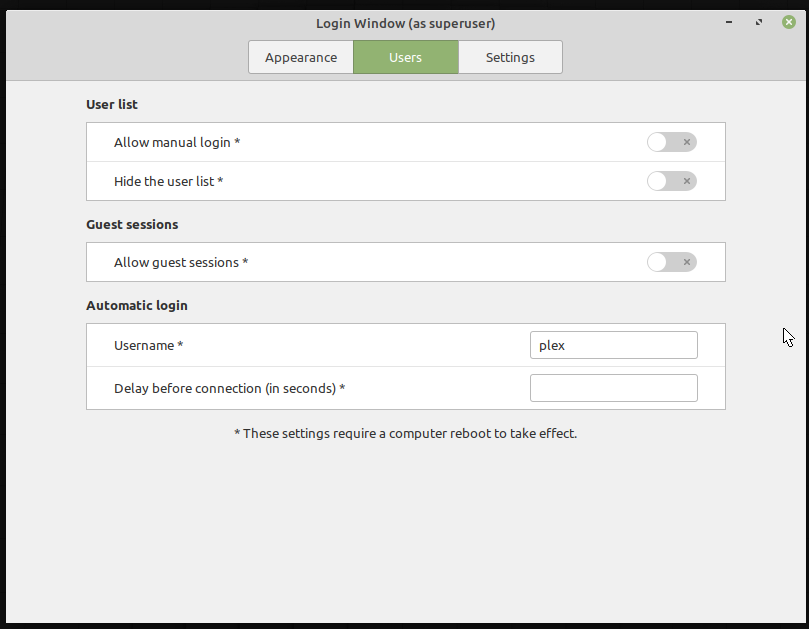
All methods was sourced from stackoverflow.com or stackexchange.com, is licensed under cc by-sa 2.5, cc by-sa 3.0 and cc by-sa 4.0