I have a custom PS1 colour where I have the actual shell commands in a distinct colour, just so I can quickly see what commands I typed and separate it from the command output itself.
Suppose the colour in PS1 is set to ‘blue’ for command prompt and the default colour in my shell is white.
- I type a command e.g. ls, (ls -l is coloured blue)
- The output it generates, first line is still blue
- All remaining line comes as white
What I want is all the output after the command to be ‘white’.
Another example:
- I type a command ‘cat ‘, colour is blue
- The output comes, the whole output is blue
I would like the output to be ‘white’ while keeping the command prompt I typed ‘blue’
On some commands, it is fine, other commands, the same colour overflows into the first line of the output and then the default colour kicks in and some other commands, the whole output (e.g. cat) has the same colour.
Is there a way to keep just the commands I typed in one colour and the rest to the default?
I’m on OSX.
EDIT #1
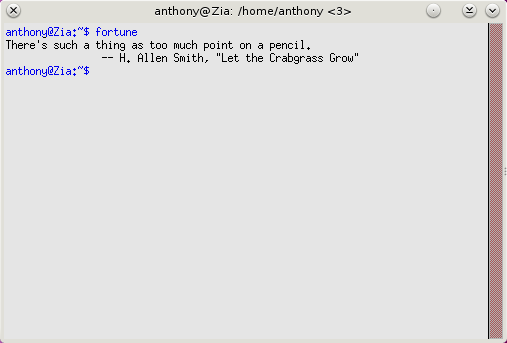
Here’s a screenshot that @derobert’s linked to in the comments that shows what I’m looking for.
Answers:
Thank you for visiting the Q&A section on Magenaut. Please note that all the answers may not help you solve the issue immediately. So please treat them as advisements. If you found the post helpful (or not), leave a comment & I’ll get back to you as soon as possible.
Method 1
You’re basically wanting to reset the terminal color right before bash executes the command. This can be done with a trap.
For example:
trap '[[ -t 1 ]] && tput sgr0' DEBUG
Bash executes the DEBUG trap immediately before the command, so this will result in tput sgr0 (which resets formatting attributes) being run before each command.
The [[ -t 1 ]] is a safety check to make sure that STDOUT is actually a terminal. There might be some cases where bash’s STDOUT isn’t connected to a terminal (piping, remote ssh, etc), and so you don’t want tput to send terminal escape codes.
All methods was sourced from stackoverflow.com or stackexchange.com, is licensed under cc by-sa 2.5, cc by-sa 3.0 and cc by-sa 4.0