I recently installed Trisquel 8.0 LTS (Flidas) on my Desktop PC which was running on Trisquel 7.0 for 4 year. The system became very slow. When I check the RAM and CPU Usage, I found that CPU is almost at 100 % I tun top to see what is going wrong and found that unattended-upgr is consuming whole CPU.
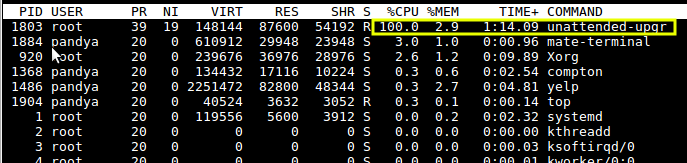
I tried to kill it by PID using sudo kill 1803 but after sometime, it started again automatically. I know that Unattended Upgrades are purposed to install important security updates automatically, however I need to disable it being launched automatically.
How do I do that?
Answers:
Thank you for visiting the Q&A section on Magenaut. Please note that all the answers may not help you solve the issue immediately. So please treat them as advisements. If you found the post helpful (or not), leave a comment & I’ll get back to you as soon as possible.
Method 1
You would need to stop the automatic updater as follows:
Run the following command
sudo dpkg-reconfigure -plow unattended-upgrades
You’ll see prompt for Configuring unattended-upgrades :
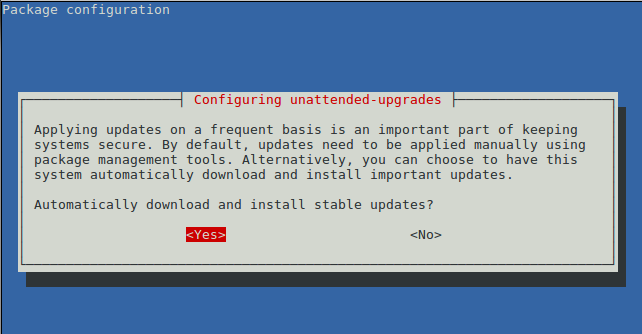
Select No to disable automatic download and install of updates and press Enter.
This updates the config file /etc/apt/apt.conf.d/20auto-upgrades, setting APT::Periodic::Unattended-Upgrade to "0".
  $ sudo dpkg-reconfigure -plow unattended-upgrades
  Replacing config file /etc/apt/apt.conf.d/20auto-upgrades with new version
  $ cat /etc/apt/apt.conf.d/20auto-upgrades
  APT::Periodic::Update-Package-Lists "0";
  APT::Periodic::Unattended-Upgrade "0";
For more information on configuring packages, see man dpkg-reconfigure
--configure package...|-a|--pending
          Configure a package which has been unpacked but not yet  config‐
          ured.   If  -a  or  --pending  is  given instead of package, all
          unpacked but unconfigured packages are configured.

          Configuring consists of the following steps:

          1.  Unpack  the  conffiles, and at the same time back up the old
          conffiles, so that they can be restored if something goes wrong.

          2. Run postinst script, if provided by the package

dpkg-reconfigure - reconfigure an already installed package

   -pvalue, --priority=value
       Specify the minimum priority of question that will be displayed.
       dpkg-reconfigure normally shows low priority questions no matter
       what your default priority is. See debconf(7) for a list.

   -a, --all
       Reconfigure all installed packages that use debconf. Warning: this
       may take a long time.

--no-reload
           Prevent dpkg-reconfigure from reloading templates. Use with caution; this will prevent
           dpkg-reconfigure from repairing broken templates databases.  However, it may be useful
           in constrained environments where rewriting the templates database is expensive.
All methods was sourced from stackoverflow.com or stackexchange.com, is licensed under cc by-sa 2.5, cc by-sa 3.0 and cc by-sa 4.0