I edited the default /etc/update-motd.d/00-header, adding some color to make it easier to read:
printf "Welcome to e[1;34m%se[0m e[2m(%s %s %s)e[0mn" "$DISTRIB_DESCRIPTION" "$(uname -o)" "$(uname -r)" "$(uname -m)"
I can run that line of code just fine in a terminal, but when I edit 00-header with this information, I get the escape codes printed out in plaintext:
Welcome to e[1;36mUbuntu 13.10e[0m e[2m(GNU/Linux 3.11.0-23-generic i686)e[0m
How can I add a splash of color to the message of the day?
Answers:
Thank you for visiting the Q&A section on Magenaut. Please note that all the answers may not help you solve the issue immediately. So please treat them as advisements. If you found the post helpful (or not), leave a comment & I’ll get back to you as soon as possible.
Method 1
Assuming you are on Ubuntu – which uses dash to run system scripts:
That file, /etc/update-motd.d/00-header, is executed by /bin/dash, (not /bin/bash,) which is pretty minimalistic (and fast) –
it seems to not support the “e” in this place – use “33” instead.
It is different in when to expand escape codes.
Method 2
On Debian/Ubuntu the motd is configured in /etc/pam.d/sshd:
session    optional     pam_motd.so  motd=/run/motd.dynamic
session    optional     pam_motd.so noupdate
which means that upon successful login the system will run something like:
cat /run/motd.dynamic
if [[ -f /etc/motd ]]; then cat /etc/motd; fi
where /etc/motd is the static part (only printed, not sourced).
Debian 9 / Ubuntu 16.04:
For generating the dynamic part run-parts is used for /etc/update-motd.d directory:
/usr/bin/env -i PATH=/usr/local/sbin:/usr/local/bin:/usr/sbin:/usr/bin:/sbin:/bin run-parts --lsbsysinit /etc/update-motd.d
For slightly more readable code you can use tput setaf {color number}. Note that to preserve colors we have to set TERM variable.
#!/bin/sh
export TERM=xterm-256color

read one five fifteen rest < /proc/loadavg
echo "$(tput setaf 2)
Kernel: `uname -v | awk -v OFS=' ' '{print $4, $5}'`
$(tput setaf 4)Load Averages......: ${one}, ${five}, ${fifteen} (1, 5, 15 min)
$(tput setaf 5)
 ______________
< Hello World! >
 --------------
        \   ^__^
         \  (oo)\_______
            (__)\       )\/\
                ||----w |
                ||     ||

$(tput sgr0)"
save the file as e.g. /etc/update-motd.d/10-uname
and make sure it’s executable:
chmod +x /etc/update-motd.d/10-uname
Basic colors are numbered:
- 1 – Red
- 2 – Green
- 3 – Yellow
- 4 – Blue
- 5 – Magenta
- 6 – Cyan
- 7 – White
The code above generate:
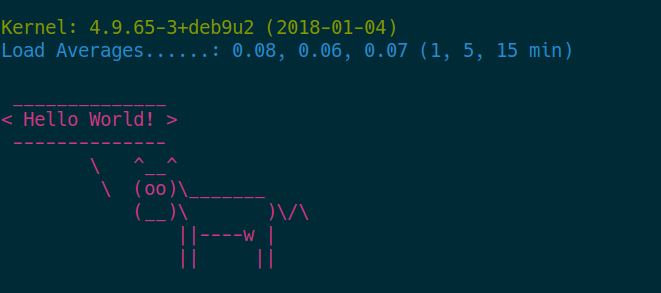
Depending on your taste you can produce more colorful output using lolcat or headings from figlet. Generated output uses standard bash syntax:
^[(B^[[m
^[[32m
Kernel: 4.9.65-3+deb9u2 (2018-01-04)
^[[34mLoad Averages......: 0.04, 0.05, 0.05 (1, 5, 15 min)
^[[35m
 ______________
< Hello World! >
 --------------
           ^__^
           (oo)_______
            (__)       )/
                ||----w |
                ||     ||

^[(B^[[m
Debian 8 / Ubuntu 14.04
The dynamic part is updated using /etc/init.d/motd start that executes following:
uname -snrvm > /var/run/motd.dynamic
All methods was sourced from stackoverflow.com or stackexchange.com, is licensed under cc by-sa 2.5, cc by-sa 3.0 and cc by-sa 4.0