How I could go about creating my own “custom” Linux distro that will run just one program, pretty much exactly the same way as XBMCbuntu.
Answers:
Thank you for visiting the Q&A section on Magenaut. Please note that all the answers may not help you solve the issue immediately. So please treat them as advisements. If you found the post helpful (or not), leave a comment & I’ll get back to you as soon as possible.
Method 1
Minimal init hello world program step-by-step
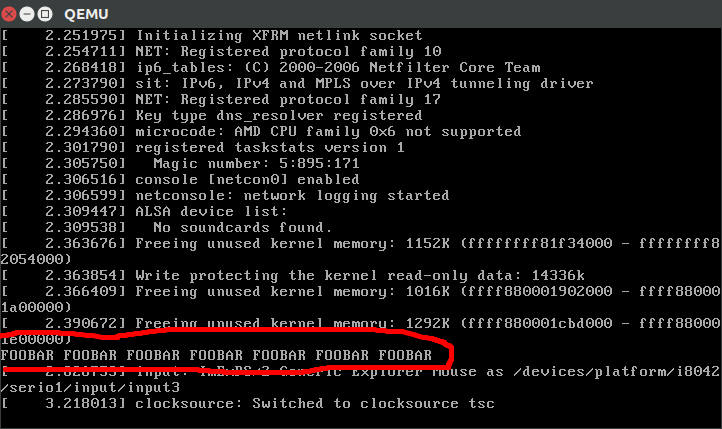
Compile a hello world without any dependencies that ends in an infinite loop. init.S:
.global _start
_start:
    mov $1, %rax
    mov $1, %rdi
    mov $message, %rsi
    mov $message_len, %rdx
    syscall
    jmp .
    message: .ascii "FOOBAR FOOBAR FOOBAR FOOBAR FOOBAR FOOBAR FOOBARn"
    .equ message_len, . - message
We cannot use the exit system call, or else the kernel panics, the only way to exit gracefully from the init is to poweroff the machine with the reboot syscall.
Then:
mkdir d
as --64 -o init.o init.S # assemble
ld -o d/init init.o      # link
cd d
find . | cpio -o -H newc | gzip > ../rootfs.cpio.gz
ROOTFS_PATH="$(pwd)/../rootfs.cpio.gz"
This creates a filesystem with our hello world at /init, which is the first userland program that the kernel will run. We could also have added more files to d/ and they would be accessible from the /init program when the kernel runs.
Then cd into the Linux kernel tree, build is as usual, and run it in QEMU:
git clone git://git.kernel.org/pub/scm/linux/kernel/git/torvalds/linux.git
cd linux
git checkout v4.9
make mrproper
make defconfig
make -j"$(nproc)"
qemu-system-x86_64 -kernel arch/x86/boot/bzImage -initrd "$ROOTFS_PATH"
And you should see a line:
FOOBAR FOOBAR FOOBAR FOOBAR FOOBAR FOOBAR FOOBAR
on the emulator screen! Note that it is not the last line, so you have to look a bit further up.
You can also use C programs if you link them statically:
#include <stdio.h>
#include <unistd.h>

int main() {
    printf("FOOBAR FOOBAR FOOBAR FOOBAR FOOBAR FOOBAR FOOBARn");
    sleep(0xFFFFFFFF);
    return 0;
}
with:
gcc -static init.c -o init
Dynamic linking would require setting up a the dynamic linker executable, the most common of which are part of C standard libraries like glibc.
You can run on real hardware with a USB on /dev/sdX and:
make isoimage FDINITRD="$ROOTFS_PATH"
sudo dd if=arch/x86/boot/image.iso of=/dev/sdX
Great source on this subject: Tech Tip: How to use initramfs | landley.net It also explains how to use gen_initramfs_list.sh, which is a script from the Linux kernel source tree to help automate the process.
Tested on Ubuntu 16.10, QEMU 2.6.1.
Next steps
The next thing you want to do, is to setup BusyBox, see also: What is the smallest possible Linux implementation?
BusyBox implements basic POSIX-y CLI utilities, including a POSIX-y shell, which you allow you to more easily experiment with the system interactively.
Personally, at this point I prefer to just rely on Buildroot, which is an amazing set of scripts that automates building everything from source and making the root filesystem.
I have uploaded a highly detailed and automated helper for that at: https://github.com/cirosantilli/linux-kernel-module-cheat
Method 2
I would not start messing with LFS, that is a garden path leading to some dark woods.
Start with a distro where you have a lot of control over the initial install, such as Arch, or a headless edition such as Ubuntu server. The point of this is not so much to save space as to delimit the complexity of the init configuration; starting from a headless distro, if the application you want to run requires a GUI, you can add what’s required for that without having to end up with a GUI login (aka. the display manager or DM) started by init, and a fullblown desktop environment to go with it.
You then want to learn how to configure the init system to your purposes — note that you cannot do without init, and it may be the best means of accomplishing your goal. The init system used on most linux distros now is systemd.
The point here is to minimize what init does at boot, and that is how you can create a system that will run a minimal amount of software to support the application you want to focus on — this is essentially how a server is set up, BTW, so it is a common task (note that you can’t literally have “just one” userland process running, at least not usefully).
If the application you want to run is a GUI program (a good example of why you can’t literally just run one application, since GUI apps require an X server), you can have an ~/.xinitrc that looks like this;
#!/bin/sh

myprogram
When you then startx, your program will be the only thing running, and it will be impossible to change desktops or start anything else, partially because there is no window manager or desktop environment (hence, there will be no window frame or titlebar either).
Method 3
if you are little bit in programming and you want create it from scratch you can go with LFS i.e. Linux from Scratch http://www.linuxfromscratch.org/
if you want to customize ubutnu you can use ubunt-builder and if you want it on rpm base you can use SUsE-Studio,Suse studio will allow you to make custom suse linux
cheers
Method 4
It is more about what your “one program” requires.
You can still have a good start of understand how to put things together by building an LFS (aka “Linux From Scratch“) .
Then you will add things required by your program or go for a full distribution because building heavy sub-system like Gnome or KDE on LFS can be a real pain-in-the-ass.
Of course going backward may be easier at first, but removing things from a full distrib can be troublesome: do this in a VM and do copy of this VM at every step.
(my 2 cents)
Edit:
As pointed out by SecurityBeast instead of starting from a full distribution like CentOS or Ubuntu, you may also have a look at building distribution tools like:
Method 5
What you need to ask is what does your “one program” need and what resources do you have.
If it needs a wide selection of libraries and support binaries you may be best off using a “regular” linux distro (Debian or similar) and just messing with the boot process a bit.
If it needs a narrower selection of support stuff but still requires stuff like networking or support for a variety of hardware using different kernel modules or userland support bits and you don’t want the disk space overhead of a regular distro then I would suggest looking at embedded distros (buildroot or similar) or maybe a linux from scratch approach (though that can be a maintainance headache)
If you need just what a non-modular kernel can provide and nothing else then running your own binary straight on the kernel may work and be the lightest soloution..
All methods was sourced from stackoverflow.com or stackexchange.com, is licensed under cc by-sa 2.5, cc by-sa 3.0 and cc by-sa 4.0