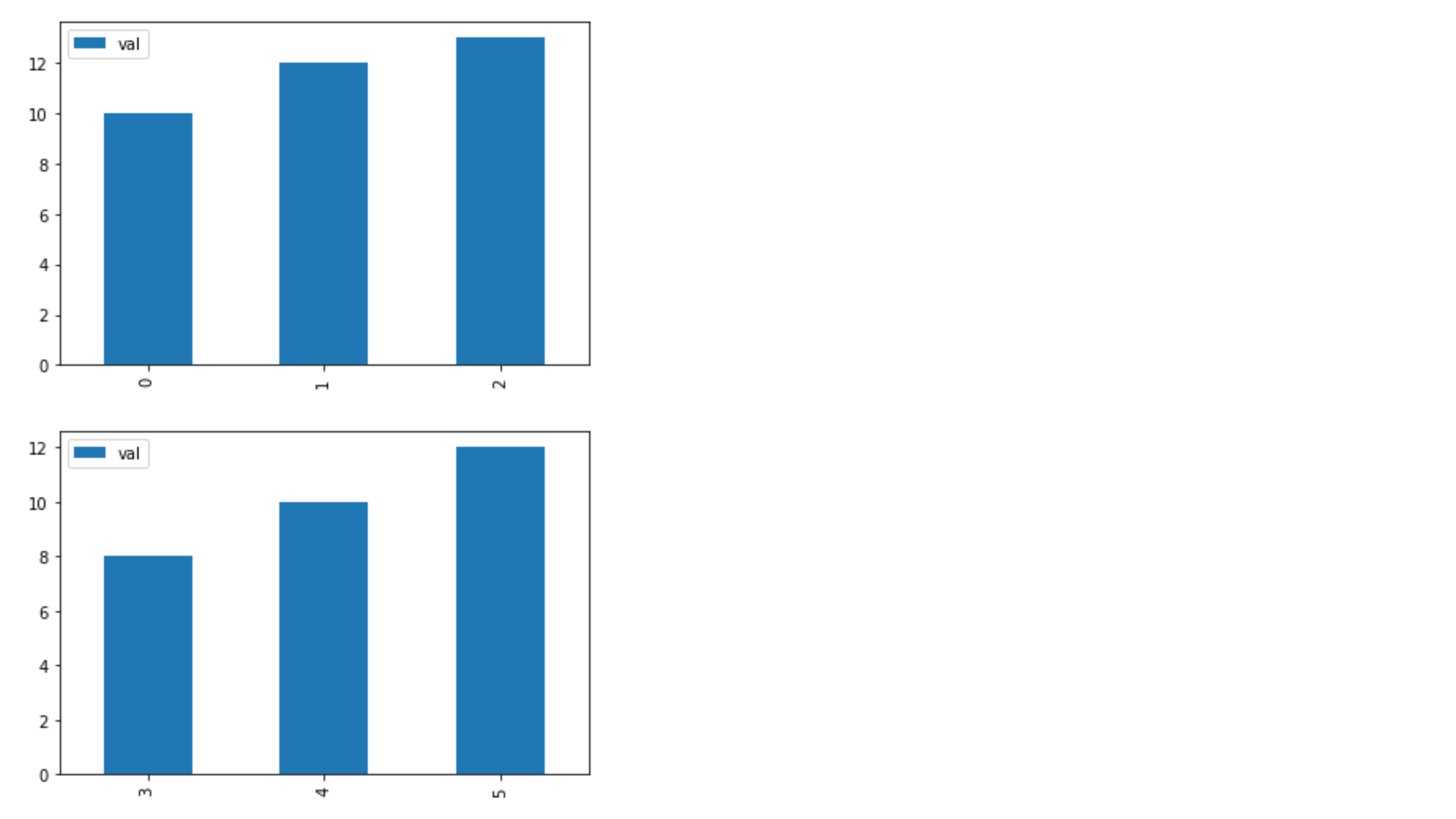
The goal here is to create a grouped bar plot, not subplots like the image below
Is there a simple way to create a grouped bar plot in Python? Right now I get separate bar plots, instead of separate bars on one plot.
import pandas as pd

df = pd.DataFrame([['g1', 'c1', 10], ['g1', 'c2', 12], ['g1', 'c3', 13], ['g2', 'c1', 8], ['g2', 'c2', 10], ['g2', 'c3', 12]], columns=['group', 'column', 'val'])

  group column  val
0    g1     c1   10
1    g1     c2   12
2    g1     c3   13
3    g2     c1    8
4    g2     c2   10
5    g2     c3   12


df.groupby(['group']).plot(kind='bar')
Answers:
Thank you for visiting the Q&A section on Magenaut. Please note that all the answers may not help you solve the issue immediately. So please treat them as advisements. If you found the post helpful (or not), leave a comment & I’ll get back to you as soon as possible.
Method 1
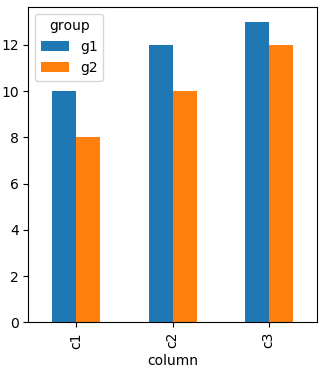
Pandas will show grouped bars by columns. Entries in each row but different columns will constitute a group in the resulting plot. Hence you need to “reshape” your dataframe to have the “group” as columns.
In this case you can pivot like
df.pivot("column", "group", "val")
producing
group   g1  g2
column
c1      10   8
c2      12  10
c3      13  12
Plotting this will result in a grouped bar chart.
import pandas as pd
import matplotlib.pyplot as plt

df = pd.DataFrame([['g1','c1',10],['g1','c2',12],['g1','c3',13],['g2','c1',8],
                   ['g2','c2',10],['g2','c3',12]],columns=['group','column','val'])

df.pivot("column", "group", "val").plot(kind='bar')

plt.show()
Method 2
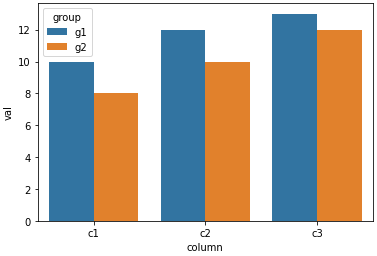
- Given a dataframe of long (tidy) data, as shown in the OP, an implementation that does not require transforming the dataframe is to use
seaborn.barplotwith thehueparameter. seabornis a high-level API formatplotlib- Tested with
seaborn 0.11.1andmatplotlib 3.4.2
import pandas as pd
import seaborn as sns

# the sample dataframe from the OP
df = pd.DataFrame([['g1', 'c1', 10], ['g1', 'c2', 12], ['g1', 'c3', 13], ['g2', 'c1', 8], ['g2', 'c2', 10], ['g2', 'c3', 12]], columns=['group', 'column', 'val'])

# plot with seaborn barplot
sns.barplot(data=df, x='column', y='val', hue='group')
Method 3
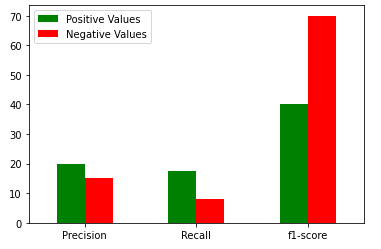
You can simply do this using the code given below:
import pandas as pd
import matplotlib.pyplot as plt

positive_values = [20, 17.5, 40]
negative_values = [15, 8, 70]
index = ['Precision', 'Recall', 'f1-score',]
df = pd.DataFrame({'Positive Values': positive_values,
                    'Negative Values': negative_values}, index=index)
ax = df.plot.bar(rot=0, color={"Positive Values": "green", "Negative Values": "red"})
Output:
Method 4
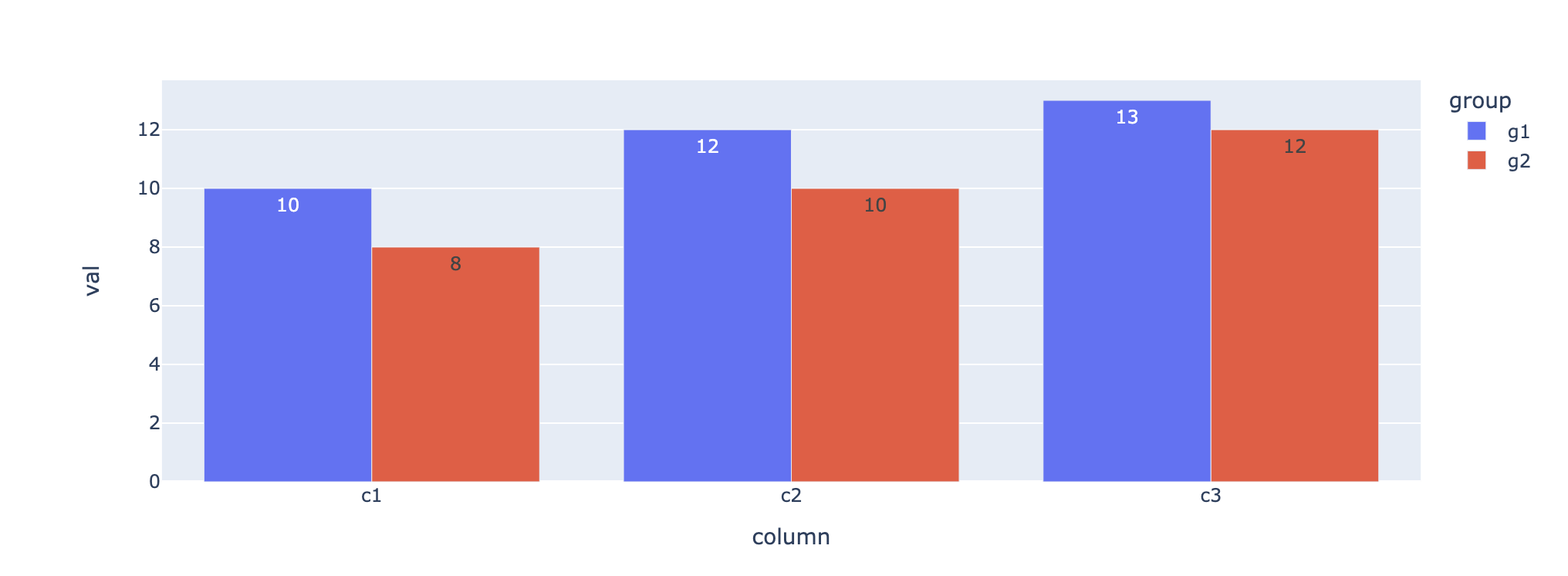
Plotly express is one of the best visualisation packages I’ve recently used. It allows you to generate visualisations without needing to perform massive data transformations.
# initial dataframe
df = pd.DataFrame([['g1','c1',10],['g1','c2',12],['g1','c3',13],['g2','c1',8],
                   ['g2','c2',10],['g2','c3',12]],columns=['group','column','val'])

df.head()

   group column val
0   g1   c1     10
1   g1   c2     12
2   g1   c3     13
3   g2   c1      8
4   g2   c2     10
5   g2   c3     12
No need to transform data, directly use plotly express:
import plotly.express as px
fig = px.bar(df, x="column", y="val",
             color='group', barmode='group',text="val",
             height=400)
fig.show()
All methods was sourced from stackoverflow.com or stackexchange.com, is licensed under cc by-sa 2.5, cc by-sa 3.0 and cc by-sa 4.0