So I’ve been using the canvas widget in tkinter to create a frame full of labels which has a scrollbar. All is working good except that the frame only expands to the size of the labels placed in it – I want the frame to expand to the size of the parent canvas.
This can easily be done if I use pack(expand = True) (which I have commented out in the code below) for the frame in the canvas but then then the scrollbar doesn’t work.
Here’s the appropriate bit of code:
    ...
    self.canvas = Canvas(frame, bg = 'pink')
    self.canvas.pack(side = RIGHT, fill = BOTH, expand = True)

    self.mailbox_frame = Frame(self.canvas, bg = 'purple')

    self.canvas.create_window((0,0),window=self.mailbox_frame, anchor = NW)

    #self.mailbox_frame.pack(side = LEFT, fill = BOTH, expand = True)

    mail_scroll = Scrollbar(self.canvas, orient = "vertical",
        command = self.canvas.yview)
    mail_scroll.pack(side = RIGHT, fill = Y)

    self.canvas.config(yscrollcommand = mail_scroll.set)

    self.mailbox_frame.bind("<Configure>", self.OnFrameConfigure)


def OnFrameConfigure(self, event):
    self.canvas.configure(scrollregion=self.canvas.bbox("all"))
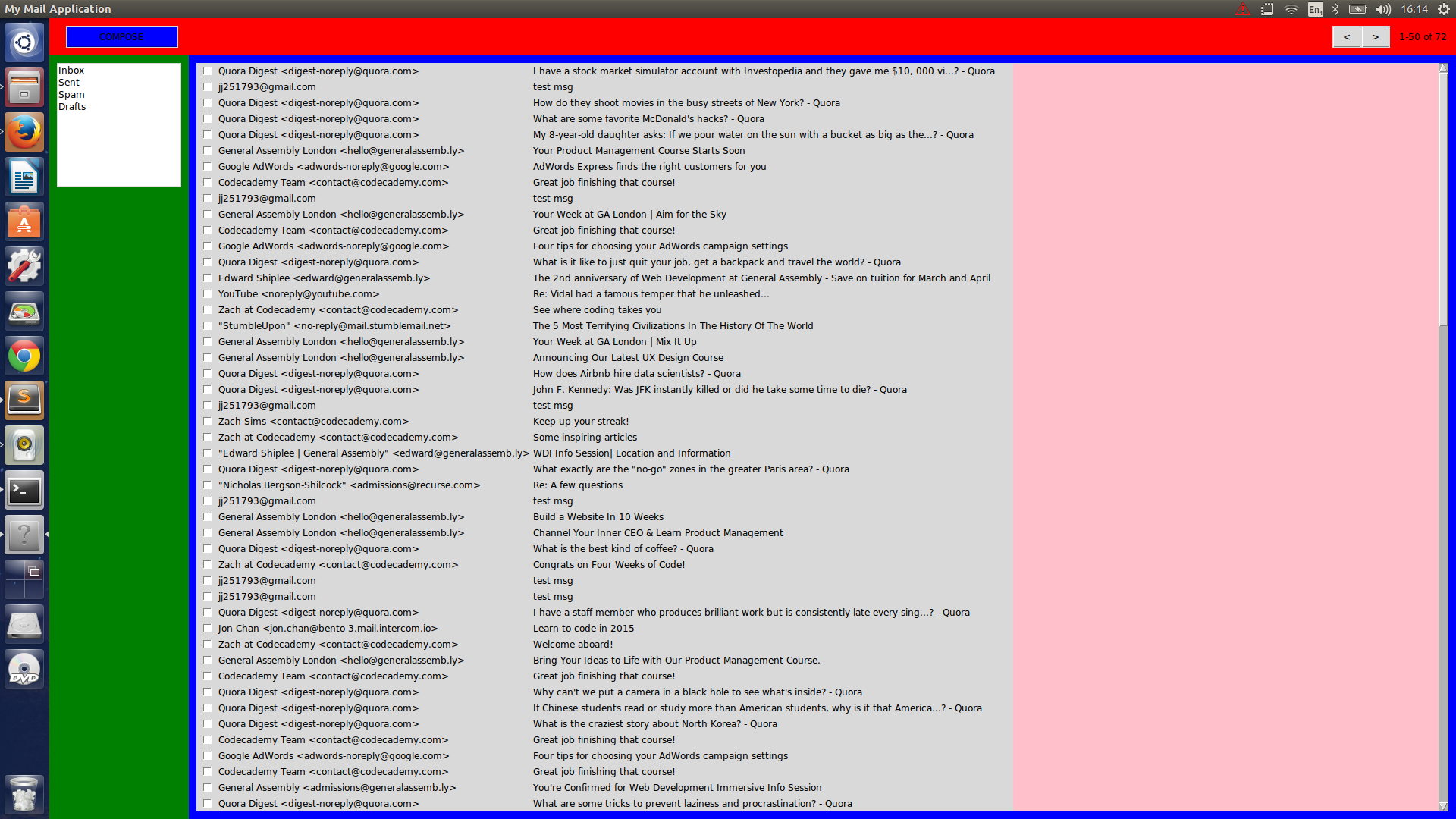
I’ve also provided an image with colored frames so you can see what I’m getting at. The pink area is the canvas that needs filling by the mailbox_frame (You can see the scrollbar on the right):
Answers:
Thank you for visiting the Q&A section on Magenaut. Please note that all the answers may not help you solve the issue immediately. So please treat them as advisements. If you found the post helpful (or not), leave a comment & I’ll get back to you as soon as possible.
Method 1
Just for future reference in case anyone else needs to know:
        frame = Frame(self.bottom_frame)
        frame.pack(side = LEFT, fill = BOTH, expand = True, padx = 10, pady = 10)

        self.canvas = Canvas(frame, bg = 'pink')
        self.canvas.pack(side = RIGHT, fill = BOTH, expand = True)

        self.mailbox_frame = Frame(self.canvas, bg = 'purple')

        self.canvas_frame = self.canvas.create_window((0,0),
            window=self.mailbox_frame, anchor = NW)
        #self.mailbox_frame.pack(side = LEFT, fill = BOTH, expand = True)

        mail_scroll = Scrollbar(self.canvas, orient = "vertical",
            command = self.canvas.yview)
        mail_scroll.pack(side = RIGHT, fill = Y)

        self.canvas.config(yscrollcommand = mail_scroll.set)

        self.mailbox_frame.bind("<Configure>", self.OnFrameConfigure)
        self.canvas.bind('<Configure>', self.FrameWidth)

    def FrameWidth(self, event):
        canvas_width = event.width
        self.canvas.itemconfig(self.canvas_frame, width = canvas_width)

    def OnFrameConfigure(self, event):
        self.canvas.configure(scrollregion=self.canvas.bbox("all"))
Method 2
Set a binding on the canvas <Configure> event, which fires whenever the canvas changes size. From the event object you can get the canvas width and height, and use that to resize the frame.
Method 3
Just an updated answer which covers both horizontal and vertical scrollbars without breaking them.
def FrameWidth(self, event):
    if event.width > self.mailbox_frame.winfo_width():
        self.canvas.itemconfig(self.canvas_frame, width=event.width-4)
    if event.height > self.mailbox_frame.winfo_height():
        self.canvas.itemconfig(self.canvas_frame, height=event.height-4)
Only sets the frame height and width if they are less than the canvas width. Respects both Horizontal and Vertical scrollbars.
All methods was sourced from stackoverflow.com or stackexchange.com, is licensed under cc by-sa 2.5, cc by-sa 3.0 and cc by-sa 4.0